Structured logging with Serilog - why plain text logs are not enough
Structured logging with Serilog replaces ambiguous text with searchable properties, consistent message templates, correlation context and safer ASP.NET Core operations.
Structured logging with Serilog - why plain text logs are not enough
Logs are the first place we go when something is wrong in production. When a customer says that a fund report is not loading, a plain text line such as Error occurred is not giving enough information to find the request, fund or operation. When every log is written as a long sentence, searching and aggregating the information is becoming difficult, and important failures are hiding in the noise.
In this article, we are going to discuss why plain text logs are not enough, how structured logging with Serilog works in ASP.NET Core 2.0, and the practices we should follow for message templates, context, sinks and sensitive data. Last year, in the logging best practices article, we discussed what to log and what not to log. Here we will focus on the shape and flow of the log event.
TL;DR Summary
- Plain text is easy to read but difficult to query consistently, because values are mixed into a sentence.
- Serilog message templates keep the event name and properties separate from the rendered text.
{FundId}creates a named property;$"Fund {fundId}"only creates an interpolated string.- Use
FromLogContextandLogContext.PushPropertyto carry correlation and business context. - Send events to appropriate sinks such as Console, rolling file, Seq, Elasticsearch or Application Insights.
- Use
@destructuring for safe object structure, and never log passwords, tokens, secrets or unnecessary PII.
Challenges
Plain text is difficult to search
Consider these two entries,
Fund FUND001 valuation failed for user 1042
Fund FUND002 valuation failed for user 1043
A person can read them, but a tool needs to understand which part is the fund identifier and which part is the user identifier. Different developers may write the same value in a different order, with a different spelling or with extra text. A query for all failures of FUND001 is then more difficult than it should be.
Context is getting lost
A request can call several services before it is completing. If every method is writing a line without correlation id, operation name or fund id, an operator is joining entries by timestamp and guessing. Under load, entries from many requests are mixed together, so the investigation is taking much longer.
Noise and storage
Writing every object and every request body at Information level is creating a large volume of data. It increases storage cost and can expose sensitive data. Structured logging is not a reason to log everything; it is a way to give important events a consistent shape.
What is structured logging?
Structured logging records an event as a message template plus named properties, rather than only recording one rendered text string.
In simple terms, the log message is having a sentence for people and a set of fields for machines. The operator can read Fund FUND001 valuation failed, while a query can filter the FundId property exactly.
Example:
logger.Information(
    "Fund valuation failed for {FundId} on {ValuationDate}",
    fundId,
    valuationDate);
The template is stored with FundId and ValuationDate properties. The same event can be rendered as text in Console and as JSON in another sink without losing the properties.
Why structured logging is important?
Structured logging is important because operations teams need to move from reactive investigation to proactive action. We should be able to count valuation failures by fund, find all events for one correlation id and alert when the failure rate is increasing.
The following diagram compares plain text log lines with structured log events.
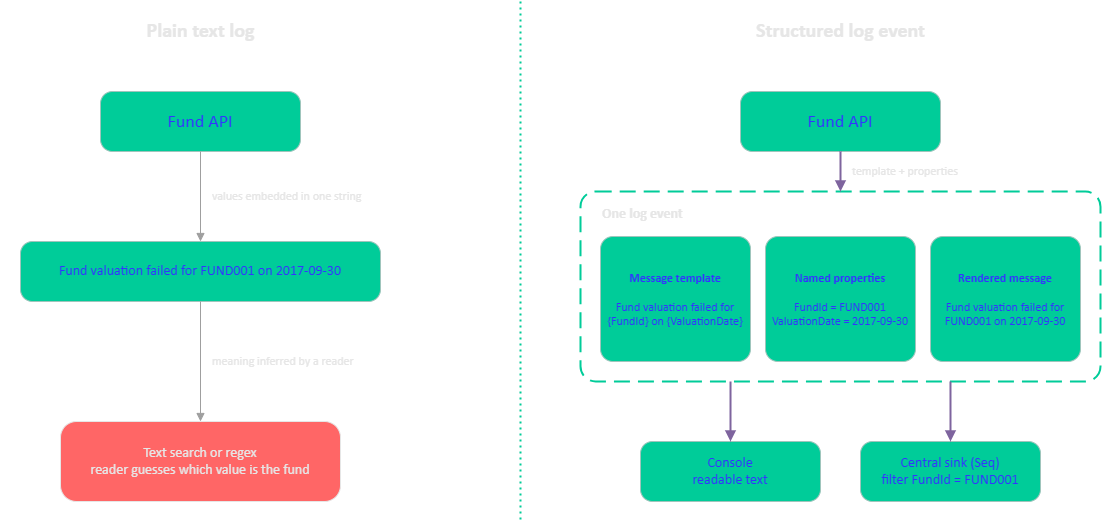
On the left, the values are embedded in one string and the meaning is being inferred by a reader. On the right, the event has a message template, named properties and a rendered message. The highlighted purple path is the structured event which can be searched consistently in every sink.
Message templates and properties
Use a message template with named placeholders,
Log.Information(
    "Fund {FundId} price {Price} was accepted from {Source}",
    fundId,
    price,
    source);
Do not use string interpolation for a structured event,
// Don't - the property names are lost.
Log.Information($"Fund {fundId} price {price} was accepted");
String interpolation is producing a final string before Serilog receives it. Serilog cannot know that one value is a fund id and another value is a price. It can still write the line, but queries and aggregations are losing the useful structure.
The placeholder name is part of the event contract. Use stable names such as FundId, CorrelationId, OrderId and ValuationDate, and keep the same name across the application. Do not put high-cardinality or secret values into the event name itself.
Destructure objects carefully
Use the @ operator when the fields of an object are useful for searching,
Log.Information(
    "Fund price received {@FundPrice}",
    fundPrice);
This is called as destructuring. Serilog writes the object properties as structured data instead of calling ToString() and putting one string into the event.
Destructuring is not meaning that the complete object is always safe to log. A price object may contain a source account, customer information or an access token by mistake. Prefer a small log model with fields which are approved for logging,
var logPrice = new
{
    fundPrice.FundId,
    fundPrice.Price,
    fundPrice.Currency
};

Log.Information("Fund price received {@FundPrice}", logPrice);
This is making the allowed shape visible and reducing accidental data exposure.
Configure Serilog in ASP.NET Core 2.0
Install the ASP.NET Core integration and the sinks which are required by the application,
dotnet add package Serilog.AspNetCore --version 2.0.0
dotnet add package Serilog.Sinks.Console
dotnet add package Serilog.Sinks.RollingFile
Configure the logger while building the host,
using Serilog;
using System.IO;
using Microsoft.AspNetCore.Hosting;

public static IWebHost BuildWebHost(string[] args)
{
    var logger = new LoggerConfiguration()
        .Enrich.FromLogContext()
        .WriteTo.Console()
        .WriteTo.RollingFile("logs/fund-api-{Date}.txt")
        .CreateLogger();

    return new WebHostBuilder()
        .UseKestrel()
        .UseContentRoot(Directory.GetCurrentDirectory())
        .UseIISIntegration()
        .UseStartup<Startup>()
        .UseSerilog(logger)
        .Build();
}
UseSerilog() connects Serilog to the ASP.NET Core logging pipeline. The Console sink is useful for a hosted process, the rolling file sink can help local diagnosis, and a central sink should be used for production search and retention. Configure levels and destinations through the normal application configuration rather than hard-coding every environment decision in code.
The following diagram explains how an ASP.NET Core request becomes a structured event and reaches different sinks.
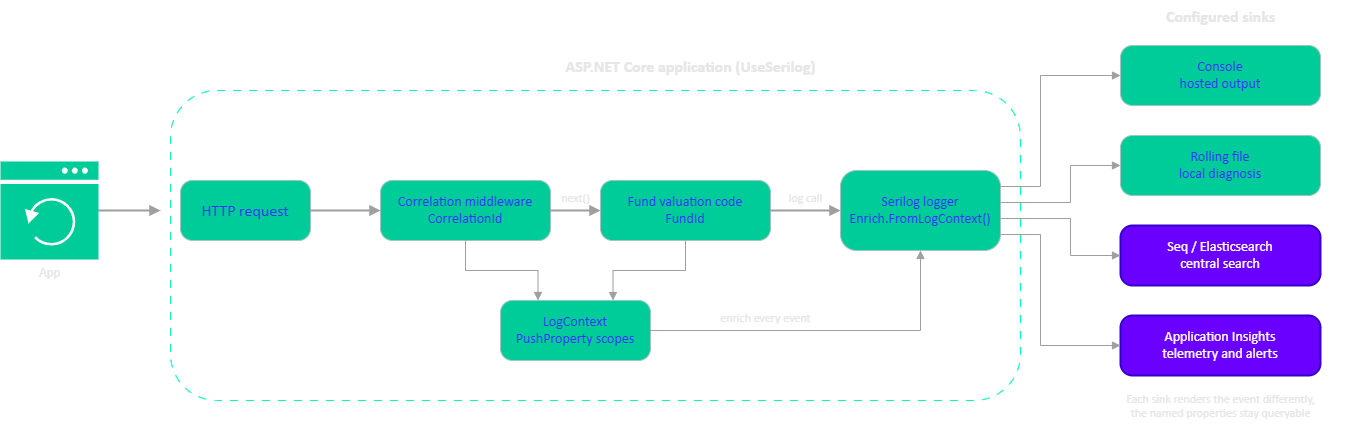
The request enters the ASP.NET Core application, the middleware and application code add context, and Serilog writes one event to configured sinks. A Console, rolling file, Seq, Elasticsearch or Application Insights sink can render or store the event differently, but the named properties should remain available.
Add correlation and business context
FromLogContext() enables properties pushed into the log context to appear in events. A middleware can create a correlation id for each request,
using (LogContext.PushProperty("CorrelationId", correlationId))
{
    Log.Information("Starting request {Path}", context.Request.Path);
    await next(context);
    Log.Information("Completed request {Path}", context.Request.Path);
}
For a fund operation, add the fund id only around the operation which needs it,
using (LogContext.PushProperty("FundId", fundId))
{
    Log.Information("Starting valuation");
    valuationService.Calculate(fundId);
    Log.Information("Valuation completed");
}
Every event inside the scope is receiving FundId and CorrelationId, so an operator can query the complete operation without manually joining lines. Keep scopes short and dispose them correctly, otherwise context can leak into another operation.
Use levels with a clear purpose,
| Level | Use when | Example |
|---|---|---|
| Fatal | The process cannot continue | The application cannot load required configuration |
| Error | An operation failed and needs attention | Fund valuation failed |
| Warning | Unexpected state was handled | Price is older than the expected window |
| Information | Important business or lifecycle event | Fund report generated |
| Debug | Developer detail during diagnosis | Intermediate mapping result |
Do not write every method entry at Information level. It is creating noise and making the important business event harder to find.
Choose sinks for the use case
There is no single sink for every scenario,
- Console is useful for local development and hosted process output.
- Rolling file is useful for short-term local diagnosis, with file retention and access controls.
- Seq provides a structured event viewer and query experience for development or controlled environments.
- Elasticsearch can store and query structured events at scale when the logging pipeline is operated correctly.
- Application Insights can correlate application telemetry and provide alerts in an Azure-hosted application.
A sink is only useful when operators can access it, query it and understand its retention. Configure failure behaviour too. Logging should not normally bring down the fund API, but silently losing every Error event is also not acceptable.
Must Do / Should / Don’t
Must Do
- Must use message templates such as
"Fund {FundId} failed"instead of string interpolation. - Must include a correlation id and enough business context to find one operation.
- Must configure
FromLogContext()when usingLogContext.PushProperty. - Must protect log storage and retention as carefully as other operational data.
Should
- Should use
@only for an approved, bounded object shape. - Should choose sinks based on who needs to query the events and how long they must be retained.
- Should use Information for meaningful lifecycle or business events, Warning for handled unexpected states and Error for actionable failures.
- Should use the logging best practices for the full list of data which must not be logged.
Don’t
- Don’t log passwords, tokens, connection strings, private keys, card numbers or unnecessary Personally Identifiable Information (PII).
- Don’t log an entire HTTP request body without checking for secrets and customer data.
- Don’t use string interpolation when the event must be queried by its values.
- Don’t send Debug logs with sensitive intermediate values to production by default.
Wrap up
In this article, we have looked at the problem with plain text logs, message templates, destructuring, ASP.NET Core 2.0 configuration, correlation context and sinks in Serilog.
I appreciate your time and efforts to read this article. In the next article, I will walk you through resilient HTTP calls with Polly, including retry, timeout and circuit breaker.
Related Posts
Logging best practices - what to log, what not to log
Logging best practices explained through operational value, useful fields, sensitive data, correlation, structured logging, retention and practical logging pipelines for practical guidance.
Avoid sequential coupling and circular dependencies - with examples
Sequential coupling and circular dependencies create hidden constraints, so constructor injection, builders, interfaces and events make code easier to test, change and evolve.
How to test ASP.NET Core Web API with in-memory TestServer?
This guide tests an ASP.NET Core Web API with an in-memory TestServer, covering host setup, HTTP requests, dependency boundaries and fast feedback without a deployed service.