Logging best practices - what to log, what not to log
Logging best practices explained through operational value, useful fields, sensitive data, correlation, structured logging, retention and practical logging pipelines for practical guidance.
Logging best practices - what to log, what not to log
Logs are the first place we go when something is wrong in production. When a customer calls our support team and says “the fund report is not loading since morning”, the logs should tell us what happened, when it started and which part of the system failed. Unfortunately, in many applications, the logs are either too little (“Error occurred”) or too much (gigabytes of debug lines per hour) and both are equally useless at 2 AM. And sometimes the logs are a security risk by themselves, because they contain passwords, tokens or personal data of our customers.
In the previous article, we discussed how to write maintainable LINQ and Entity Framework queries. In this article, we are going to see why logging matters for operations, what to log, what not to log, and the best practices we follow across our teams.
TL;DR Summary
- Logs are for the people who operate the system, write them for the reader at 2 AM.
- Use the right log level, Error for failures that need action, Warning for unexpected but handled, Information for business events, Debug for developers.
- Every log entry must have a timestamp (UTC), level, correlation id and enough context to understand it alone.
- Use structured logging, log properties not concatenated strings.
- Never log passwords, tokens, connection strings, card numbers or personal data (PII).
- Centralize the logs, a log file on a web server which nobody can access is not a log.
- Logging must not break or slow down the application.
Challenges
Blind spots
When something fails silently, there is no log entry, and we come to know only when the customer reports. The Mean Time To Detect (MTTD) is long and the Mean Time To Resolve (MTTR) is longer because we don’t have any trace of what happened.
Noise
When every method logs “Entering method” and “Leaving method” at Information level, the important errors are lost in millions of lines. The storage cost is going up and searching the logs becomes slow.
Logs without context
A log entry like Error: Object reference not set to an instance of an object doesn’t tell us which user, which fund, which request or which server. We can see that something is broken, but we cannot find it.
Sensitive data in logs
Logging the full request body or the full exception with all variables can write passwords, access tokens and customer personal data into a plain text file. Logs are usually copied to many places and accessed by many people, so it is a data breach waiting to happen.
What is Logging?
Logging is the practice of recording events that happen in an application, with enough context, so that people can understand the behaviour of the system, investigate problems and audit important actions after the fact.
In simple terms, logs are the black box recorder of our application. Like the flight recorder, it is useless if it records nothing, and also useless if it records so much that the important seconds cannot be found.
The following diagram depicts the logging pipeline we use.
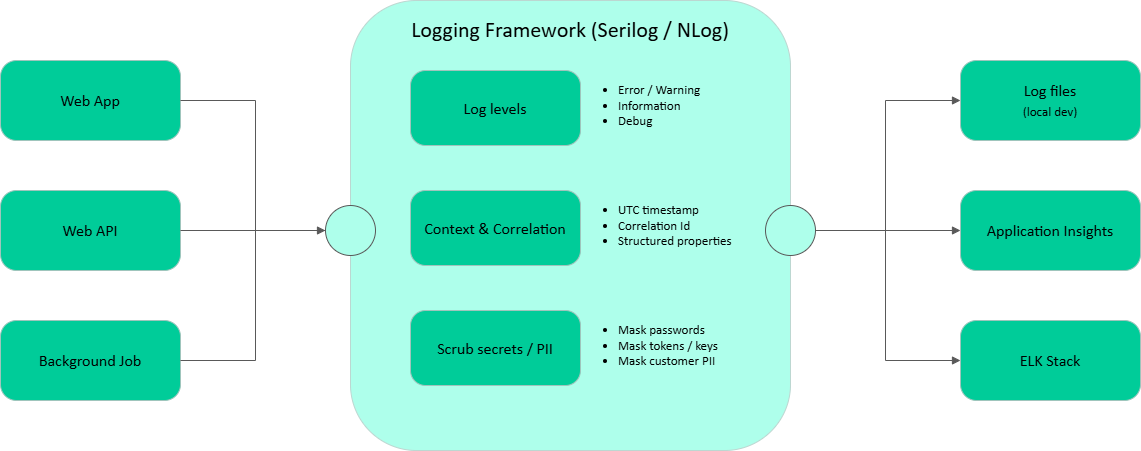
All our applications write logs through one logging framework (we use Serilog, NLog and log4net are equally good). The framework adds the common context, applies the log level and the scrubbing rules, and sends the entries to the configured sinks, local files for development, Application Insights and ELK Stack (Elasticsearch, Logstash, Kibana) for test and production.
Why logging is important?
In order to remove the blind spots, to reduce the MTTD and MTTR, and to keep an audit trail of important business actions, every application must have a consistent logging. Most importantly, good logs allow us to take proactive actions, we can set alerts on error rates and find the issue before it is impacting our customers.
What to log?
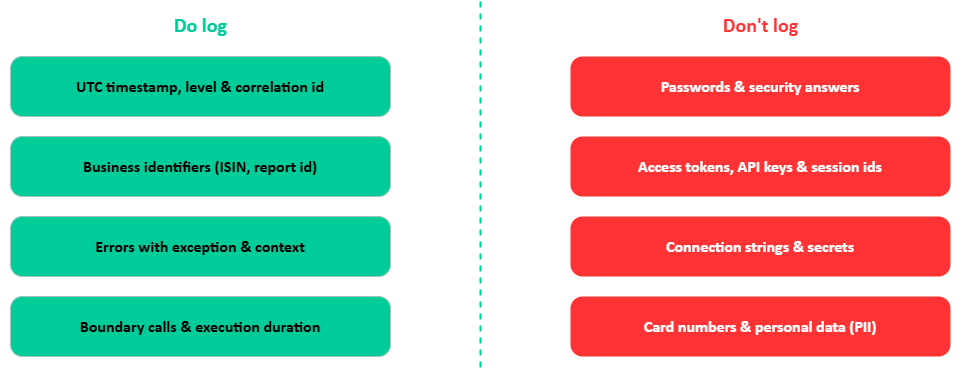
The following diagram summarises what to log and what not to log.
Use the right log level
| Level | Use when | Example |
|---|---|---|
| Fatal / Critical | The application cannot continue | Cannot connect to the configuration store at start up |
| Error | An operation failed and needs attention | Price import failed for file prices_20160512.csv |
| Warning | Unexpected, but handled | Price for fund LU0000000001 is older than 2 days, used previous price |
| Information | Important business or lifecycle events | Fund report generated for 1,250 funds in 42 seconds |
| Debug | Details for developers, disabled in production | SQL parameters, intermediate values |
Log with context
Every log entry should be understandable on its own. It must have,
- Timestamp in UTC.
- Log level.
- Application name, environment and server/instance name.
- Correlation id - one id for the whole request, passed to all downstream services, so we can follow a request across the services.
- The business identifiers - fund ISIN, report id, batch id.
- For errors, the full exception with stack trace (logs are internal, unlike API responses).
Use structured logging
Log the values as properties, not as concatenated strings. Then we can search and filter by them.
// Don't
_logger.Information("Report " + reportId + " generated for " + fundCount + " funds in " + elapsed + " ms");

// Do
_logger.Information("Report {ReportId} generated for {FundCount} funds in {ElapsedMs} ms",
                    reportId, fundCount, elapsed);
With the second version, we can query “all reports where ElapsedMs > 30000” in Kibana or Application Insights.
Log the boundaries
Log at the entry and exit points of the system, incoming requests, outgoing calls to other services and databases (with duration), messages received from queues and scheduled jobs. Don’t log every internal method call.
What not to log?
It is mandatory to keep the following data out of all logs,
- Passwords and security answers, even when the login fails.
- Access tokens, API keys, session ids and cookies.
- Connection strings and secrets.
- Credit card numbers and bank account numbers.
- Personal Identifiable Information (PII) - names, email addresses, phone numbers, addresses of our customers, unless there is a clear legal need and the log store is protected for it.
Be mindful of the indirect ways to log sensitive data,
- Logging the full HTTP request body or headers (Authorization header).
- Logging the whole object with
JsonConvert.SerializeObject(user). - Exception messages from some libraries which include the connection string or the failed SQL with parameters.
Use a scrubbing step in the logging framework (ex: a Serilog destructuring policy or a custom enricher) to mask the known sensitive properties, so a developer mistake doesn’t end up in the log store.
Best Practices
Find below the quick summary of the logging best practices which must be implemented across all teams.
- Use one logging framework through an abstraction, configured from config file, not hard-coded.
- Log levels must be changeable without a new deployment.
- Use asynchronous / buffered sinks, logging must not slow down the request.
- Logging must never throw, a failure in the log sink must not break the business operation.
- Centralize logs from all servers and services in one place with search.
- Define a retention period for each environment, otherwise the storage cost keeps growing.
- Create alerts on Error rate, not on every single error.
- Review the logs during development, if a log line is not useful for you, it will not be useful for operations team.
Note: Logs, metrics and traces are complementary. For response times and throughput, use an Application Performance Monitoring (APM) tool like Application Insights or New Relic instead of writing timing logs for every request.
Must Do and Don’ts
- Must Do: Add a correlation id to every log entry and pass it to downstream services.
- Must Do: Log exceptions with the stack trace and the business context.
- Must Do: Mask sensitive data in the logging pipeline.
- Don’t: log and rethrow the same exception in every layer, it creates five copies of the same error. Log once at the boundary.
- Don’t: use
catch (Exception ex) { _logger.Error(ex); }and continue as nothing happened. - Don’t: leave Debug level enabled in production.
Wrap up
In this article, we have looked at the challenges with logging, what is logging, what to log, what not to log and the best practices we follow across our teams. I hope this article provided you some insights into making your logs useful for operations. In the next article, I will walk you through feature toggles and how they help us to ship unfinished code safely.
Related Posts
Code review checklist for .NET teams
A practical .NET code review checklist covering design, readability, correctness, errors, security, performance, testing, operations, and constructive review comments and discussion.
SOLID Principles - Part 1
The first two SOLID principles, Single Responsibility and Open/Closed, explained with fund report and fee calculation examples in C#, plus when not to apply them.
Why we need Clean Code?
Why clean code matters, what makes code clean (meaningful names, small functions, guard clauses, comments that explain why) and how to bring the practice into your team.