How to test ASP.NET Core Web API with in-memory TestServer?
This guide tests an ASP.NET Core Web API with an in-memory TestServer, covering host setup, HTTP requests, dependency boundaries and fast feedback without a deployed service.
How to test ASP.NET Core Web API with in-memory TestServer?
Testing an ASP.NET Core Web API through a browser or a deployed environment is useful, but it is not giving fast feedback for every change. On the other hand, unit testing a controller with mocks is not proving that routing, middleware, model binding and JSON formatting are working together. We need a test which exercises the HTTP pipeline without starting a real web server.
In this article, we are going to see how to test an ASP.NET Core 1.1 Web API with the in-memory TestServer, xUnit and the SDK-style Visual Studio 2017 project format. We will create a server with WebHostBuilder, create an HttpClient, replace production services with test services and run the tests with dotnet test.
TL;DR Summary
TestServerhosts an ASP.NET Core application in memory and exposes a normalHttpClient.- Use
Microsoft.AspNetCore.TestHostandnew TestServer(new WebHostBuilder().UseStartup<Startup>()). - The test verifies routing, middleware, model binding, controller execution and response formatting together.
- Use a
TestStartupor test service registration to replace a database or external API with a deterministic fake. - Keep pure business rules in unit tests and use
TestServerfor the HTTP integration boundary. - This example is for ASP.NET Core 1.1 and uses the in-memory hosting API directly.
Challenges
Controller unit tests miss the pipeline
A controller unit test can call an action method directly, but that call is skipping route matching, request serialization, model binding, filters and middleware. A route typo can therefore pass the controller test while returning 404 to a real client.
Deployed tests are slow
Starting IIS or a complete environment for every change is making the feedback loop long. A developer is waiting for deployment before finding a status-code or JSON-shape problem, and the failure is more expensive to diagnose.
Real dependencies are not deterministic
An API test which calls the real fund database or a partner price service is depending on data, network and service availability. It can fail for reasons unrelated to the change. The test should exercise our web pipeline while replacing dependencies which are not part of this test’s purpose.
What is TestServer?
TestServer is an in-memory host from Microsoft.AspNetCore.TestHost which runs an ASP.NET Core application without opening a real network port.
In simple terms, it is a small web server inside the test process. We send requests through HttpClient, and the request travels through the application pipeline as it would in a running API, but the test does not need IIS, Kestrel or a deployed environment.
The following diagram depicts the in-memory TestServer request pipeline.
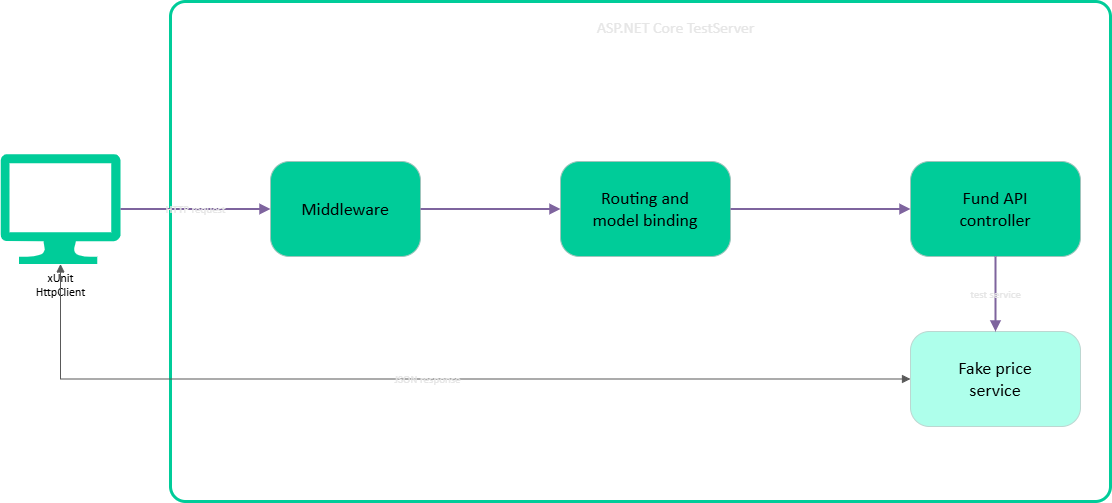
The client sends an HTTP request to TestServer. The request is passing through middleware and routing before the controller calls the test service. The response then travels back to the client. The purple path highlights the route which the test is verifying; the database and external service are replaced by deterministic test services.
Why TestServer is important?
TestServer is important because it gives us a useful middle layer between a pure unit test and a deployed end-to-end test. It is fast enough to run in the build, but it is still checking the HTTP contract.
In order to catch incorrect routes, middleware registration, model binding and response formatting before deployment, we need these tests. They are also useful for a refactoring: if the public API behaviour is unchanged, the test can protect the behaviour while the internal classes are changing.
Step 1: Create the test project
Create an xUnit test project using the .NET Core tooling available with Visual Studio 2017,
dotnet new xunit -n Funds.Api.IntegrationTests
cd Funds.Api.IntegrationTests
dotnet add reference ../Funds.Api/Funds.Api.csproj
dotnet restore
dotnet test
The exact patch version should match the ASP.NET Core 1.1 patch version used by the API. Keep the test project targeting the same framework as the application, for example netcoreapp1.1.
The SDK-style project file is small,
<Project Sdk="Microsoft.NET.Sdk">
  <PropertyGroup>
    <TargetFramework>netcoreapp1.1</TargetFramework>
  </PropertyGroup>

  <ItemGroup>
    <PackageReference Include="Microsoft.NET.Test.Sdk" Version="15.0.0" />
    <PackageReference Include="xunit" Version="2.2.0" />
    <PackageReference Include="xunit.runner.visualstudio" Version="2.2.0" />
    <PackageReference Include="Microsoft.AspNetCore.TestHost" Version="1.1.1" />
  </ItemGroup>

  <ItemGroup>
    <ProjectReference Include="..\Funds.Api\Funds.Api.csproj" />
  </ItemGroup>
</Project>
The package versions are examples, use the patch version matching your API. Keep all related ASP.NET Core packages on compatible patch versions, otherwise package resolution can produce confusing runtime failures.
Step 2: Create the TestServer
The basic server setup is only a few lines,
using System;
using System.Net.Http;
using Microsoft.AspNetCore.Hosting;
using Microsoft.AspNetCore.TestHost;

public class ApiTestFixture : IDisposable
{
    private readonly TestServer server;

    public ApiTestFixture()
    {
        var builder = new WebHostBuilder()
            .UseStartup<Startup>();

        server = new TestServer(builder);
        Client = server.CreateClient();
    }

    public HttpClient Client { get; private set; }

    public void Dispose()
    {
        Client.Dispose();
        server.Dispose();
    }
}
UseStartup<Startup>() is using the same application startup class as the API. This is a good first test because it verifies the production registration. If the production startup requires settings which are not available in the test process, provide them with UseConfiguration or use a test startup described in the next step.
Step 3: Replace services for the test
The API should not call a live price provider when we are testing routing and response formatting. Create a test startup which registers the same MVC pipeline but uses a fake service,
using Microsoft.AspNetCore.Builder;
using Microsoft.AspNetCore.Hosting;
using Microsoft.Extensions.DependencyInjection;

public class TestStartup
{
    public void ConfigureServices(IServiceCollection services)
    {
        services.AddMvc()
            .AddApplicationPart(typeof(Startup).Assembly);
        services.AddSingleton<IPriceReader, FakePriceReader>();
    }

    public void Configure(IApplicationBuilder app, IHostingEnvironment environment)
    {
        app.UseMvc();
    }
}
Note:
TestStartupis in the test assembly, soAddApplicationPartmakes the API assembly’s controllers available to MVC.
The fake is deterministic,
public class FakePriceReader : IPriceReader
{
    public FundPrice GetLatest(FundId fundId)
    {
        return new FundPrice(fundId, 10.50m);
    }
}
Create the server with UseStartup<TestStartup>() when this is the intended boundary test,
var builder = new WebHostBuilder()
    .UseStartup<TestStartup>();

using (var server = new TestServer(builder))
using (var client = server.CreateClient())
{
    // Send requests here.
}
For a larger application, keep TestStartup close to the production startup and share common registration methods. Do not silently remove authentication or important middleware from the test; otherwise the test is no longer representing the real pipeline. Replace only the dependencies which are outside the test boundary.
Step 4: Send a request and assert the response
The test is using the normal HttpClient API,
using System.Net;
using System.Net.Http;
using System.Threading.Tasks;
using Xunit;

public class FundsApiTests : IClassFixture<ApiTestFixture>
{
    private readonly HttpClient client;

    public FundsApiTests(ApiTestFixture fixture)
    {
        client = fixture.Client;
    }

    [Fact]
    public async Task GetFund_ReturnsTheFundPrice()
    {
        var response = await client.GetAsync("/api/funds/FUND001/price");

        Assert.Equal(HttpStatusCode.OK, response.StatusCode);
        var body = await response.Content.ReadAsStringAsync();
        Assert.Contains("10.5", body);
    }
}
The test verifies the URL, route, controller, fake service and JSON response in one flow. Test another important response,
[Fact]
public async Task GetUnknownFund_ReturnsNotFound()
{
    var response = await client.GetAsync("/api/funds/UNKNOWN/price");

    Assert.Equal(HttpStatusCode.NotFound, response.StatusCode);
}
Test a small set of important API behaviours: successful response, validation failure, not found and an authorization result where applicable. Keep the detailed price calculation tests in a unit-test project.
Step 5: Run from the command line
Run the tests from the solution folder,
dotnet restore
dotnet test tests/Funds.Api.IntegrationTests/Funds.Api.IntegrationTests.csproj
If the test fails, first check whether the failure is in application behaviour, test registration or an unavailable external dependency. A useful integration test should fail with a message which tells us which contract is broken.
Must Do / Should / Don’t
Must Do
- Must use the ASP.NET Core 1.1 compatible
Microsoft.AspNetCore.TestHostpackage. - Must create the server with
new TestServer(new WebHostBuilder().UseStartup<Startup>())or a clearly equivalent test startup. - Must assert status code and response content, otherwise a request which returns an error page can look like a passing request.
- Must replace databases and external services when they are outside the boundary under test.
Should
- Should keep TestServer tests in a
*.IntegrationTestsproject. - Should use a fixture to create and dispose the server once per test class where shared state is safe.
- Should test the public HTTP contract and keep business rule combinations in unit tests.
- Should keep authentication and important middleware in the test pipeline.
Don’t
- Don’t start a deployed production service from a repeatable test.
- Don’t replace every application service with a mock, otherwise the test becomes a controller unit test with extra setup.
- Don’t share mutable test data between tests without resetting it.
Wrap up
In this article, we have looked at the purpose of TestServer, created an ASP.NET Core 1.1 in-memory host, replaced a service, sent requests with HttpClient and ran the xUnit tests with dotnet test.
I hope this article provided you some insights into testing the Web API pipeline. In the next article, I will walk you through structured logging with Serilog and why plain text logs are not enough.
Related Posts
Integration tests vs unit tests - where to draw the line
Unit and integration tests serve different boundaries, feedback loops and maintenance costs, with practical guidance for choosing test types and organising a .NET solution.
Code review checklist for .NET teams
A practical .NET code review checklist covering design, readability, correctness, errors, security, performance, testing, operations, and constructive review comments and discussion.
How to write unit tests with NUnit and Moq?
Unit testing with NUnit and Moq explained through FIRST properties, the AAA pattern, test doubles, test cases, exceptions, and verification of interactions.