How to write Postman Scripts? - Part 1
The basics of Postman scripts: when pre-request and test scripts run, the execution order, the Postman Sandbox and how to write a first script.
How to write Postman Scripts? - Part 1
Introduction
In every regression phase, the QA team used to spend lots of time on repeated tests, and these tests are the most time-consuming tasks. Automated tests are the solution for this issue, and it is also applicable for API testing. For API automation tests, we have lots of tools in the market and Postman is one of the right choices since it provides the complete workflow to develop, test, document and monitor an API. Postman provides the test script feature through which we can write our automated tests for an API.
This is a two-part series. In this article, we are going to see the basics of Postman scripts: what a Postman script is, when it executes and how to write your first script. In the next article, we are going to write automated API tests with real world examples.
TL;DR Summary
- Postman script is a JavaScript-based script which runs before a request is sent (Pre-request script) or after the response is received (Tests script).
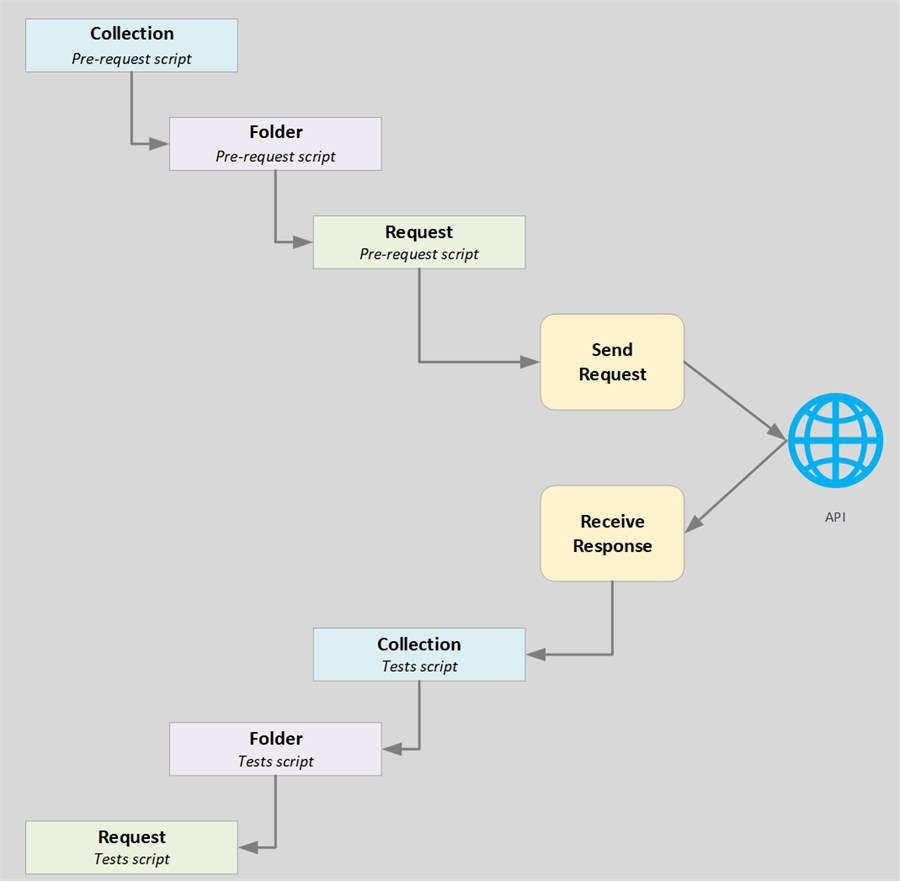
- We can write scripts at the collection, folder and request level, and Postman executes them in a fixed order.
- All scripts run inside the Postman Sandbox, which exposes a global
pmobject. - Use
pm.test()to write a test case andconsole.log()with the Postman Console to see what is going on. - Postman scripts are easy to learn, but they must be treated as production code; otherwise they will become a maintenance overhead.
Benefits and Drawbacks
Before we start, let us see some benefits and drawbacks of Postman automation tests.
Benefits
- Not much learning curve required except a basic understanding of Postman and JavaScript.
- Creating an API automation test is much simpler than UI automation tests, so you can create automation tests quickly and easily.
- Can save QA time by automating all possible repeated tests and the smoke test for your critical business data API.
- Can save Developer time to identify the impacted area whenever there is a change in an API function, and in turn it can reduce the roundtrip between Developer and QA.
Drawbacks
- Initially, we need to put some extra effort to build the required scripts, but it is worth to invest.
- Need to keep the scripts up to date on every change in the API. We must treat these scripts as equal to production code. Most of the time we will not give importance to test scripts.
- It will add the maintenance overhead if we do not write useful tests. So, think twice before writing an automation script.
- Postman does not support code reusability since all test scripts are bound to a collection instead of a separate file, but there is a way to reuse the code.
- All tests will run synchronously in the collection runner, so it is not suitable for performance or stress testing. You can use Newman for this purpose.
Pre-requisites
To write a Postman script, you should have the following knowledge,
- Basics of HTTP protocol
- Basics of Postman
- Basics of JavaScript
Postman desktop app is required to follow along with these articles. Chrome add-on is not recommended. If you have not already installed the desktop app, you can download it from https://getpostman.com.
What is Postman Script?
Postman script is a JavaScript-based test script which is used to send the dynamic data with an API request and validate the API response.
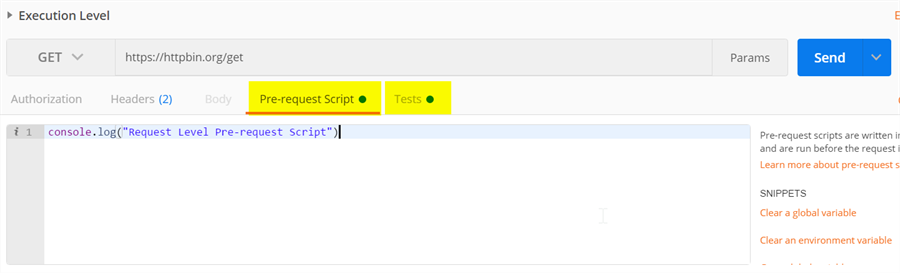
Postman allows us to write scripts in two different scopes or events of a request,
- Pre-request script - It will execute before sending the request to the server, and it helps us to write a script to modify or update the request before sending it.
- Tests script - It will execute right after the response is received from the server. Here, we can write scripts to validate the response based on our test case. Most of the time it will be used for testing purpose.
Postman provides two different tabs to write pre-request and test scripts. It is packed with a bundle of script snippets, and you can find them on the right side of the script box.
Script Execution Order
Postman has the following artifacts hierarchy, and at each level, we can write scripts.
- Collection
- Folder 1
- Request 1
- …
- Request N
- Folder N
- Request 1
- …
- Request N
- Folder 1
You may raise a question related to the order of script execution when you write a script for the different levels. Very good question! The following diagram answers your question.
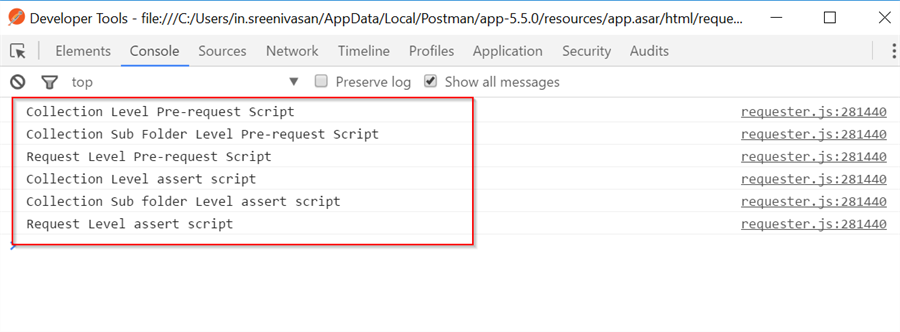
Execution order console logs:
Quick Start
Let us write a Hello World Postman script. Follow the following steps to write it.
Steps:
-
Open the Postman.
-
Create a new request.
-
Enter
https://httpbin.org/getinto the URL field. -
Open the Pre-request Script tab and write the following script,
console.log("Hello World! - Request Level - Pre-request Script");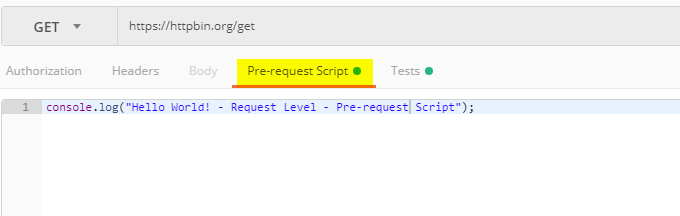
Hello World script in the Pre-request Script tab -
Open the Tests script tab and write the following script,
console.log("Hello World! - Request Level - Tests Script");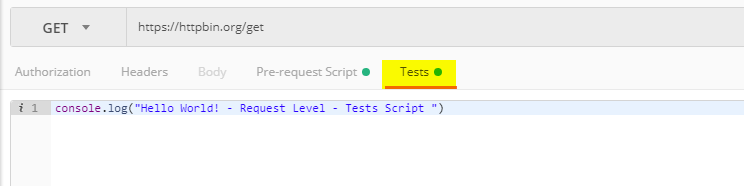
Hello World script in the Tests tab -
Open the Postman console from View -> Show Postman Console.
-
Click on the Send button.
-
Before it sends the request to the server, you can see the pre-request log entry in the console.
-
Once the response is returned, you can see the test script log entry.
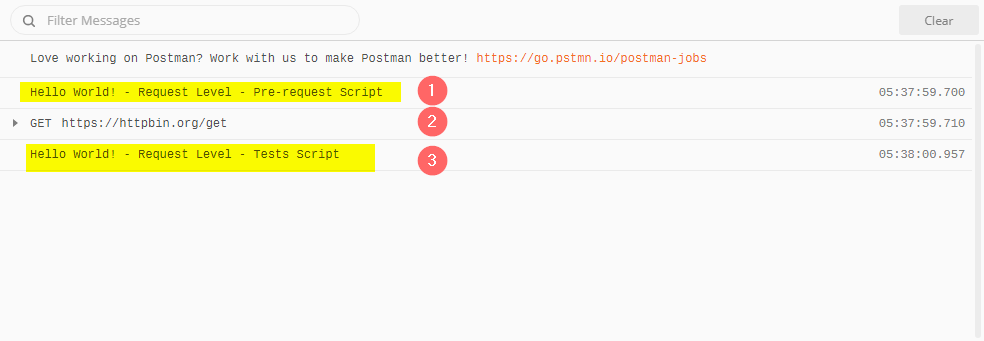
Postman Console with the pre-request and tests log entries
As per the above snapshot, the Postman console displays our custom logs whatever we added in the pre-request and tests script tabs.
Postman Sandbox
Postman uses a sandbox to execute the script, and this is the runtime environment for all Postman test scripts. It is pre-loaded with some libraries and these can be used in Postman scripts. For more information, refer to this link.
Postman exposes a global object called “pm” which provides all methods and properties that are required for writing a tests script.
Few important methods and properties of the pm object as follows,
pm.test(<test case name>, callback)pm.infopm.globalspm.environmentpm.variablespm.requestpm.responsepm.iterationData
Test Case
Postman provides two ways to write test cases. One is using pm.test("<test case name here>", test function) and another method is to use tests["<test case name>"] = assert statement.
pm.test("api should return 200 status code", function () {
    pm.response.to.be.ok;
});

tests["api should return 200 status code"] = responseCode.code === 200;
For more information, refer to this link.
Conclusion
In this article, we have looked at what a Postman script is, the benefits and drawbacks of Postman automation tests, the script execution order, the Postman Sandbox and how to write a Hello World script. I really appreciate that you took the time to read this article.
In the next article, I will walk you through how to write an API automation test with real world examples and how to run them with test data in the Postman Collection Runner.
Related Posts
How to automate API tests with Postman Scripts? - Part 2
Automate API tests with Postman scripts: prepare test cases and data, write tests for real examples and run them with the Collection Runner.
Postman Environments
Postman environments let us keep one request template for local, dev, qa and production by moving host names and API keys into environment variables, instead of duplicating collections.
What is contract testing and why do we need it? - Part 1
What an API contract is, why we need contract testing, how it fits with unit, integration and end-to-end tests, and provider-driven versus consumer-driven approaches.