How to handle long running requests, versioning, testing and documentation in a REST API? - Part 6
Design long running requests with 202 and a status resource, define breaking changes and version an API, and cover testing and documentation with OpenAPI.
How to handle long running requests, versioning, testing and documentation in a REST API? - Part 6
An API is not done once the first version goes live. Some requests take longer than a gateway allows, consumers keep asking for changes, and new developers need to understand the API without reading its code. If we don’t plan for these from the start, a long running request will time out at the proxy, a small change will break a consumer in production, and every integration will start with a meeting. In the previous article, we discussed performance and concurrency. In this last article of the series, we are going to see how to design long running requests, how to version an API, which tests are mandatory and how to document an API.
REST API Design Guidelines series:
- Why REST and what makes an API RESTful?
- How to design resources and URIs for a REST API?
- How to use verbs, representations and status codes in a REST API?
- How to handle errors and secure a REST API?
- How to improve REST API performance and handle concurrency?
- How to handle long running requests, versioning, testing and documentation in a REST API? (this article)
TL;DR Summary
- Don’t hold the client connection for long running requests; accept with 202 and a Content-Location header to check the status.
- The status resource returns 200 with the percentage of completion while processing, 200 with error details on failure and 303 with the outcome URI on completion.
- Any change to the contract is a breaking change; the server should protect the client by providing backward compatibility.
- Use the Major.Minor version schema and specify the version in the query string.
- All APIs must have unit, integration and acceptance tests.
- Document all APIs with Swagger OpenAPI.
Asynchronous Requests (Long running tasks)
HTTP is a synchronous and stateless protocol. When a client sends a request to a server, the client expects an answer, either success or failure. But it doesn’t mean that the server must finish processing the request before returning a response. Sometimes, the server will take a long time to process the request, and in this case the client should not hold the connection until the server replies with a response. When the client holds the connection, it will have an impact on performance as well as security, so it is not recommended to hold the connection between the client and the server for long running requests. In fact, nowadays most firewalls or gateways close the connection automatically after a given timeout has expired. In our case, Cloudflare closes the connection after 100 seconds. We must keep this in mind and design our API effectively to address this scenario.
How to design the long running requests?
Follow the following steps to design the long running requests,
- Client sends a request with GET/POST/PUT/DELETE.
- Server accepts the request and initiates the long running process.
- Server prepares the status checking URI and sends the response to the client with 202 (Accepted) status and the Content-Location header to check the status of the long running process.
- Client receives the response from the server and sends a GET request to the status check resource which is given in the Content-Location header.
- Server receives the status checking request and checks the status of the long running process. Server sends one of the following responses depending on the current status of the request,
- Still processing - Return response code 200 (OK) and a representation of the requested resource’s current status. The representation also contains the percentage of task completion.
- Completed - Return response code 303 (See Other) and a Location header containing the URI of a resource that shows the outcome of the task.
- Failure - Return response code 200 (OK) with a representation of the task resource informing that the long running task has failed. The server embeds the failure reason within the representation. The client needs to read the body of the representation to find the reason for failure.
- Client receives the response and processes it based on the long running task status from the representation.
- When the server sends 200 status code for still processing, then the client reads the percentage of completion and checks the status again later.
- When the server sends 200 status code for failure, then the client reads the reason for failure and decides on a retry or other action.
- When the server sends 303 status code for success, then the client sends a GET request to access the state of the requested resource.
The following table summarizes the status resource responses,
| Task status | Status code | Header | Body |
|---|---|---|---|
| Accepted | 202 (Accepted) | Content-Location: status checking URI | Optional |
| Still processing | 200 (OK) | - | Current status and percentage of completion |
| Failure | 200 (OK) | - | Failure status and reason |
| Completed | 303 (See Other) | Location: URI of the task outcome | Optional |
Example
In our domain, generating a pdf for a portfolio is one of the time-consuming tasks. Let us take this example and implement the above design approach on it.
Steps:
-
Client sends the request to the API to generate the pdf for the given portfolio details.
-
Server initiates the pdf generation process and sends back a 202 response to the client with the status check URI.
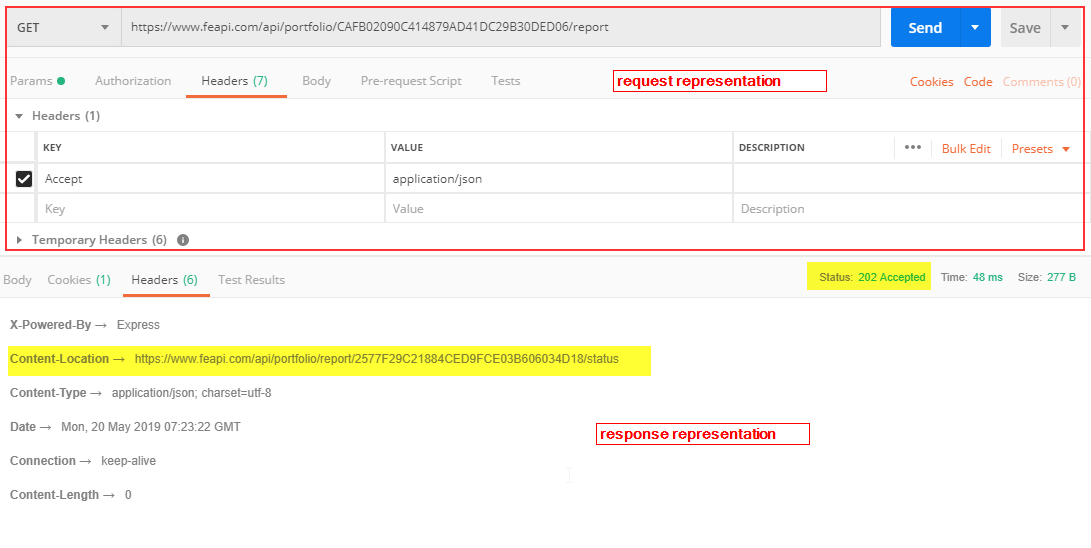
202 Accepted response with the status check URI in the Content-Location header -
Client sends the request to check the report status.
-
Server checks the status and sends the response to the client.
-
When the server sends the in-progress status, the response will look like as below,
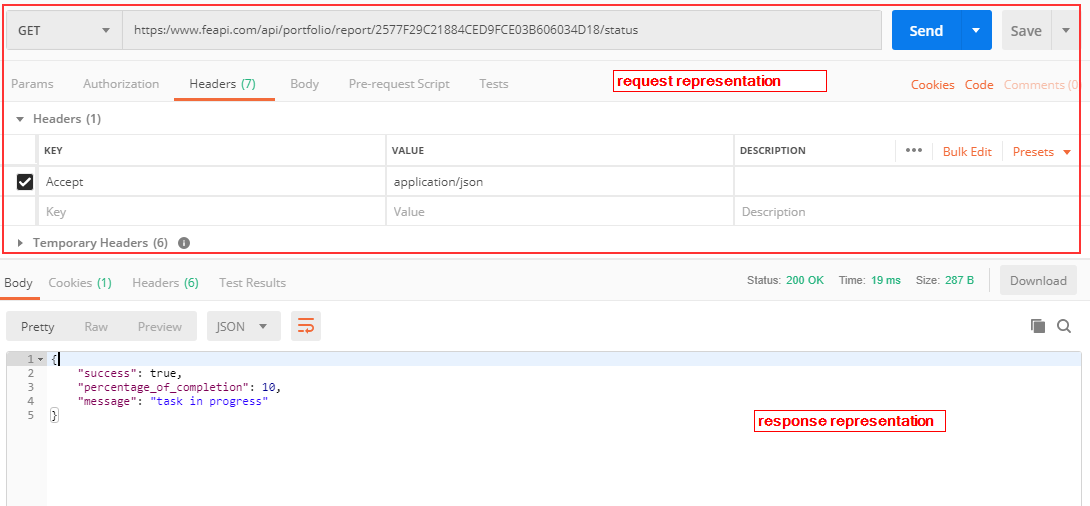
Status check response while the report is still processing -
When the server sends the error status, the response will look like as below,
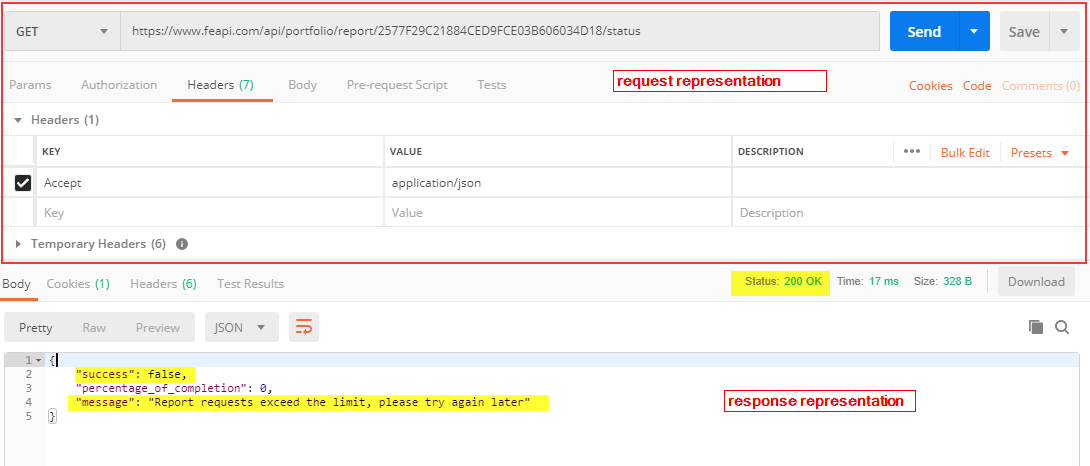
Status check response when the report generation failed -
When the server sends the completed status, the response will look like as below,
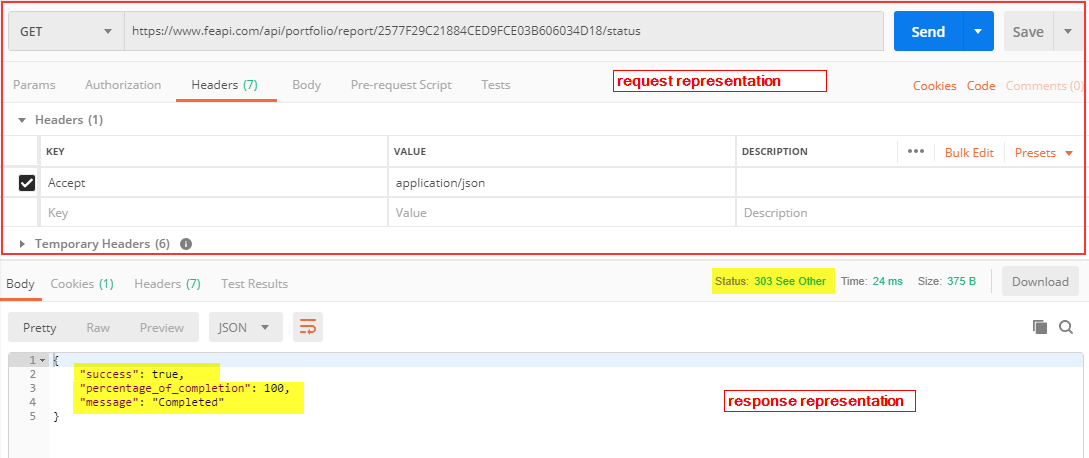
Status check response when the report is completed
-
-
Client sends the GET request when the long running request is completed.
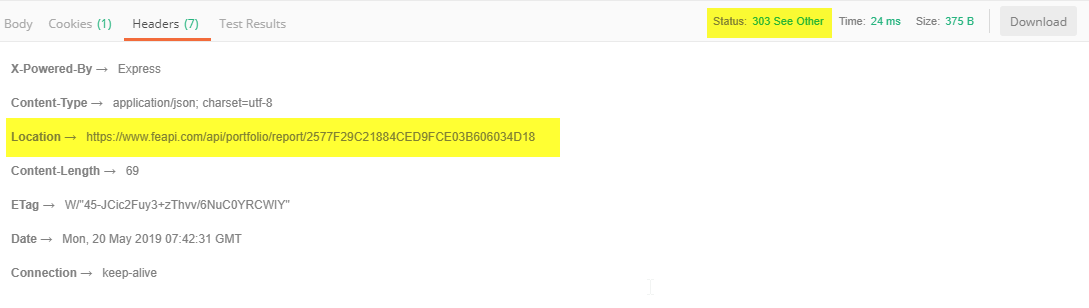
Client reads the outcome of the completed task
Versioning
Managing change and adapting to change is very hard in computer programming. In a distributed client/server environment, clients count on servers to honor their contracts. RESTful web services are no exception, and the contract consists of URIs, resources, the structure and content of representations and the HTTP methods for each resource.
For any change to this contract, the server should consider providing backward compatibility. In this case, clients need not upgrade at the same time; they can even ignore consuming the latest version. The server needs to provide support for the older version until all clients have upgraded to the newer one.
Sometimes we make changes for security or compliance, and at that time the consumer doesn’t have any option to ignore or defer the upgrade to the new version.
Managing changes takes discipline, careful planning and defensive coding practices. Most changes have good intentions. Either they fix something broken or they enhance some functionality. However, if not planned well, changes can be disruptive.
Both clients and servers need to take the appropriate steps to manage the changes smoothly. For the server, the goal is to keep the clients from breaking. For the clients, the objective is to not fail when new unknown data or links appear in representations.
Defining the breaking changes
Any change to the contract of an API is considered a breaking change. Changes that impact the backward compatibility of an API are breaking changes.
Possible breaking changes:
- Removing or renaming APIs or API parameters
- Changes in behavior for an existing API
- Changes in error codes and fault contracts
- Security related changes
Version Schema
APIs are versioned using a Major.Minor versioning schema. The minor part is used to specify any non-breaking changes. The major part is used to specify the breaking changes in the API. API versioning is not like normal versioning; you should be mindful when creating minor versions, otherwise it adds complexity in handling versioning at the server side.
There are various options available to specify the version for an API, and those are,
| Option | Example | Recommendation |
|---|---|---|
| Embedding the version string in the URI | https://api.example.com/api/v1/funds/P124 | Not recommended, since it pollutes the URI |
| As a query string parameter of the URI | https://api.example.com/api/funds/P124?api-version=1.0 | Recommended approach, since it does not pollute the URI |
| As a custom version header | x-version: 1.0 | When your consumers are web browsers, a preflight request will be triggered due to the custom header |
| As a custom media type | Accept: application/vnd.example.v1+json | It has the same effect as a custom header |
When to Version
APIs must increment their version number in response to any breaking change. But it is optional to increase the version for non-breaking changes.
Use a new major version number to signal that support for existing clients will be deprecated in the future. When introducing a new major version, we must provide a clear upgrade path for existing clients and develop a plan for deprecation. We should use a new minor version for all other changes which will not introduce any breaking changes.
Here is the list of few common issues when we introduce a new version,
- Version changes may involve new business rules and new application flows. These require code changes in clients.
- Maintaining multiple versions of a resource at the same time is not trivial. You may need to partition your servers, code or data stores for each version.
- Clients may store URIs locally or bookmark them. When you assign new URIs, clients will have to upgrade those URIs along with other stored data of resources.
- Data stored by a client for one version of an API may not work with data from a different version of the same API. Clients may have to port resource data stored locally before migrating to the new version. You should avoid this by making compatible changes.
Testing
The following automated tests must be carried out for all APIs,
- Unit Test - Refer to the unit testing guidelines.
- Integration Test
- Acceptance Test - Use the REST Assured library (Java). We will see how to use it in an upcoming series on contract testing.
Documentation
Discoverability is important for RESTful web services, and we need to address two kinds of discoverability: design-time discoverability and runtime discoverability.
- Design-time discoverability helps the consumer to design and build clients. API documentation is an example of design-time discoverability.
- Runtime discoverability, on the other hand, helps to maintain loose coupling between clients and servers and enables plug-and-play-style automation. Runtime discovery involves HTTP’s uniform interface, media types, links and link relations (HATEOAS, which we discussed in Part 1).
API Documentation
The best way to promote design and development-time discoverability is to document the information needed to implement clients. API documentation should contain the following human-readable information,
- All resources and the methods supported for each resource
- Media types and representation formats for resources in requests and responses
- Details about success, error and fault codes
- Query parameters used for all fixed URIs
- URI templates and token substitution rules
- Authentication and security credentials for accessing resources
Swagger OpenAPI provides the standard template to describe RESTful APIs with all the necessary information to implement a client or consume a specific API.
Swashbuckle is one of the OpenAPI implementations for ASP.NET. It is available as a NuGet package from nuget.org.
Must Do: All APIs must implement Swagger OpenAPI through the Swashbuckle middleware.
Best practices checklist
Asynchronous Requests
- Should not hold the client connection until the server completes and sends the response for long running requests.
- Should use the 202 response code after accepting long running requests.
- 202 response should have the Content-Location header with the status checking URI.
- Server should send the response with 200 status code and the percentage of completion for the still processing status.
- Server should send the response with 200 status code and error details for the failure status.
- Server should send the response with 303 status code and the URI to access the long running task’s outcome for the completed status.
Versioning
- Try to avoid breaking changes.
- Any change to the contract should be considered as a breaking change.
- Server should protect the client from breaking changes by providing backward compatibility.
- Client should not fail when new unknown data or links appear in the representation.
- API versioning should follow the Major.Minor version schema.
- Major version should be increased for breaking changes.
- Minor version should be increased for non-breaking changes, but it is optional.
- Should not increase the minor version unnecessarily, otherwise it will introduce maintenance overhead.
- Use the query string to specify the version in a URI.
Testing
- All APIs must have unit tests.
- All API projects must have integration tests.
- All API projects must have user acceptance tests.
Documentation
- All APIs should be documented with Swagger OpenAPI.
Wrap up
In this article, we have looked at how to design long running requests with 202 and a status resource, how to define breaking changes and version an API, the mandatory tests and how to document an API with Swagger OpenAPI. With this, we have completed the REST API design guidelines series: from REST constraints, resources and URIs, verbs and status codes, error handling and security, performance and concurrency, to long running requests, versioning, testing and documentation. I really appreciate that you took the time to read this series. I hope these guidelines help you to design APIs which are easy to consume, scale and change.
Related Posts
How to design resources and URIs for a REST API? - Part 2
Identify resources from domain nouns and functions, choose the right granularity with an example and follow the conventions to design URIs.
How to handle errors and secure a REST API? - Part 4
Classify errors and faults, design the error body and apply the security techniques for a REST API: authentication, CORS and rate limiting.
How to improve REST API performance and handle concurrency? - Part 5
Improve REST API performance with Cache-Control, conditional GET, ETag and compression, and handle concurrency with optimistic locking.