How to design resources and URIs for a REST API? - Part 2
Identify resources from domain nouns and functions, choose the right granularity with an example and follow the conventions to design URIs.
How to design resources and URIs for a REST API? - Part 2
In REST, identifying and providing the resource abstraction is the most important and tricky part of API design. A wrong resource design will either make your consumers call your API too many times or couple them tightly with your internal implementation, and both are very hard to fix once the API is in production. In the previous article, we discussed what REST is, its constraints and the resource, URI and verb concepts. In this article, we are going to see how to identify resources, how to define the right granularity for a resource and how to design URIs for them.
REST API Design Guidelines series:
- Why REST and what makes an API RESTful?
- How to design resources and URIs for a REST API? (this article)
- How to use verbs, representations and status codes in a REST API?
- How to handle errors and secure a REST API?
- How to improve REST API performance and handle concurrency?
- How to handle long running requests, versioning, testing and documentation in a REST API?
TL;DR Summary
- Identify resources from domain nouns and from processing or computing functions.
- Don’t blindly map domain entities to resources; define the granularity based on consumer requirements.
- Fine-grained resources lead to a chattier API (an anti-pattern); coarse-grained resources couple the client and the server.
- A collection resource must support pagination and search.
- URIs must be descriptive, use plural nouns, encode hierarchy with path variables and use query strings for non-data elements.
- Don’t change URIs after production and don’t hard-code them at the client end.
API Design
A resource comprises a URI, verbs and a representation. An API exposes its data and functionality through resources which are identified by URIs. A resource might have various operations, and each can be triggered with a specific verb (GET, POST, PUT and DELETE). A representation describes the resource state and it is transferred back and forth between client and server.
Identifying resources
We can identify resources easily by following these techniques.
Identifying resources from problem or business domains
We can use object-oriented design techniques to design resources from domain entities. Collect all nouns from your business use cases and start creating a resource for each noun. But be mindful, the resource should be lightweight and it should not expose all functionality or data the way domain entities are exposed internally.
Steps to design:
- Analyze your business use cases.
- Find all domain nouns that can be operated using “read”, “create”, “update” or “delete” operations. It completely depends on your requirements and it is not necessary that all resources fit all operations.
- Promote or create each identified noun as a resource.
- Use GET, POST, PUT or DELETE methods to implement “read”, “create”, “update” or “delete” operations respectively on each resource.
Example:
In the mutual fund domain, we have domain nouns like Unit, Fund, Universe, Group, Portfolio, etc. We can design a resource for each noun. But it is not necessary that these resources have all CRUD operations. In fact, we have lots more read operations than other operations.
Warning: Simply mapping the domain entities to resources sometimes creates a design smell. Refer to the Resource granularity section to get more information on this.
Identifying resources from processing or computing functions
In some scenarios, few operations will not be associated with a specific domain noun. For example, combining two pdf files into one file is a pure file processing function, so it can’t fit within the pdf resource.
In this case, we can create a separate resource with the name of “combine-pdf”. Processing or computing functions are not expected to change or write anything at the server, so GET is the only verb to fetch a representation containing the output.
Steps to design:
- Analyze your business use cases.
- Find all processing or computing functions.
- Promote or create each identified processing or computing function as a resource.
- Use the GET method to read the response on each resource. Optionally, you can use either the OPTIONS or HEAD verb here.
Example:
In the mutual fund domain, we might use some processing functions like on-the-fly currency conversion, performance calculation, stitching pdfs, etc.
Collection Resource
A collection is a special kind of resource. It groups other homogeneous resources together and its representation focuses on links to other resources. All items should share the same schema, and these items may be part of different collections. A well-designed collection resource will contain information like the URI of each item, data and links in the response representation.
Example:
Request:
https://api.example.com/api/{univcode}/fundsResponse:
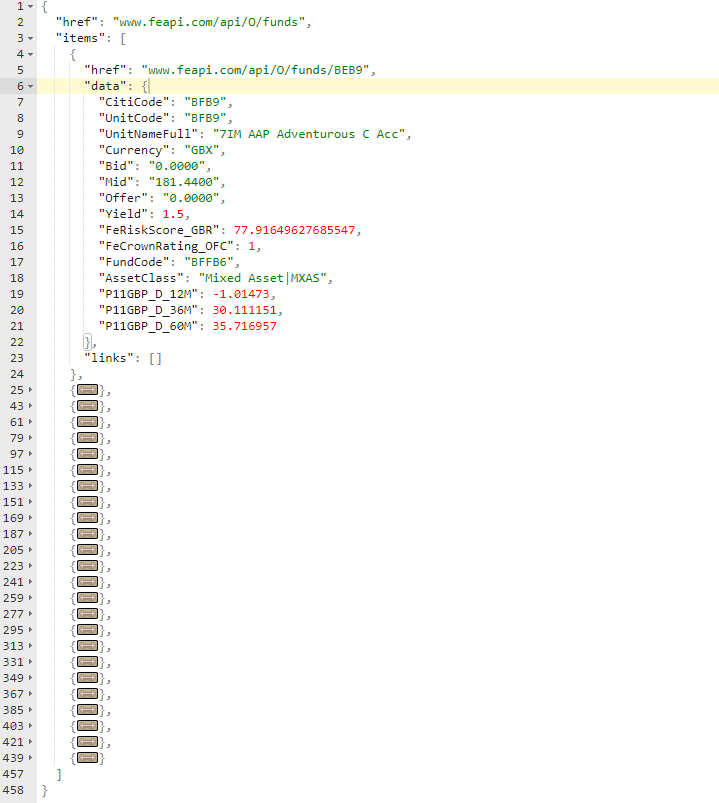
Must Do: A collection contains one or more items, so it is important to add pagination to retrieve a collection resource. It is also important to provide the search feature for a collection resource.
Resource granularity
Blindly mapping domain entities into resources may lead to resources that are inefficient and inconvenient to use. Also, it may break the client-server isolation constraint by exposing the internal details to the client.
Consider the following things while you define the granularity of a resource,
- What are the expectations from clients or consumers?
- Size of the data
- Network efficiency
- Cacheability
- Frequency of change
- Mutability
Fine-grained vs Coarse-grained
Designing a small API is good for maintenance, but when we design an API around fine-grained resources, we end up with a chattier API for the consumer application. Basically, the consumer needs to make too many calls to achieve a certain business functionality which could be achieved with a few calls. On the other hand, when we design the API with very coarse-grained resources (which are designed to do everything), there will not be enough variations to support all the API consumers’ requirements. Most importantly, the API may become difficult to use and maintain since it exposes some internal details to the consumer and it leads them to confusion on how and what to use. Sometimes, it will introduce lots of maintenance issues, especially when we want to change or remove one or more additionally exposed attributes and those are consumed by consumers either knowingly or unknowingly.
Let us discuss the API design for a news article to understand this subject better. A news article API can be designed in two ways.
Approach 1: Fine-grained resources
The first approach is to design fine-grained APIs, one each for article content, author, tags, picture, comments, etc. This approach creates multiple APIs, resulting in chattier interactions between the consumer and the server. It means the client needs to make multiple API calls to the server to get the complete news article details, and this adds more load to the server, which in turn impacts the consumer by waiting more time to get the data. For your information, a chattier API is one of the anti-patterns, which we should keep in mind while designing an API.
https://api.example.com/api/news/{news id}
https://api.example.com/api/news/{news id}/author
https://api.example.com/api/news/{news id}/tags
https://api.example.com/api/news/{news id}/comments
Approach 2: Coarse-grained resource
The second approach is to design the above APIs as a single coarse-grained resource. Now the problem is introduced in adding a comment, because the responsibility of adding or updating comments lies with the news resource instead of a sub resource. It introduces difficulty at both the consumer and provider end. The client should send a “POST” request to create a comment on the “news” resource, and in the REST world it is more like creating a news article instead of creating a comment. It leads to lots of questions like how to add a comment, what data needs to be sent to the server (either the whole news article data or the comment data alone), how to retrieve a specific comment, etc. At the server end, we will end up adding lots of conditional logic to differentiate what kind of resource is being created, whether it’s an article or a comment, and it will reduce the maintainability and usability of the API.
https://api.example.com/api/news/{news id}This API looks like it is designed to access news article content, but when it does more than expected, like add or update a comment, it introduces lots of confusion over using this API.
Refined design
Must Consider: It is significant to define the granularity of a resource depending on the client’s needs, reusability and maintainability factors.
We can refine the above APIs as follows,
| Verb | URI | Purpose |
|---|---|---|
| GET | https://api.example.com/api/news/{news id} | Read an article and return details like title, content, author name and tags |
| GET | https://api.example.com/api/news/{news id}/comments | Read all comments for a news article |
| POST | https://api.example.com/api/news/{news id}/comments | Add a comment for a news article |
| GET | https://api.example.com/api/news/{news id}/tags | Read all tags for a news article (only when tags are consumed in different use cases) |
In our case, most of the time we read the resource state instead of creating it, and we don’t allow users to create new tags, so it is better to keep the tags with the article content itself. If you have a different use case, then you can create a separate sub resource for tags.
URI Design
A URI is an opaque identifier of a resource and it is used to identify a resource. It should be meaningful and well structured. A client should be able to construct a URI for a resource that they want, and they should not be concerned about how the server designs a URI. Use the following conventions while you are designing the URI for a resource.
URIs should be descriptive
It should express the intent of the business process and be predictable. If clients know the URI template, then they should be able to make their own entry points into the service.
Example:
https://api.example.com/api/funds/HI34This URL clearly expresses that it provides the details about the fund which has the fund code HI34. From this URL, the client can replace the fund code to get details of another fund without knowing much about the server-side implementation. So, the template URL will be https://api.example.com/api/funds/{fund code}.
Use nouns to represent the resources in URI
In REST, all resources are represented with nouns. Don’t use verbs (like getFunds or createComment) in the URI; the HTTP verb already tells the action. We can use either singular or plural nouns to represent a resource, but we should stick with one convention and don’t mix both in a URI. As part of our standard, we use plural nouns to represent a resource URI.
Example:
https://api.example.com/api/groups/{group code}
https://api.example.com/api/funds/{fund code}
https://api.example.com/api/news/{news id}
Use path variables to encode hierarchy
Sometimes it is required to access the sub resources of a parent resource. In this case, we should form the URI based on the hierarchy order like parent/child/grandchild.
URI template:
https://api.example.com/api/parent-resource/child-resource/grandchild-resourceLet us take our news article example. When we want to design an API for reading all comments for an article, the URI should be as follows,
https://api.example.com/api/news/85644/commentsUse commas or semicolons to represent non-hierarchical resources
Sometimes it is required to access the state of multiple sibling resources. In this case, we can use either commas or semicolons as a separator. Use commas when the parameter order is important and use semicolons when the parameter order is not important. Semicolons are also used to identify matrix parameters.
Example:
https://api.example.com/api/funds/HI34;HI45
https://api.example.com/api/funds/HI34/performance/custom;p=trtg,c=gbp,m=bidtobid
Use underscore or hyphen to improve readability of URI
As part of a descriptive URI, sometimes you might end up needing a space to improve the readability, but space is not a URI safe character. In this case, we can use either an underscore or a hyphen to replace the space character in the URI.
Example:
https://api.example.com/api/combine-pdfUse query strings for non-data elements
Use query strings for non-data elements like search, filter, page, etc.
Example:
https://api.example.com/api/funds?search=Aberdeen&page=2&count=10Don’t change the URIs
URIs should be designed to last a long time. Consumers may store URIs in databases and configuration files, or may even hard-code them in code. So, don’t try to change a URI once it is consumed by clients. Use redirection if you really need to change them.
Don’t hard-code URIs at client end
Don’t hard-code the URIs at the client end, because sometimes it might be required to change the API URI due to some unavoidable situations. Hard-coding URIs leads to lots of changes in the code and it is a kind of code smell.
Best practices checklist
Resource Design
- Identify domain nouns and map each noun to a resource.
- Map the verbs to the resource’s functions or operations.
- Create a new resource for processing or computing functions.
- Don’t blindly map domain nouns to resources; instead, define the right granularity for each resource.
- Define the resource granularity based on consumer requirements.
- Don’t define fine-grained resources; they will introduce a chattier API, which is an anti-pattern.
- Don’t define coarse-grained resources; they will bring coupling between the client and the server.
- Don’t expose all internal domain entities through the resource representation.
- A resource can have one to six functions, one for each verb.
URI
- Define a descriptive URI for each resource.
- Use nouns to represent the resources in a URI.
- Don’t use verbs to represent a resource in a URI.
- Use plural names.
- Don’t mix both singular and plural names in a URI.
- Use path variables to encode hierarchy.
- Use commas or semicolons to represent non-hierarchical resources.
- Use an underscore or hyphen to improve the readability of a URI.
- Use query strings for non-data elements.
- Don’t change the URIs after production.
- Don’t hard-code URIs at the client end.
Wrap up
In this article, we have looked at how to identify resources from domain nouns and processing functions, how to define the right granularity with the news article example, and the conventions to design URIs. I really appreciate that you took the time to read this article. In the next article, I will walk you through how to design the representations, which status codes to use and how to use each HTTP verb with examples.
Related Posts
How to use verbs, representations and status codes in a REST API? - Part 3
Design incoming and outgoing representations, choose the right status codes and use each HTTP verb correctly, with examples.
Why REST and what makes an API RESTful? - Part 1
Why REST replaced WS-* services, what makes an API RESTful and the six REST constraints, with resources, URIs, verbs, safety and idempotence.
How to handle errors and secure a REST API? - Part 4
Classify errors and faults, design the error body and apply the security techniques for a REST API: authentication, CORS and rate limiting.