How to promote internal APIs to external users? The architecture - Part 1
Why we promote internal APIs, what changes when an API goes public and the general architecture with Cloudflare, Traffic Manager, Application Gateway and APIM.
How to promote internal APIs to external users? The architecture - Part 1
Most organizations build their APIs for internal consumers first: their own web applications, mobile apps and back-office systems. Over a few years, these APIs become part of every product family, and then a day comes when customers and partners want to access them directly to build their own applications. An internal API and a public API look the same from the code, but they live in very different worlds: unknown clients, internet traffic, attackers, and consumers who can’t walk to your desk and ask how it works. In this series, I share the guidelines we derived for our teams to prepare their internal APIs for external and public usage. In this article, we are going to see what changes when an API goes public, the general architecture we use, and how the DNS, Traffic Manager and Application Gateway are configured.
Promoting Internal APIs series:
- How to promote internal APIs to external users? The architecture (this article)
- How to secure APIs for external users? Network, authentication and API clients
- How to manage API access for external users? Roles, consent and the service catalog
TL;DR Summary
- When an internal API goes public, the consumers, the threats and the support model change; the API needs a single public front door, strong security and self-service access.
- Use one dedicated, multi-region API Management (APIM) instance as the front door for all public APIs.
- Traffic flows: Cloudflare → Traffic Manager → Application Gateway (per region) → APIM (internal mode) → private endpoints of the APIs.
- The APIs themselves are never exposed to the internet; they are reachable only through private endpoints in the virtual network.
- Use public DNS records for the internet path and private DNS records for the internal path, with the same host names.
- The Application Gateway routes only the APIs which are configured as external/public and rejects all other requests.
Why promote internal APIs?
We have built many APIs over the past few years, and they are part of all our product families. There are situations where these APIs need to be accessed by our external users directly. Especially when the product value chain is built, the usage of these APIs by external users will increase. Hence, it is important to derive the guidelines for the teams to prepare their APIs for public usage.
The APIs which we were looking to promote first were the core data and service APIs, like the search service, the portfolio API and the product data APIs.
What changes when an API goes public?
Before we look at the architecture, let us understand what really changes when an internal API is opened to external users.
| Internal API | External/Public API | |
|---|---|---|
| Consumers | Known teams and applications | Unknown customers, partners and their developers |
| Network | Private network or VPN | Internet |
| Threats | Mostly accidental misuse | Deliberate attacks, scraping, credential stuffing |
| Authentication | Often shared or implicit trust | Every client must be identified, authorized and scoped |
| Onboarding | A conversation with the team | Self-service: discover, subscribe, get credentials |
| Change management | Coordinate with known consumers | Versioning and deprecation policies, because you can’t coordinate with everyone |
| Support | Direct contact | Documentation, SDKs and samples |
So, promoting an API is not only “opening a firewall port”. We need a front door which controls what is exposed, a security model which works for unknown clients, and a way for users to get access without a manual process. This series covers all three.
General Architecture
The following diagram depicts the general architecture we use to expose the internal APIs to external users.
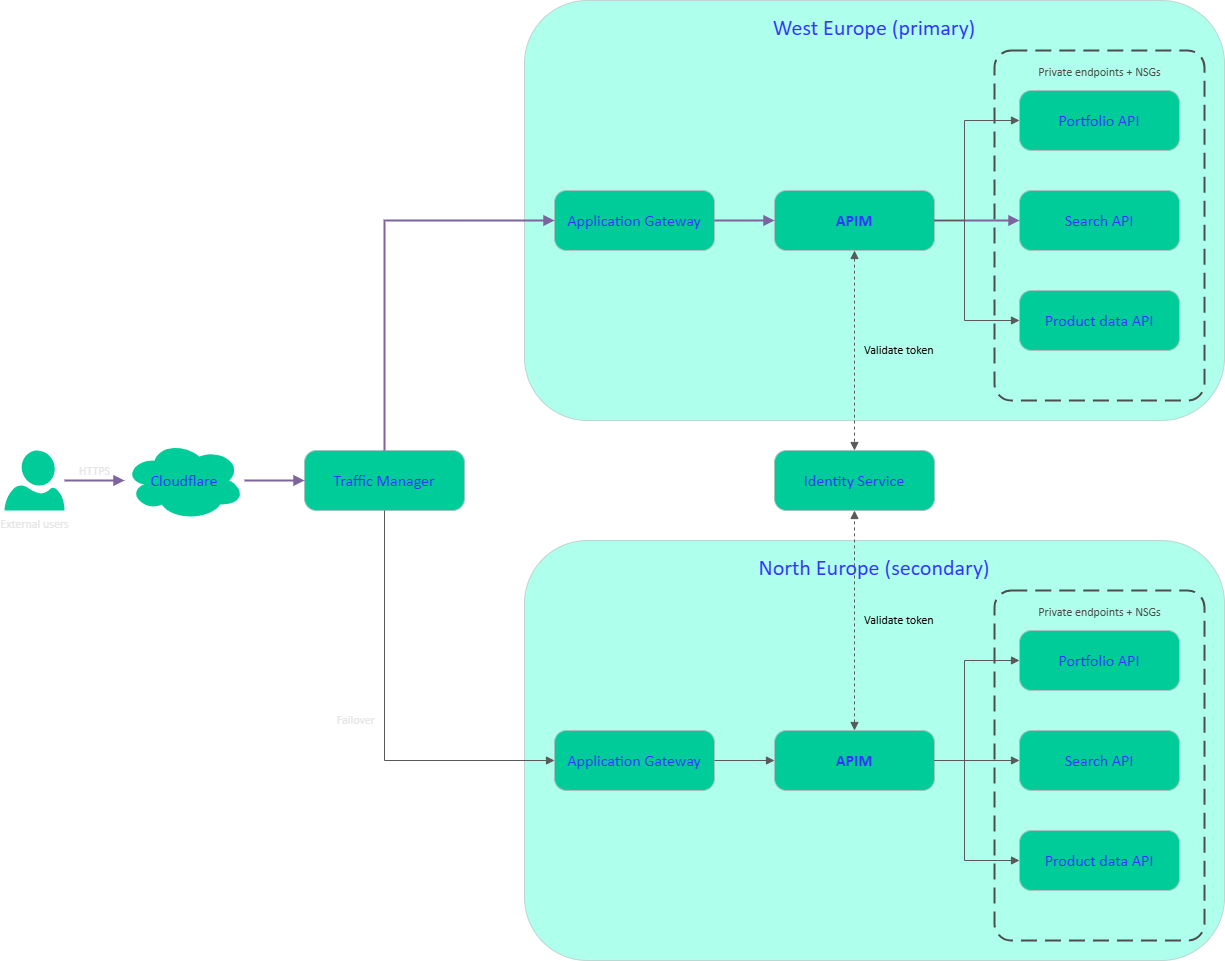
The flow highlighted in purple is the request path of an external user to an API in the primary region. Let us walk through it,
- Cloudflare - All public traffic first reaches Cloudflare, which provides DNS, DDoS (Distributed Denial of Service) protection, WAF (Web Application Firewall) and caching at the edge.
- Traffic Manager - It routes the traffic to the healthy region, i.e. West Europe (primary) or North Europe (secondary).
- Azure Application Gateway - Each region has an Application Gateway with a public IP in the core services network. It is the only public entry point into the region, and it allows only the APIs which are configured as external/public.
- API Management (APIM) - One dedicated APIM instance for all public APIs, deployed in both regions and running inside the virtual network. It applies the API policies like authentication, rate limiting and transformations.
- Enterprise Auth - Our identity service (built on IdentityServer) issues and validates the tokens for the API clients. We will see it in detail in the next articles.
- Private endpoints - APIM reaches each API (App Service or Azure Function) through its private endpoint, so the APIs are never exposed to the internet.
- NSGs (Network Security Groups) - Each API has its own NSG which allows only the expected traffic.
- Private DNS zones - They resolve the API host names to the private IP addresses inside the virtual network.
Notice the layers: Cloudflare protects the edge, Application Gateway decides what is public, APIM decides who can call what, and the private endpoints and NSGs make sure nothing can bypass the front door. If one layer is misconfigured, the next one still protects the API.
Must Consider: Use one dedicated APIM instance for all public APIs instead of each team exposing its own API. It gives the external users one consistent host name, one way to authenticate and one place to find all APIs, and it gives us one place to apply the security and usage policies.
DNS Configuration
The architecture uses the same host names on both the internet and the internal network, but they resolve to different targets. This is called split-horizon DNS.
Public DNS records (Cloudflare)
| CNAME | Points to |
|---|---|
api.example.com | <name>.trafficmanager.net (Traffic Manager) |
api1.example.com | FQDN or IP address of the West Europe Application Gateway (e.g. <name>-appgw-we.westeurope.cloudapp.azure.com) |
api2.example.com | FQDN or IP address of the North Europe Application Gateway (e.g. <name>-appgw-ne.northeurope.cloudapp.azure.com) |
Traffic Manager Profile
| Setting | Endpoint Address |
|---|---|
| Public End Point 1 | api1.example.com |
| Public End Point 2 | api2.example.com |
Private DNS records
| CNAME | Points to |
|---|---|
api.example.com | <name>.trafficmanager.net (Traffic Manager) |
api1.example.com | Internal IP address of the primary region’s API Management instance |
api2.example.com | Internal IP address of the secondary region’s API Management instance |
How it works:
- An external user calls
api.example.com. Cloudflare resolves it to Traffic Manager, which returnsapi1orapi2based on the region health, and the public DNS resolves that to the Application Gateway of the region. - An internal application calls the same
api.example.com. Traffic Manager again returnsapi1orapi2, but the private DNS resolves it directly to the internal IP address of APIM, so the internal traffic never leaves the virtual network.
Both internal and external consumers use the same URL, get the same failover behavior and go through the same APIM policies.
Application Gateway
Create routing rules to allow the private endpoints of the APIs which are configured to be external/public, and reject all other API requests.
This is an important control. APIM may host internal-only APIs as well, and the Application Gateway makes sure that only the APIs we explicitly decided to promote are reachable from the internet. Promoting a new API then becomes a deliberate change in the routing rules, not an accident.
Wrap up
In this article, we have looked at why we promote internal APIs, what changes when an API goes public, the general architecture with Cloudflare, Traffic Manager, Application Gateway, APIM and private endpoints, and how the public and private DNS and the Application Gateway are configured. I really appreciate that you took the time to read this article. In the next article, I will walk you through how to secure the APIs: the network security baseline, the authentication flows for trusted and public clients, and how to manage the API clients.
Related Posts
How to manage API access for external users? Roles, consent and the service catalog - Part 3
Manage API access for external users with roles, consent approvals and a service catalog, plus a readiness checklist before an API goes public.
How to secure APIs for external users? Network, authentication and API clients - Part 2
Secure APIs for external users: the network security baseline, authentication flows for trusted and public clients and managing API clients and secrets.
What is resiliency and why do we need a DR strategy? - Part 1
What resiliency is, why we need a DR strategy, how high availability, disaster recovery and backup differ and the principles we follow.