How to manage API access for external users? Roles, consent and the service catalog - Part 3
Manage API access for external users with roles, consent approvals and a service catalog, plus a readiness checklist before an API goes public.
How to manage API access for external users? Roles, consent and the service catalog - Part 3
A secure architecture and the right authentication flows are not enough if nobody controls who gets access to which API. When any admin can grant any scope, access spreads silently, and when every request needs a manual approval, external users wait for days and give up. The goal is to keep the product teams in control of their APIs, while giving the users a self-service experience. In the previous article, we discussed the network security baseline, the authentication flows and the API client rules. In this last article of the series, we are going to see the changes we need in our auth system to manage API access, how the roles and consent work together, the subscription/service catalog portal, and a readiness checklist to promote an API.
Promoting Internal APIs series:
- How to promote internal APIs to external users? The architecture
- How to secure APIs for external users? Network, authentication and API clients
- How to manage API access for external users? Roles, consent and the service catalog (this article)
TL;DR Summary
- Introduce a new “API Admin” role, with a maximum of 2 API admins per product, who owns the API resources and scopes of that product.
- End users can’t access the scope of an API without the consent of the API admin, except for pre-authorized users of specific subscription holders.
- Remove the global “Auth Admin” role from everyone except 1 or 2 users who manage the system.
- API users own their API clients and application clients, and request access to the scopes they need.
- A subscription/service catalog portal showcases all APIs, and lets the users manage their clients, request access and get SDKs and samples.
How API access is managed
The following diagram depicts how the subscription management and our Enterprise Auth work together to manage API access.
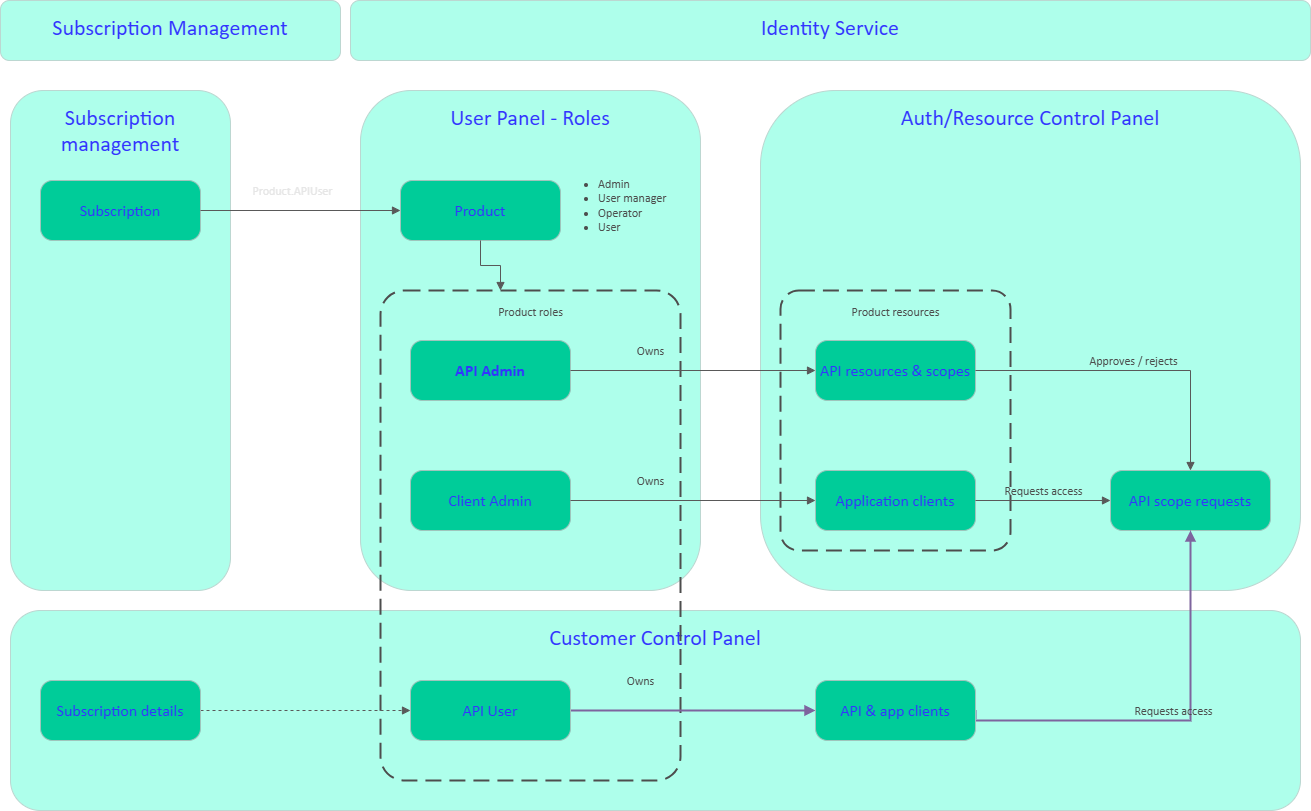
The flow highlighted in purple is how an external API user gets access to an API: they own their clients and request access to an API scope. Let us walk through the diagram,
- Subscription Management - A customer’s subscription gives access to a product, with the
Product.APIUserentitlement for API access. - User Manager - Roles - Each product has a set of roles: Admin, User Manager, API Admin, Operator, User and Client Admin.
- Auth/Client Admin - The API Admin owns the API resources and API scopes of the product, and the Client Admin owns the application clients of the product.
- API User - An external user with API access (through the lite version of the portal, along with the subscription details) owns their own API clients and application clients.
- Request access to the scope - The API user requests access to an API scope for their clients, and the API Admin approves or rejects the API scope request.
In simple terms, the product team decides what can be accessed (API resources and scopes), the customer decides who in their organization builds applications (API users and their clients), and the API admin is the gate between the two.
Enterprise Auth Changes
In order to support the above flow, the client admin tool needs to go through the following changes,
- A new role, “API Admin”, needs to be created.
- For every product, there shall be a maximum of 2 API admins.
- API resources must be managed by the specific API admin only.
- End users can’t gain access to the scope of APIs without consent from the API admin.
- The API admin must approve the consent request.
- Meanwhile, there shall be pre-authorization approvals granted for the users from specific subscription holders. For them, approval need not be provided by the API admins.
- The global “Auth Admin” role must be removed for all users except 1 or 2 users who manage the system.
Each change addresses a specific risk,
| Change | Why |
|---|---|
| Dedicated API Admin role | Product teams own the access to their own APIs, instead of a central team guessing |
| Maximum 2 API admins per product | Clear ownership, with a backup, and a small group to audit |
| Consent from the API admin | No user gets access to a scope silently |
| Pre-authorization for subscription holders | Customers who already pay for the access don’t wait for a manual approval |
| Remove the global Auth Admin role | The principle of least privilege; fewer people who can change everything |
Subscription Portal / Service Catalog Portal
To make the APIs self-service, we need a portal for the external and public users. The portal should,
- Showcase all the available APIs that can be accessed to build apps by the external/public users.
- Allow all types (external, public) of end users to,
- View the subscription details
- Manage the API clients
- Request access for API scopes
- Provide SDKs and samples for all APIs.
A service catalog is a major item in our roadmap, and the details on how and when will be clarified over time. Until then, a lite version of the portal along with the subscription details covers the essential self-service needs.
Info: Think of the portal as the “shop window” of the APIs. Developers decide in the first few minutes whether an API is worth integrating, based on how easily they can find it, understand it, get credentials and make the first successful call.
API readiness checklist
Before promoting an internal API to external users, use the following checklist, which brings together the guidelines from this series,
Architecture (see Part 1)
- The API is published through the dedicated APIM instance.
- The Application Gateway routing rule allows the API, and all other requests are rejected.
- The API is deployed in both regions, behind Traffic Manager.
- Public and private DNS records are configured.
Security (see Part 2)
- The API is behind the environment’s virtual network, with NSGs and a private endpoint for APIM.
- The public endpoint of the App Service/Function is blocked.
- APIM validates the access tokens from Enterprise Auth.
- The right authentication flow is chosen: Client Credentials for trusted servers, Authorization Code + PKCE for public clients.
- Client secrets have an expiry period, and users can regenerate them.
Access management (this article)
- The API resources and scopes are defined, and owned by the product’s API admins (maximum 2).
- Consent approval or pre-authorization for subscription holders is configured.
- The API is listed in the subscription/service catalog portal, with SDKs and samples.
API design (see the REST API Design Guidelines series)
- The API follows the design guidelines, is versioned and is documented with OpenAPI.
- Error responses don’t leak internal details, and rate limits are configured.
Wrap up
In this article, we have looked at how subscription management and our auth system work together to manage API access, the changes we need like the API admin role and consent approvals, the subscription/service catalog portal, and a readiness checklist to promote an API. With this, we have completed the Promoting Internal APIs series: from the architecture with a single front door, the network and authentication security, to the access management and self-service portal. I really appreciate that you took the time to read this series. I hope it helps you to open your internal APIs to the outside world safely, and to make them easy to adopt.
Related Posts
How to promote internal APIs to external users? The architecture - Part 1
Why we promote internal APIs, what changes when an API goes public and the general architecture with Cloudflare, Traffic Manager, Application Gateway and APIM.
How to secure APIs for external users? Network, authentication and API clients - Part 2
Secure APIs for external users: the network security baseline, authentication flows for trusted and public clients and managing API clients and secrets.
What is resiliency and why do we need a DR strategy? - Part 1
What resiliency is, why we need a DR strategy, how high availability, disaster recovery and backup differ and the principles we follow.