How to create Azure resources with ARM templates?
Azure Resource Manager templates explained through infrastructure drift, template structure, parameters, dependencies, and AzureRM deployment commands for repeatable environments and deployments.
How to create Azure resources with ARM templates?
Creating cloud resources by clicking through a portal is useful for learning, but it is difficult to repeat exactly. A second environment may receive a different setting, a resource can be created in the wrong region, and nobody can easily review what changed. Infrastructure is also code, hence it needs the same repeatable thinking as application code.
Azure Resource Manager (ARM) templates describe Azure resources as JavaScript Object Notation (JSON) and allow us to deploy them as a group. In this article, we are going to see how to create a Resource Group deployment with an ARM template and the new Azure PowerShell AzureRM cmdlets.
We can create Azure resources in two common ways:
| Approach | Pros | Cons |
|---|---|---|
| Portal deployment | + Quick for exploration<br>+ Easy to discover settings | − Harder to repeat exactly<br>− Changes can drift silently |
| ARM template deployment | + Reviewable and reusable<br>+ Supports repeatable environments | − JSON takes initial effort<br>− Template errors need diagnosis |
TL;DR Summary
- ARM templates describe infrastructure as declarative JSON.
- A Resource Group gives related resources a lifecycle boundary.
- Parameters separate reusable structure from environment-specific values.
- Dependencies should be explicit when one resource requires another.
- Deployment output and validation are part of the infrastructure pulse check.
- Never put secrets directly into a template checked into source control.
Challenges
Portal drift
Two people can create the same web app through the portal and select different plans or settings. Over time, the environments drift and a release behaves differently in each one. A template creates a reviewable baseline so the team can discuss infrastructure changes before applying them.
Ordering and dependencies
An App Service web app requires an App Service plan, and the plan must exist before the web app can reference it. If the template does not express this relationship, deployment may fail or become difficult to diagnose. ARM can infer some dependencies from resource references, but explicit design is still important.
Secret handling
A template is often stored with source code and copied into build artifacts. A storage key or database password in the JSON can then spread beyond its intended boundary. Use secure parameter handling and replace the input place holders with actual values at deployment time.
What is an ARM template?
An ARM template is a JSON document which declares the Azure resources and configuration required for a deployment.
In simple terms, it is a recipe for an environment. The recipe says what resources should exist and how they relate, while ARM decides how to create or update them. It is different from a long list of portal clicks because the desired state can be reviewed and reused.
Why infrastructure as code is important?
When infrastructure is repeatable, operations can recreate a test environment and compare it with production. This reduces the blind spot between what the application expects and what the platform provides. It also makes rollback or recovery planning more realistic, although data itself still requires a separate backup plan.
How to create an ARM deployment?
The following diagram depicts a parameter file and ARM template creating a Resource Group deployment,
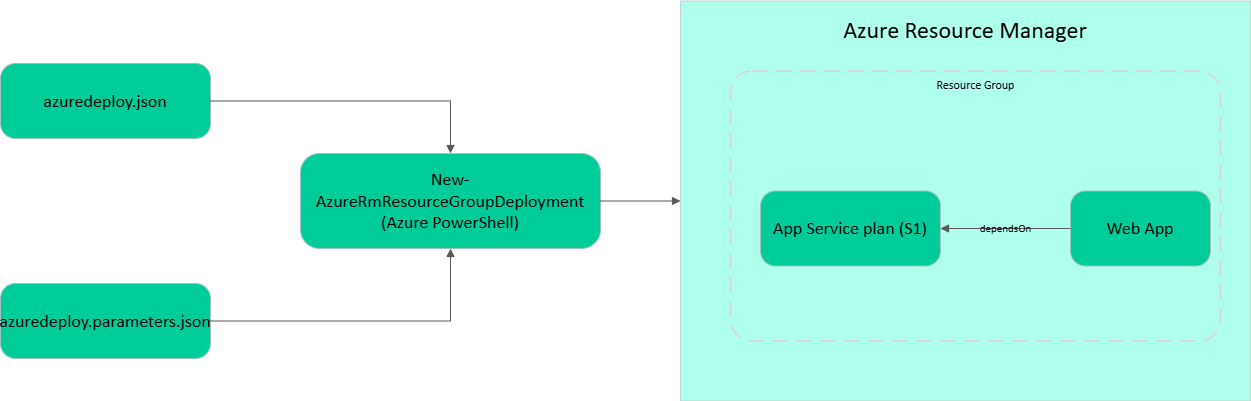
Option1: ARM template deployment
Steps to Implement:
Follow the following instructions to create an App Service environment with an ARM template.
-
Create a template file named
azuredeploy.json.{ "$schema": "http://schema.management.azure.com/schemas/2015-01-01/deploymentTemplate.json#", "contentVersion": "1.0.0.0", "parameters": { "webAppName": { "type": "string" }, "appServicePlanName": { "type": "string" }, "location": { "type": "string" } }, "resources": [ { "apiVersion": "2015-08-01", "name": "[parameters('appServicePlanName')]", "type": "Microsoft.Web/serverfarms", "location": "[parameters('location')]", "sku": { "name": "S1", "tier": "Standard" }, "properties": { "numberOfWorkers": 1 } }, { "apiVersion": "2015-08-01", "name": "[parameters('webAppName')]", "type": "Microsoft.Web/sites", "location": "[parameters('location')]", "dependsOn": [ "[resourceId('Microsoft.Web/serverfarms', parameters('appServicePlanName'))]" ], "properties": { "serverFarmId": "[resourceId('Microsoft.Web/serverfarms', parameters('appServicePlanName'))]" } } ] } -
Create a parameter file and replace the input place holders with actual values.
{ "$schema": "http://schema.management.azure.com/schemas/2015-01-01/deploymentParameters.json#", "contentVersion": "1.0.0.0", "parameters": { "webAppName": { "value": "<web app name>" }, "appServicePlanName": { "value": "<App Service plan name>" }, "location": { "value": "<Azure region>" } } } -
Install the Azure PowerShell module and login to the subscription.
Login-AzureRmAccount Select-AzureRmSubscription -SubscriptionId <subscription id> -
Create the Resource Group.
New-AzureRmResourceGroup -Name <Resource Group name> -Location <Azure region> -
Validate the template before creating resources.
Test-AzureRmResourceGroupDeployment ` -ResourceGroupName <Resource Group name> ` -TemplateFile .\azuredeploy.json ` -TemplateParameterFile .\azuredeploy.parameters.json -
Deploy the template.
New-AzureRmResourceGroupDeployment ` -ResourceGroupName <Resource Group name> ` -TemplateFile .\azuredeploy.json ` -TemplateParameterFile .\azuredeploy.parameters.json ` -DeploymentName <deployment name> -
Just to pulse check, list the resources and inspect the deployment result.
Get-AzureRmResource -ResourceGroupName <Resource Group name>
Get-AzureRmResourceGroupDeployment -ResourceGroupName <Resource Group name>
Note: Replace the input place holders with actual values. Test the template in a non-production Resource Group first, because a successful JSON validation does not prove the application configuration is correct.
Template design considerations
Use parameters for names, locations and plan sizes, while keeping the resource relationships in the template. Add tags such as environment and owner so operations can identify the resource purpose. Keep secrets out of the template and pass them through a protected deployment mechanism.
ARM deployment is declarative, but it does not make every application change atomic. A new web app may exist while its database or deployment artifact is not ready. We should compose the infrastructure and application release into a pipeline with visible stages, otherwise the team will confuse resource creation with a usable environment.
Keep templates small enough for a reviewer to understand and use linked templates only when the resource group is genuinely too large to manage as one unit. Name deployments so an operator can identify which release created them. This makes troubleshooting easier when a Resource Group contains more than one application component.
Parameters, outputs and dependencies
Find below the common values which should be parameters instead of hard-coded values,
- Resource Group location
- App Service plan name and SKU
- Web app name
- Storage account name
- Environment tag
Do not make every small value a parameter, because the template then becomes difficult to understand. The parameters should represent values which are changing between environments, while the resource relationship should remain in the template. Use outputs for values required by the next deployment step, for example the web app name or endpoint.
When one resource is using another resource’s identifier, ARM can infer a dependency from resourceId. Use an explicit dependsOn when the relationship is not visible from a reference, otherwise deployment order is becoming a blind spot. Test the template in a non-production Resource Group first, and keep the deployment name meaningful so operations can refer it later.
Must Do and Don’ts
- Must Do: Validate the template before deployment and review the parameter file.
- Must Do: Use tags for environment and owner, because a Resource Group can contain resources from several teams.
- Must Do: Keep secrets out of the JSON and use protected deployment inputs.
- Don’t: copy a production storage key into a parameter file committed to the repository.
- Don’t: assume resource creation means the application is ready, because deployment and application configuration are separate stages.
- Keep in mind that: a declarative template is repeatable only when its external values and versions are also controlled.
In our case, the portal is useful for discovering a setting, but ARM template is better for environments which are recreated or reviewed. It takes some more effort in beginning, but it is reducing configuration drift and the ripple effect of a manually created environment.
Option2: Portal deployment
The portal is a good way to explore a service and confirm which settings are available. Record the decisions and move repeatable environments into a template, otherwise a second environment will depend on a sequence of clicks which is difficult to review.
Wrap up
In this article, we have looked at infrastructure drift, ARM template structure, parameters, dependencies and AzureRM deployment commands. Thanks for reading this article. In the next article, I will explain OAuth 2.0 and OpenID Connect, and how authorization differs from authentication.
Related Posts
How to configure deployment slots in Azure App Service?
Azure App Service deployment slots explained through staging, slot settings, validation, and swapping an ASP.NET MVC release into production safely.
How to deploy an ASP.NET MVC application to Azure App Service?
Deploying an ASP.NET MVC 5 application to Azure App Service, from creating the web app and publishing with Visual Studio through validation and configuration.
How to automate releases with VSTS Release Management?
VSTS Release Management explained through release definitions, environments, approvals, variables, deployment slots, smoke tests and automated ASP.NET deployments for practical guidance.