How to configure deployment slots in Azure App Service?
Azure App Service deployment slots explained through staging, slot settings, validation, and swapping an ASP.NET MVC release into production safely.
How to configure deployment slots in Azure App Service?
Releasing a new version directly to the production web site can create an unpleasant situation. The package may be correct, but a configuration difference or a slow start can impact users while the team is still checking the release. Few teams are having a proper place to test the release before customer traffic is reaching it, hence we need a way to prepare the new version separately and then move it to production in a controlled manner.
Azure App Service deployment slots provide separate live app instances under one App Service plan. In this article, we are going to see how to create a staging slot, deploy an ASP.NET MVC application to it, validate the release and swap it with production.
We can release an application to App Service in two common ways:
| Approach | Pros | Cons |
|---|---|---|
| Direct production deployment | + Simple to understand<br>+ Fewer slots to manage | − Higher customer impact risk<br>− Rollback can take longer |
| Staging slot and swap | + Validate before production<br>+ Fast rollback path | − Uses additional instance capacity<br>− Requires slot-aware settings |
TL;DR Summary
- A deployment slot is a live environment associated with an App Service web app.
- A staging slot allows us to validate a release before users receive it.
- Slot settings must be marked as deployment slot settings when they belong to one environment.
- Swapping slots is faster and more repeatable than copying files manually.
- Database changes still need a backward-compatible release plan.
- Always perform a pulse check after the swap, because a successful swap does not prove the business flow is healthy.
Challenges
Risky production release
When we publish directly to production, users may receive a partially deployed application or an application which has not warmed up. An error in one configuration value will have a ripple effect from the first request to customer support. A staging slot gives us a front door where the release can be tested without exposing it to all users.
Configuration and data compatibility
The application binaries and settings are not always independent. A new version may expect a database column which the old version does not understand. We must design the database change in a backward-compatible manner, otherwise a slot swap only changes the speed of the failure.
Operational confidence
A slot is useful only when we use it as part of a process. If nobody tests the slot and the team only swaps it because the build is green, we are still reactive. The release checklist should include logs, dependencies, authentication and one important domain flow.
What is a deployment slot?
A deployment slot is a separately addressable App Service environment which runs the same application under the same App Service plan.
In simple terms, production and staging are two doors to two running versions of the web application. We can deploy to staging, test it, and swap the doors so staging becomes production. The underlying resources are shared according to the App Service plan, so capacity and cost need to be considered.
Why deployment slots are important?
Deployment slots reduce release downtime and make rollback easier. If a release is not behaving as expected, we can swap back to the previous slot, provided the data changes are compatible. This is similar to keeping two printed newspapers ready: we finish checking the next edition before replacing the one currently in the shop.
How to configure slots?
The following diagram depicts a production slot and a staging slot before and after a swap,
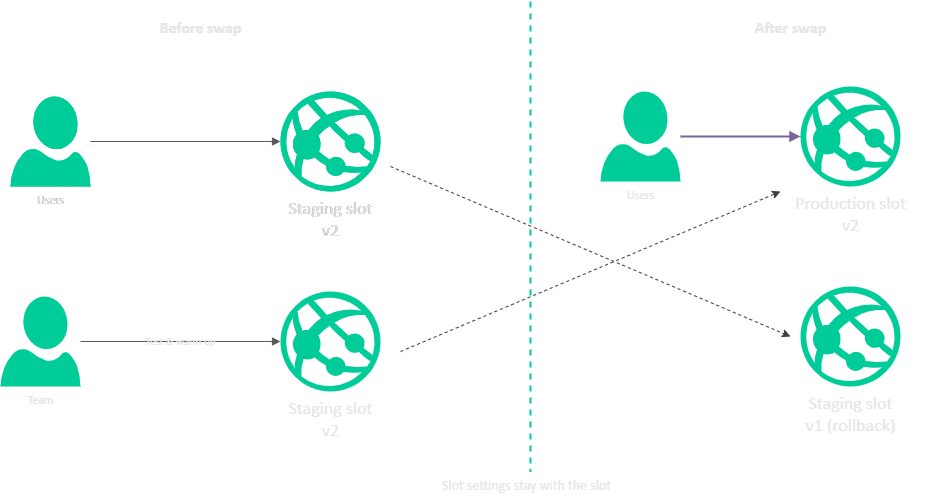
Option1: Staging slot and swap
Steps to Implement:
Follow the following instructions to configure a staging deployment slot.
-
Open the Azure portal and select the App Service web app.
-
Create a new deployment slot with the name
staging.Deployment slots > Add Slot > Name: staging > Clone settings from: production -
Open the staging slot and copy its URL for testing.
https://<app name>-staging.azurewebsites.net/ -
Configure the staging database and external service settings.
-
Mark environment-specific values as deployment slot settings.
Application settings > Deployment slot setting: selected
Connection strings > Deployment slot setting: selected
Note: A slot setting stays with the slot during a swap. Mark a database connection as a slot setting when staging must never use production data.
-
Publish the ASP.NET MVC application to the staging slot from Visual Studio 2015.
Publish target: <App Service name>/staging Configuration: Release -
Warm up the staging application by opening its home page and health endpoint.
-
Test login, important API calls, and a worked domain example such as searching a news article and opening its details.
-
Review application logs and compare the response behaviour with the current production version.
-
Just to pulse check, verify the slot URL and deployment status before the swap.
Azure portal > Deployment slots > staging > Browse -
Swap the staging slot with production after the release owner approves it.
Deployment slots > staging > Swap > Source: staging > Target: production -
Test the production URL and monitor the first requests.
https://<app name>.azurewebsites.net/Info: Keep the old version in the other slot for the rollback window. Do not delete it immediately, because the first production traffic is the best pulse check of the release.
Option2: Direct production deployment
Direct deployment can be suitable for a low-risk internal application or an environment where slots are not available. Build and test the exact artifact first, schedule the release, and keep a rollback package ready. For customer-facing applications, the staging option normally gives a healthier release process because users are not the first testers.
What should not be swapped?
Slot swaps are not a replacement for release design. Static application settings can be swapped, while secrets and environment endpoints normally should stay with the slot. Database schema changes should follow expand-and-contract thinking: add a compatible change first, deploy code which can work with both versions, and remove old behaviour only after the swap is stable.
We should also check scheduled jobs and external callbacks. If both slots execute the same job, the job may run twice. Disable the staging job or use a slot-specific setting, otherwise the customers may receive duplicate news notifications.
Best practices for slot based release
Let us take a closer look at the checks which are important before and after swap,
- Must Do: Mark staging connection strings and secrets as deployment slot settings, because staging should not start using production dependencies before the swap.
- Must Do: Warm up the staging slot and call important endpoints, because an application which is not loaded yet can show a problem only after swap.
- Must Do: Keep the previous version available until the release is stable.
- Don’t: Run scheduled jobs in both slots, otherwise the same notification or import will be executed twice.
- Be mindful: A slot swap does not roll back a database schema which is already changed.
A common release sequence is adding a backward-compatible database column, deploying code which can work with old and new schema, testing the staging slot and then swapping. Later, when no old code is running, the old column or behaviour can be removed. This is the same as changing a bridge while traffic is still moving, we need to keep both ends working during the transition.
When a swap is not possible, direct production deployment is still an option for low-risk internal applications. In our case, customer-facing applications should use staging and swap, because the cost of one extra slot is normally smaller than the ripple effect of discovering a release problem from customer support.
Wrap up
In this article, we have looked at deployment slots, staging configuration, slot settings, validation and swapping an ASP.NET MVC release into production. I appreciate your time and efforts to read this article. In the next article, I will walk you through using Azure Redis Cache for session state and output cache.
Related Posts
How to deploy an ASP.NET MVC application to Azure App Service?
Deploying an ASP.NET MVC 5 application to Azure App Service, from creating the web app and publishing with Visual Studio through validation and configuration.
How to automate releases with VSTS Release Management?
VSTS Release Management explained through release definitions, environments, approvals, variables, deployment slots, smoke tests and automated ASP.NET deployments for practical guidance.
Getting started with Docker - Part 1
Getting started with Docker through images, containers, Docker Toolbox, Docker Machine, host addresses, and basic Docker 1.x commands for practical first steps.