Git branching strategies - Git Flow vs GitHub Flow
Git Flow and GitHub Flow compared through branch roles, pull requests, release stabilisation, hotfixes, continuous delivery and team selection criteria.
Git branching strategies - Git Flow vs GitHub Flow
Git makes branching very cheap. Creating a branch takes a second and switching between branches is instant, so every developer creates branches freely. But without a common strategy, the repository soon becomes a forest of branches, nobody knows which branch is in production, hotfixes are made on the wrong branch and the release day turns into a merge day. The tool is not the problem, the missing agreement is.
Last year, we moved from TFVC to Git and started with a simple branching model for a small team. Since then, more teams and more repositories have joined, and the question “which branching strategy should we use?” came up again and again. In the previous article, we discussed semantic versioning. In this article, we are going to see the two most popular strategies, Git Flow and GitHub Flow, compare them and discuss how to choose the right one for your team.
TL;DR Summary
- A branching strategy is a team agreement on which branches exist, what they mean and how code moves between them.
- Git Flow uses long living
masteranddevelopbranches plus feature, release and hotfix branches. - GitHub Flow uses only
masterand short living feature branches merged through pull requests. - Git Flow suits scheduled releases and supporting multiple versions, like NuGet packages or installed products.
- GitHub Flow suits web applications which are deployed continuously.
- Whatever you choose, keep the feature branches short living and protect
masterwith pull requests and a CI build.
Challenges
Long living branches
When a feature branch lives for weeks, it drifts away from the main branch. The merge at the end has many conflicts and the testing starts again. It is the same problem we discussed in the feature toggles article.
No single source of truth
When nobody knows which branch matches production, a hotfix is done on a branch which already has unreleased features, and those features go to production by accident.
Different rules in every repository
When each team invents its own model, developers moving between teams make mistakes and the build and release definitions are different for every repository.
What is a Branching strategy?
A branching strategy is a set of rules that defines which branches a repository has, the purpose and lifetime of each branch, and how changes flow between them from development to production.
In simple terms, it is the traffic rules for our code. Everyone can drive, but we must agree on which side of the road to drive and who goes first at the junction.
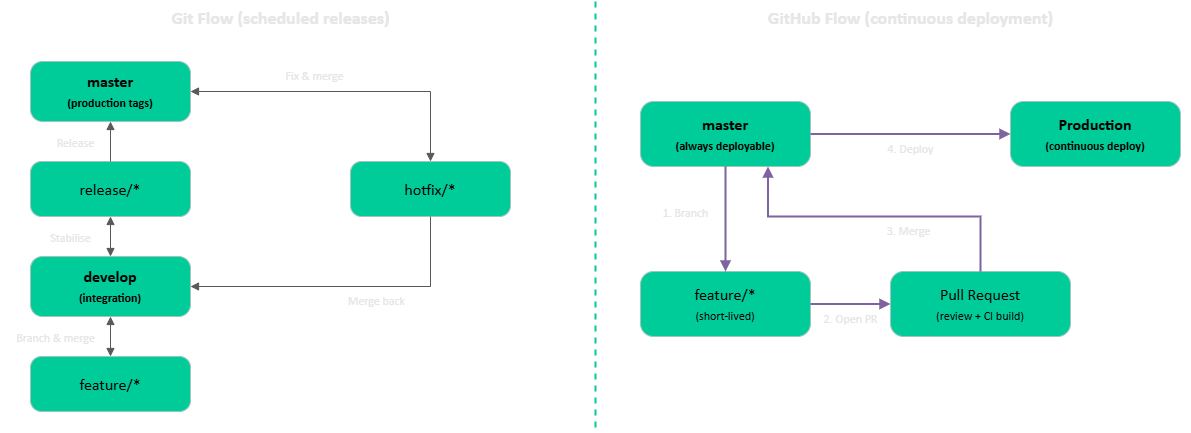
The following diagram depicts Git Flow and GitHub Flow side by side.
What is Git Flow?
Git Flow was introduced by Vincent Driessen in 2010 in his “A successful Git branching model” article. It has the following branches,
master- Always reflects the production. Every commit on master is a release and it is tagged with the version number.develop- Integration branch for the next release. Feature branches are merged here.feature/*- Created fromdevelopfor each feature, merged back intodevelop.release/*- Created fromdevelopwhen the release is feature complete. Only bug fixes, version bump and release notes happen here. Merged intomasterand back intodevelop.hotfix/*- Created frommasterto fix a production issue. Merged intomasteranddevelop.
There is also a git-flow command line extension which automates these steps.
git flow init
git flow feature start fund-search-filters
git flow feature finish fund-search-filters
git flow release start 2.3.0
git flow release finish 2.3.0
What is GitHub Flow?
GitHub Flow was described by Scott Chacon in 2011, based on how GitHub deploys its own website. It is much simpler,
masteris always deployable.- Create a descriptively named branch from
masterfor any change. - Commit to that branch and push it regularly.
- Open a pull request for review and discussion when you need feedback or are ready to merge.
- Once reviewed and the build is green, merge to
master. - Deploy immediately after merging (some teams deploy the branch to production first and merge after verification).
git checkout master
git pull
git checkout -b feature/fund-search-filters
git push -u origin feature/fund-search-filters
# open a pull request in VSTS or GitHub
Git Flow vs GitHub Flow
| Git Flow | GitHub Flow | |
|---|---|---|
| Long living branches | master, develop | master only |
| Release style | Scheduled, versioned releases | Continuous deployment |
| Pros | + Clear place to stabilise a release<br>+ Supports hotfixes while next release is in progress<br>+ Good for multiple supported versions | + Very simple, easy to learn<br>+ Small, frequent merges and deployments<br>+ master always matches production |
| Cons | − More branches and merges to manage<br>− Changes wait in develop for the next release<br>− Easy to make mistakes without tooling | − Needs good automated tests and CI/CD<br>− No place to stabilise a release<br>− Not suitable for supporting multiple versions |
| Best for | NuGet packages, installed products, mobile apps, teams with release trains | Web applications and APIs deployed many times a week |
Why the right branching strategy is important?
In order to know exactly what is in production, to fix production issues without releasing unfinished work and to keep the merges small and safe, every repository must follow an agreed branching strategy. The strategy also drives our build and release pipelines, which branch triggers CI, which branch deploys to QA and which branch deploys to production. When the branching is unclear, the automation is unclear too.
How we chose?
In our case, we have two kinds of repositories, and we decided based on how the code is released.
- For our web applications and Web APIs, which are deployed to Azure App Service through VSTS Release Management, we use GitHub Flow. Every merge to
mastertriggers a build, and the release is promoted through Dev, QA and Production environments. Unfinished features are hidden behind feature toggles. - For our shared NuGet packages and the desktop tool which clients install, we use Git Flow, because we need to support the previous version and stabilise a release before publishing.
If you have different use case, like a team which is not ready with automated tests yet, Git Flow gives more safety with the release branch. But be mindful, it is not a replacement for automated tests, it only gives more time to test manually.
Best Practices
Find below the quick summary of the practices which we follow across all repositories, regardless of the strategy.
- Protect
master(anddevelop) with branch policies, no direct pushes, a pull request with at least one reviewer and a green CI build is mandatory. - Keep feature branches short, ideally less than a week. Rebase or merge from the main branch daily.
- Use naming conventions,
feature/<work item id>-<short-name>,hotfix/<version>,release/<version>. - Tag every production release with the version number.
- Delete the branch after it is merged.
- Link pull requests to the work items, so we know why a change was made.
Must Do and Don’ts
- Must Do: Document the chosen strategy in the repository README.
- Must Do: Make sure the branch which deploys to production is protected.
- Should: Use feature toggles instead of long living feature branches.
- Don’t: commit directly to
master. - Don’t: keep a personal branch for months and merge it in one big pull request.
- Don’t: mix both strategies in the same repository.
Wrap up
In this article, we have looked at the challenges of branching without an agreement, Git Flow, GitHub Flow, a comparison of both, and how we chose based on how our code is released. Thanks for reading this article and I hope this article provided you some insights into choosing the right branching strategy for your team. In the next article, I will walk you through static code analysis with StyleCop, FxCop and ReSharper.
Related Posts
What is engineering practices and why do we need them?
Engineering practices explained as shared disciplines for building, testing, delivering, and operating software with consistent quality, faster feedback, and safer releases.
Feature toggles - shipping unfinished code safely
Feature toggles explained through release control, toggle types, configuration, rollout, cleanup and practices for shipping unfinished code without accumulating debt.
Async and await in C# - common mistakes
Async and await explained for web applications, including I/O-bound work, async void, blocking calls, deadlocks, ConfigureAwait, fake async, and sequential awaits.