Feature toggles - shipping unfinished code safely
Feature toggles explained through release control, toggle types, configuration, rollout, cleanup and practices for shipping unfinished code without accumulating debt.
Feature toggles - shipping unfinished code safely
Most of the teams want to release frequently, but the features they build don’t always fit into one sprint. A new fund search experience can take six weeks to build. If we keep it in a long running feature branch, merging it back after six weeks is painful and risky. If we merge it to the main branch early, the unfinished code goes to production with the next release. Either way, we have a real challenge, and usually the release date is moved, or the merge day turns into a firefighting day.
In the previous article, we discussed logging best practices. In this article, we are going to see what are feature toggles, the types of toggles, how we implemented them in our ASP.NET applications and, most importantly, how to keep them from becoming a new kind of technical debt.
TL;DR Summary
- A feature toggle is a switch in the code which turns a feature on or off without a new deployment.
- It allows us to merge unfinished code to the main branch and release it hidden.
- It separates deployment (moving code to production) from release (making it available to users).
- There are four common types, release toggles, experiment toggles, ops toggles and permission toggles.
- Keep the toggle check at one place, near the entry point of the feature.
- Every release toggle must have an owner and a removal date, otherwise toggles become technical debt.
Challenges
Long living feature branches
When a feature branch lives for weeks, it diverges from the main branch every day. The merge at the end is big, conflicts are many and the testing has to start again. In our experience, the risk of a merge grows faster than the size of the branch.
Coupled deployment and release
Without toggles, the only way to release a feature is to deploy it, and the only way to hide it is to not deploy it. When the business wants to release on a specific date, or roll back only one feature, we have to do a new deployment.
Big bang releases
All features in a release go live at the same time for all users. When something is wrong, all users are affected at once and the rollback is the whole release.
What is a Feature toggle?
A feature toggle (also called as feature flag or feature switch) is a technique where a condition in the code decides at runtime whether a feature is active, based on configuration, so the behaviour can change without changing or redeploying the code.
In simple terms, it is like a light switch for a feature. The wiring (the code) is already installed in the house (production), but the light is switched on only when we are ready.
The following diagram depicts how a feature toggle works.
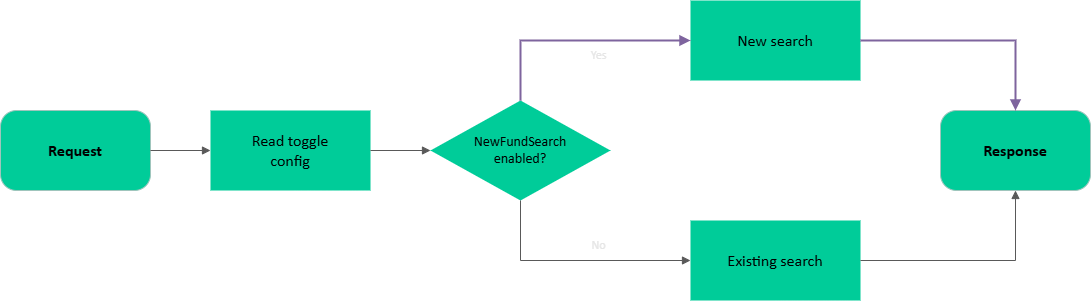
The flow highlighted in purple is the new feature path, it is active only when the toggle is enabled. When the toggle is disabled, the existing path continues as before.
Types of Feature toggles
Not all toggles are the same. They differ in how long they live and how dynamic they are.
| Type | Purpose | Lifetime | Who changes it |
|---|---|---|---|
| Release toggle | Hide unfinished or untested features | Days to weeks | Development team |
| Experiment toggle | A/B testing, compare two versions | Weeks | Product owner / analytics |
| Ops toggle | Turn off a heavy feature under load (kill switch) | Months or permanent | Operations |
| Permission toggle | Enable features for specific users or clients (beta, premium) | Long term | Business / support |
Most of the confusion comes from mixing these types. A release toggle must be removed soon, a permission toggle is part of the product.
Why Feature toggles are important?
In order to merge the code to the main branch daily, to release when the business is ready and not when the code is deployed, and to turn off a misbehaving feature in seconds instead of a rollback, feature toggles are important. It is one of the key enablers of continuous delivery. Most importantly, it reduces the risk of every release, because a new feature can be enabled first for internal users, then for few clients and then for everyone.
How we implemented it?
We kept the implementation simple. A toggle is a named boolean read from configuration through an interface.
public interface IFeatureToggles
{
    bool IsEnabled(string featureName);
}

public class ConfigFeatureToggles : IFeatureToggles
{
    public bool IsEnabled(string featureName)
    {
        var value = ConfigurationManager.AppSettings["Feature." + featureName];
        bool enabled;
        return bool.TryParse(value, out enabled) && enabled;
    }
}<appSettings>
<add key="Feature.NewFundSearch" value="false" />
</appSettings>On Azure App Service, app settings in the portal override the web.config values, so we can switch a toggle per environment (and per deployment slot) without a new deployment.
Use the toggle at the entry point of the feature, not deep inside many classes.
public class FundSearchController : ApiController
{
    private readonly IFeatureToggles _toggles;
    private readonly IFundSearch _existingSearch;
    private readonly IFundSearch _newSearch;

    public FundSearchController(IFeatureToggles toggles, IFundSearch existingSearch, IFundSearch newSearch)
    {
        _toggles = toggles;
        _existingSearch = existingSearch;
        _newSearch = newSearch;
    }

    public IHttpActionResult Get([FromUri] FundSearchCriteria criteria)
    {
        var search = _toggles.IsEnabled("NewFundSearch") ? _newSearch : _existingSearch;
        return Ok(search.Find(criteria));
    }
}
Even better, decide the implementation once in the IoC container registration, so the controller doesn’t know about the toggle at all.
Note: For more advanced needs (percentage rollout, user targeting, changing toggles without restart), there are libraries like FeatureToggle on NuGet and hosted services like LaunchDarkly. For a quick start, configuration based toggles are fine, but when the number of toggles and teams grows, it is highly recommended to use a proper toggle management tool.
Testing with toggles
Every toggle doubles the number of paths. Be mindful about the combinations,
- Test both states of each active toggle in the automated tests.
- Test the combination which is currently in production, and the combination which will be in production next.
- Don’t try to test every combination of all toggles, keep the number of active toggles small instead.
Keeping the toggles under control
Feature toggles are not free. Every toggle is an if statement in the code, a configuration value to manage and a path to test. When the old toggles are never removed, the code is full of dead branches and nobody knows which toggles are safe to delete. It is technical debt.
Here are the rules we follow,
- Every release toggle has an owner and a planned removal date, recorded in the backlog item.
- When a feature is fully released, removing the toggle and the old code is a task in the next sprint.
- Keep a list of all active toggles per application, review it in the sprint retrospective.
- Limit the number of active release toggles per application.
Must Do and Don’ts
- Must Do: Default every new toggle to off, so a missing configuration doesn’t release a feature by accident.
- Must Do: Check the toggle at one place, near the entry point.
- Must Do: Remove release toggles once the feature is released.
- Should: Log the toggle state at application start, it helps a lot while investigating issues.
- Don’t: use toggles to hide bad code or skip the code review.
- Don’t: nest toggles inside other toggles.
- Don’t: reuse an old toggle name for a new feature, a repurposed flag which woke up old code was one of the causes of Knight Capital’s trading loss in 2012.
Wrap up
In this article, we have looked at the challenges of long living branches and big bang releases, what are feature toggles, the four types, how we implemented them and how to keep them from becoming technical debt. Thanks for reading this article and I hope this article provided you some insights into shipping unfinished code safely. In the next article, I will walk you through semantic versioning for NuGet packages and APIs.
Related Posts
Why we need Clean Code?
Why clean code matters, what makes code clean (meaningful names, small functions, guard clauses, comments that explain why) and how to bring the practice into your team.
Code review checklist for .NET teams
A practical .NET code review checklist covering design, readability, correctness, errors, security, performance, testing, operations, and constructive review comments and discussion.
SOLID Principles - Part 1
The first two SOLID principles, Single Responsibility and Open/Closed, explained with fund report and fee calculation examples in C#, plus when not to apply them.