Azure API Management Platform for Your API Program
How Azure API Management provides a developer portal, API gateway, lifecycle management, analytics and monetization for an API program.
Azure API Management Platform for Your API Program
In the first two articles, we have discussed the API economy and the importance of API management solutions for any organization that wants to manage its API program. In this article, we are going to see how to manage your API programs with the Azure API Management platform.
In general, there are three common challenges in any API program, Scope (bringing the centralized control), Scalability (API program scale across multiple teams) and Security. We have already discussed this in detail in the previous article.
A healthy API management process will solve these issues. API management platforms provide a set of tools to implement the seamless API management process for our API programs. Azure APIM is one of the leading API management platforms and we are going to discuss some of the concepts from it.
What is the Azure API Management Platform?
Azure API Management is a fully managed API management platform that helps organizations to publish, secure, transform, maintain and monitor the published APIs (digital assets). Azure APIM brings the necessary tools and industry practices to implement a healthy API management process that contributes to a successful API program. Out of the box, it brings all Cloud-native capabilities like scalable, secure, highly available, performance, monitor, etc.
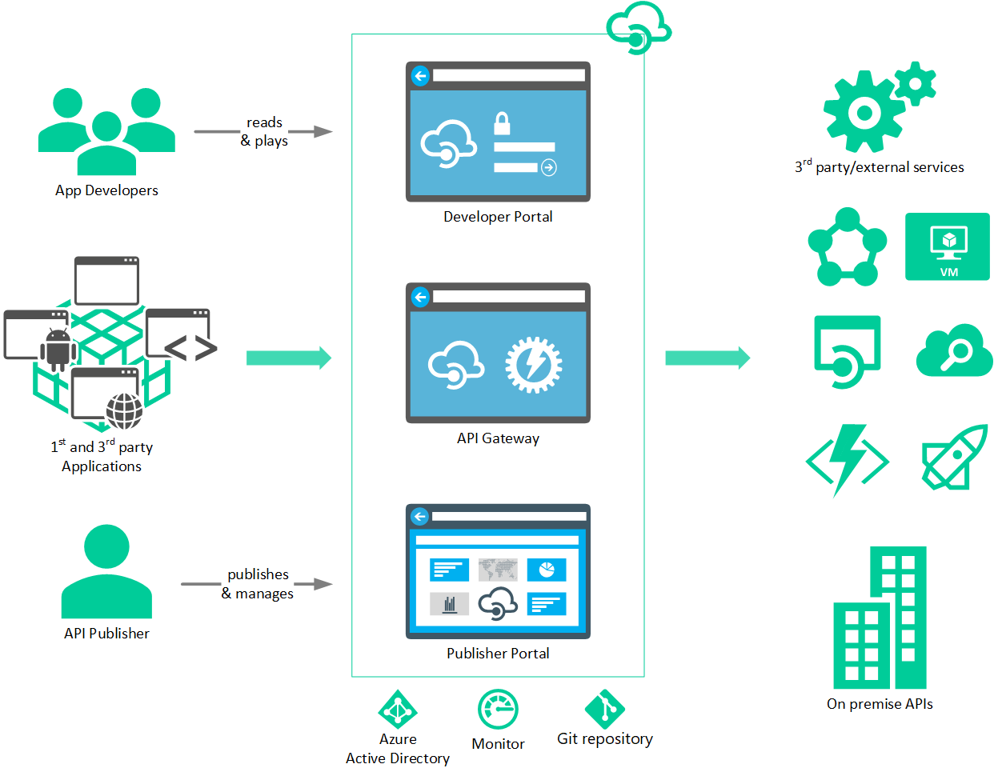
Azure APIM has three major components and those are,
API gateway
It acts as an interceptor and receives all calls and forward to back end services or respond based on the defined rules or policies. It does the authentication and authorization by verifying API keys, JWT tokens, certificates or other forms of authentications.
It transforms the back end data into the required format on the fly without writing any complex code, it also caches the back-end response depends on the cache policy. API gateway enforces the rate limits and usage quota for the consumers. It logs all requests and metadata for detailed business analytics.
Publisher Portal (Azure Portal)
As the name suggests it is purely for API publishers (Organization, which expose their digital assets through APIs) and this is the place where the API publisher set up and manage their API programs. It provides the necessary tools to create and manage the API schema, convert one or more APIs into products, setup the policies like transformations, cache, rate limit, etc. It also helps organizations to get insights into how their digital assets are consumed.
Developer Portal
It is an interactive playground where Application Developers (API consumers) read the API documents, play with APIs, create a trial or free account and subscribe to get API keys. It also provides insight into their own usage.
Features of Azure API Management
Azure API management comes with the following features that support an API management solution.
- API Life Cycle Management - It provides the necessary tools to manage the APIs from definition to publish and monitor.
- API Documentation - Provides the necessary tools to the publisher to create API documentation with an interactive playground. The publisher can easily create their API documentation using Open API schema. It brings a great experience for application developers.
- Security - Security is one of the major concerns for any organization. Azure API management provides the necessary security practices for our API program.
- Authentication and Authorization - Provides industry-standard authentication and authorization protocols like OpenId Connect, OAut2.0, SAML, etc. Natively, it integrates with Azure Active Directory.
- Rate-limiting - Provides the capability to control the access of exposed data, it enables the publisher to control how much of data can be delivered to a specific consumer or Geolocation, etc.
- Back-end Abstraction - It acts like a gateway and no matter where your API is hosted or even if your back-ends are built with a different technology stack or a different flavour of application.
- Transformation - It supports all standard web formats like JSON, XML, CSV and HTML. This could be a major time saver for an organization that has one or more legacy systems that need to integrate with the API program. Azure APIM comes with the necessary tools with handles above formats.
- Health Monitoring - It is important to monitor the health of all API endpoints to track the status and Azure APIM provides a health monitoring system.
- Performance Improvement - It provides the ability to cache response either from the internal or external cache.
- Analytics - Azure APIM provides lots of insights to both publishers and consumers. It actively tracks all calls and provides the necessary business intelligence and also provides the custom analysis of more specific business needs. Analytics is key to troubleshoot. API management provides in-depth visibility of operational metrics for each API and Product. These metrics enable Infrastructure & Operations teams to monitor and troubleshoot performance and security issues.
Terminology
Azure APIM brings lots of its own terms and it’s important to understand them to work with Azure APIM.
- Product - It represents the logically grouped one more APIs. The publisher can define the policies specific to a product like a rate limit, quota, etc. The application developer can access the product-specific APIs into the developer portal.
- API (Front-end API) - It is a facade that sits in front of the back end API and it enables customizing the request and response without modifying the back end API.
- API Operation - An API can contain one or more operations, it represents a unique API endpoint exposed by Azure APIM with a specific HTTP verb.
- Subscription - It is a management element and contributes to managing the API business model. The consumer should get the subscription in order to access the API, thus APIM helps the publisher to manage their business model more specific to the consumer. Each subscription has its own keys and it allows the consumer to securely access the API.
- Back-end APIs - The underlying APIs or services which need to expose outside the world securely and reliably.
- Polices - A rule set to control, harmony and customize both request and response.
- Version - An API changes over time and each change is marked as a separate version based on the number of changes that happened. Each endpoint can have one or more versions and depends on the consumer need they can call the specific version of an API. Normally these versions exist for backward and forward compatibility.
- Revision - This is a special form of version when you have a published API and you want to make the changes to it and at the same time you don’t want to disturb the existing consumer. Revision help publisher to make the changes to published APIs without impacting consumers.
Steps to onboard your API program into Azure API Management
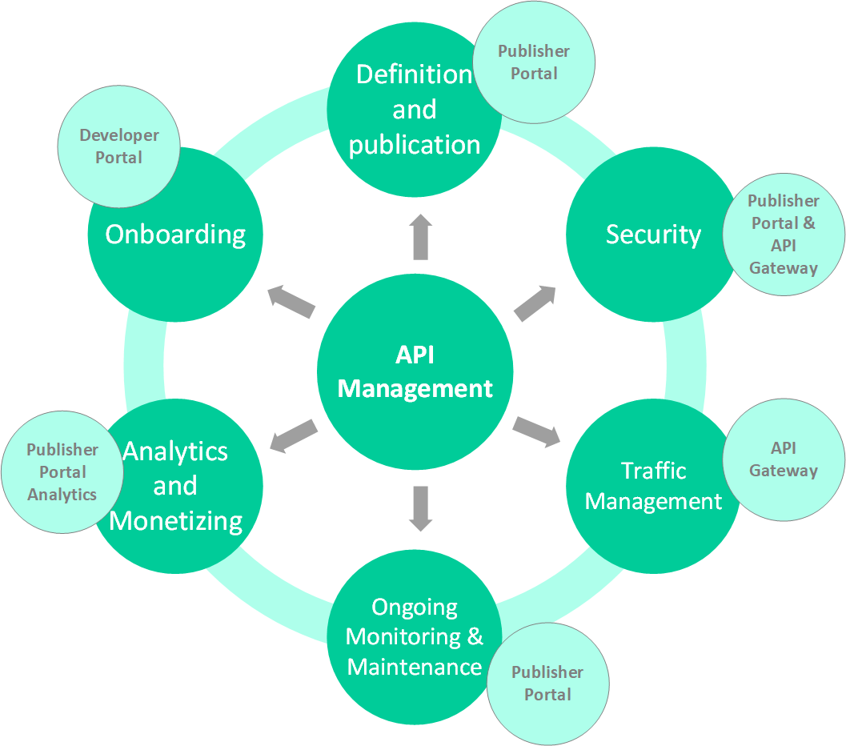
Let us see how we can onboard our API program into Azure API management. API management covers the API life cycle. The following list provides the API life cycle steps while onboarding Azure APIM.
Definition and publication
- Create your API product
- Import your Back end service definition (Open API specification) or configure
- Create and map the subscription to a product or API
- Define the necessary authentication and authentication
- Define the other required policies
- Document the APIs
- Test the API products
- Publish them
Security
- The API gateway will handle the authentication and authorization based on the policy definition
- Depends on the usage stats and update the rate-limiting policies for specific consumers
Traffic Management
- The API gateway actively tracks and monitor all calls
- The API gateway will enforce the usage quota to specific consumers depends on the policy definition
Ongoing Monitoring and Maintenance
- Through the publisher portal, you can monitor all the API products
- You can update or retire the existing published APIs. Through version and revision, you can modify the existing API and you can retire by removing specific endpoint.
Analytics and Monetizing
- API collects various logs and metrics, creates a couple of dashboards to provide the business insights from the collected logs and metrics.
- Analytics provides the informed decisions to the publisher
- The publisher should analyze their digital asset value and fine-tune it over the period.
- The publisher can update or create a new business model based on the business insights provided by the analytics
Onboarding
- Developer portal simplifies the consumer onboarding process
- The developer can go through the API documentation and play around with APIs
- Once the developers are happy with APIs they can directly subscribe to APIs and start using them
Wrap Up
The Azure API management platform is indeed a potential platform to manage our API programs and it has got the necessary tools. Until now, we have seen what the Azure API management platform is and how it can contribute to our API program. Also, we have seen, how we can onboard the API program with Azure API management. Thanks for reading this article, hopefully, this article would have provided you with a high-level view of Azure API management.
Related Posts
Why we need a Healthy API Management Solution?
The common challenges of an API program across the API lifecycle, and how API management and an API management platform help to keep it healthy.
API Gateway pattern - one front door for many services
The API Gateway pattern explained through routing, authentication, rate limiting, aggregation, caching, Azure API Management policies and ownership boundaries for practical guidance.
Welcome to API Economy
How APIs create a value chain from business assets to platform APIs, consumers, applications and API monetization models.