Why we need ReSharper to improve the code quality? - Part 1
Why small code style issues become technical debt, and why we need immediate feedback and build enforcement with ReSharper.
Why we need ReSharper to improve the code quality? - Part 1
Almost all software teams agree that clean code is important, but very few teams have a way to enforce it. Every developer has own habits, own naming style and own idea of what is “good code”, and these differences are growing silently with every commit. After some time, the code base is full of unused variables, unreachable code and inconsistent names, and nobody wants to touch it. In this series, I share the guidelines we derived for our developers to use ReSharper, the code style enforcement and the code coverage tooling. In this article, we are going to see why we need a tool like ReSharper, and what problems it is solving for our teams.
ReSharper Guidelines series:
- Why we need ReSharper to improve the code quality? (this article)
- What is ReSharper? Code style rules, severity and dotCover
- How to enforce ReSharper code style rules in the build?
- ReSharper guidelines: installation, license, code coverage and troubleshooting
TL;DR Summary
- Inconsistent code style and small code issues pile up as technical debt, and they are expensive to fix later.
- Code reviews are late feedback, a tool in the developer’s editor gives the feedback immediately.
- ReSharper highlights code style issues while we write the code, and it comes with 2200+ code style rules.
- Highlighting alone is not enough, developers can ignore warnings. The build must fail when the rules are violated.
- Code coverage tells us how much of the code is exercised by the tests, so we know how safe it is to change.
- With these in place, we move from reactive clean-up to proactive quality.
Common Challenges
Let us discuss the key concerns why we need a common approach for code quality,
Inconsistent code style
When ten developers write code in ten different styles, the code base becomes difficult to read. A new developer has to learn the style of each file, and reviewers spend their time on naming and formatting instead of the design and the logic.
Technical debt
Unused variables, unreachable code, parameters which are never used, names which don’t follow the convention, each one is small. But together they make the code difficult to understand and change. It is called as technical debt, and the interest on it is paid by every developer who works on the code after us.
Late feedback
Mostly, these issues are found in a code review or even later, when the code is already merged. The developer has moved to the next task by then, and fixing the old code is a context switch. The later we find the issue, the more it costs.
Unknown test coverage
Teams say “we have unit tests”, but how much of the code is really covered by them? Without a measurement, we can’t say how safe it is to make a change. Hence every change becomes a risk for production.
Productivity
Developers spend a lot of time on repetitive things, like renaming, navigating the code and fixing the simple issues by hand. It reduces the time they can spend on solving the real business problems.
What happens if we don’t act?
The impact is a chain, and it ends with the customer,
- Code style issues are not caught early, so they get merged.
- Technical debt grows, so the code is difficult to understand and change.
- Changes take more time and bring more defects, because nobody is sure what will break.
- The defects reach the customers, and our release speed and customer satisfaction are reduced.
Without a tool, we will be always reactive. We clean the code only when it is hurting us, and that is already late.
How can ReSharper help?
ReSharper is a Visual Studio plugin which checks the code while the developer is typing. It shows the issues in the editor immediately, with the suggestion to fix them. When we also enforce the rules in the build, the issues can’t go to the repository unnoticed.
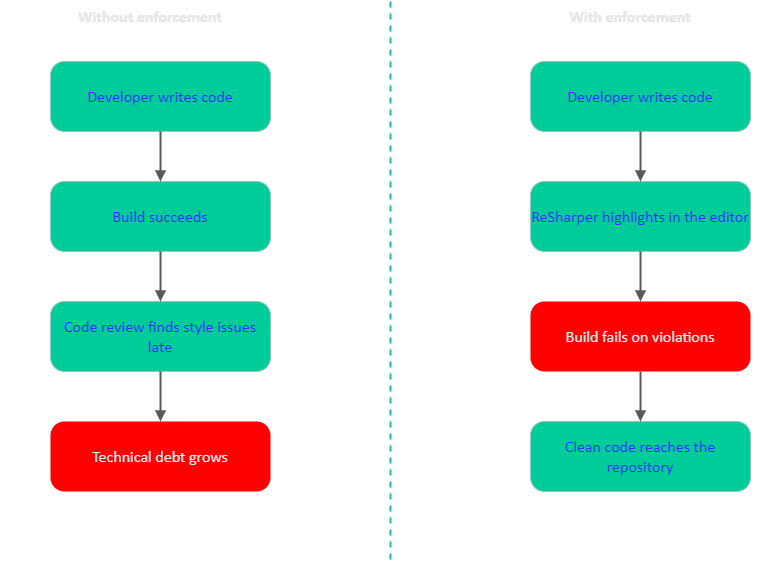
The following diagram depicts the difference between a team without enforcement and a team with enforcement,
Let us look at what each side gives us,
- Without enforcement - The build succeeds even when the code has style issues, so they are found late in a code review, and finally they become technical debt.
- With enforcement - ReSharper highlights the issue in the editor, the build fails when the rules are violated, and only clean code reaches the repository.
Think about spell check in a word processor. If it highlights the wrong spelling while you type, you fix it in a second. If somebody reads the whole document and gives you the list of spelling mistakes next week, it takes much more time and nobody likes it. ReSharper is the spell check for our code.
Note: Code coverage is a separate question. A tool like dotCover measures how much of the code is executed by the tests. We will see it in the next article.
Wrap up
In this article, we have looked at the common challenges of code quality, how small issues become technical debt, and why we need immediate feedback and enforcement in the build. I really appreciate that you took the time to read this article. In the next article, I will walk you through what is ReSharper, how the code style rules and their severity work, and what is dotCover.
Related Posts
How to enforce ReSharper code style rules in the build? - Part 3
How to enforce ReSharper code style rules in the build with a NuGet package, and how to configure the NuGet package source.
ReSharper guidelines: installation, license, code coverage and troubleshooting - Part 4
The ReSharper best practices, how to install it and activate the license, the dotCover must-dos and how to troubleshoot the slowness.
What is ReSharper? Code style rules, severity and dotCover - Part 2
What ReSharper is, how its 2200+ code style rules and severity levels work, and what dotCover and code coverage tell us.