What we learned from containerizing JsReport on AKS? - Part 1
Lessons from containerizing JsReport on AKS, including Docker, Helm, Azure infrastructure, pipelines, scaling and the disposable environment lifecycle.
What we learned from containerizing JsReport on AKS? - Part 1
Containers are everywhere these days. Every conference talk, every architecture review and every job description talks about Docker and Kubernetes. But there is a big gap between reading about containers and running one of our own applications in a Kubernetes cluster, with all the infrastructure, deployment, security and monitoring around it. In the middle of 2020, we took one of our reporting services, built on JsReport, and moved it into containers on Azure Kubernetes Service (AKS). It was a small application, but the journey gave us an extensive, hands-on experience with Docker, Kubernetes, Helm, Infrastructure as Code (IaC) and a good number of Azure resources.
In this article series, I share what we did, what went well, what twisted us around and, most importantly, what I learned about myself and our team along the way. This first part covers the context, why we chose containers, the overall architecture and the lifecycle we followed. In the next three parts, we will go deep into Infrastructure as Code, deployment, scaling and monitoring with Helm, and disaster recovery.
TL;DR Summary
- Containerizing even a small application touches every part of the delivery chain, infrastructure, build, deployment, security, scaling and monitoring.
- Docker gave us better hardware utilization, immutable and self-contained deployments, auto scaling and self-healing out of the box.
- We treated the environment as disposable, spin up, deploy, operate and monitor, then tear down, all through pipelines.
- Infrastructure as Code was the biggest win, and also the biggest learning curve.
- Helm made Kubernetes releases and rollbacks manageable.
- For effective IaC and Kubernetes, developers need good competency in DevOps and Azure, not just in application code.
The Context
JsReport is an open source reporting platform. It renders reports from templates, mainly into PDF, using a headless browser behind the scenes. In our case, it is the service that turns templates and data into PDF documents for our applications. First we tried with azure managed app service, but we found that it was not flexible enough to meet our needs and less controllable. So we decided to move to a more flexible platform, and that was azure kubernetes service (AKS).
Architecture, system design and cloud solutions are my day to day work. I have designed many solutions on Azure and I have built Azure infrastructure with Infrastructure as Code and Azure DevOps pipelines many times. But I had not run a workload on pure AKS end to end. Kubernetes was always one box in the diagram, and this time I wanted to open that box, get my hands dirty with Docker, Kubernetes and Helm, and own it from the cluster to the pods. Hmm, the box looked much simpler from the outside!
Why Containers?
Let us first see why we wanted containers in the first place. Find below the benefits that we were looking for,
- Better hardware utilization - Containers provide an isolated environment, so multiple containers can run side by side on the same node without stepping on each other.
- Simplified deployment - Container images are immutable and self-contained. The image that we tested is exactly the image that runs in production, along with all its dependencies.
- Auto scaling - The platform can add more instances when the load goes up and remove them when it goes down.
- Self-healing - When a container crashes, Kubernetes restarts or replaces it without anyone waking up at night.
- Infrastructure as Code (IaC) - The whole environment can be described in code and recreated at any time.
A reporting service like JsReport is a good candidate for these benefits. The load is not flat, the rendering is CPU and memory hungry, and every instance is the same. So, it is easy to scale out and scale in.
The Architecture
The following diagram depicts the overall architecture we ended up with.
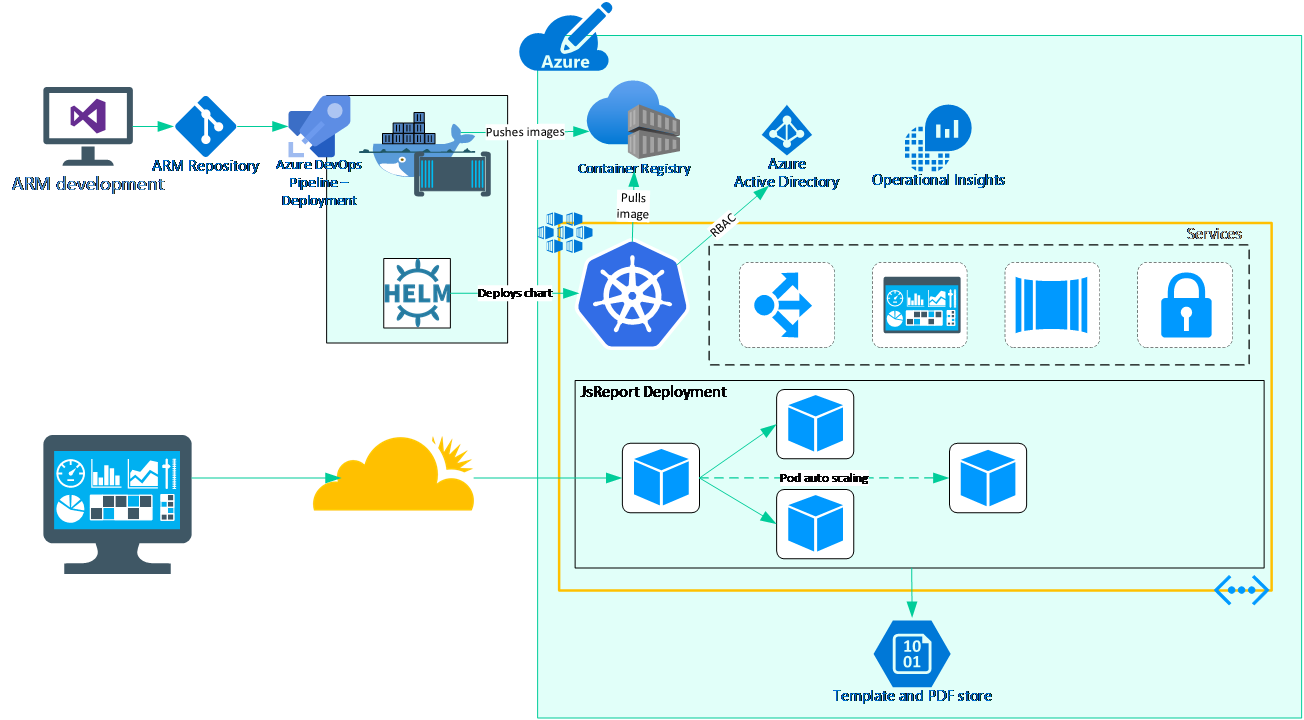
Let us walk through it from left to right.
- ARM development - We define all Azure resources as Azure Resource Manager (ARM) templates and keep them in a Git repository.
- Azure DevOps pipeline - The pipeline deploys the infrastructure, builds our custom Docker images, pushes them to Azure Container Registry (ACR) and deploys the Helm chart into AKS.
- Azure Container Registry - It stores all our private Docker images and also the Helm charts. AKS pulls the images from here.
- AKS - It runs the JsReport deployment. Access is controlled through Role Based Access Control (RBAC) with Azure Active Directory.
- Kubernetes services - The ingress controller, services, secrets and config maps that sit around the JsReport pods.
- Pod auto scaling - The Horizontal Pod Autoscaler adds and removes JsReport pods based on the load.
- Cloudflare - It sits in front of the cluster as the front door for the incoming requests.
- Operational Insights - Log Analytics collects the container logs, metrics and infrastructure health.
- Template and PDF store - The templates and the generated PDFs are stored outside the containers, so the pods remain stateless.
It looks like a lot of boxes for one reporting service, and it is. As an architect, I knew that, but building it myself was a good reminder. The application was the smallest part of this diagram. Everything else is the platform that keeps the application running, secure and observable.
The Lifecycle We Followed
We didn’t want a long-lived, hand-crafted environment that nobody dares to touch. Instead, we treated the environment as disposable and followed the following lifecycle,
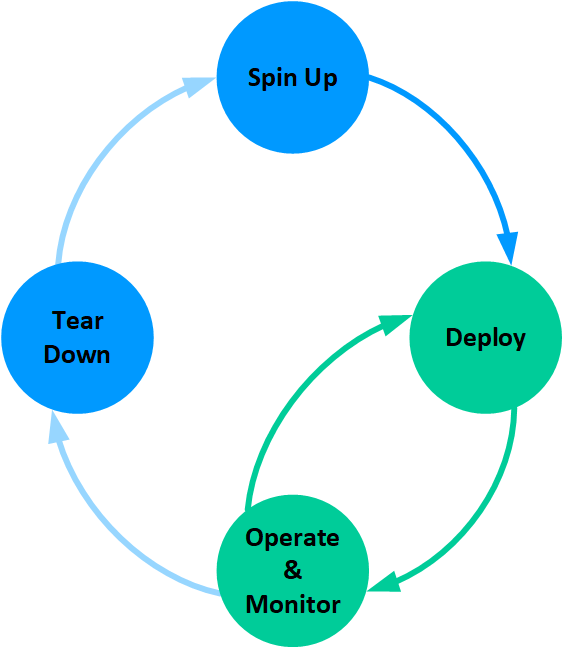
- Spin up - Create the whole infrastructure from the ARM templates through a pipeline.
- Deploy - Build the images, push them to ACR and deploy the application through Helm.
- Operate & Monitor - Run the application, watch the logs and metrics, and deploy again when we have changes. This inner loop between deploy and operate is where we spend most of the time.
- Tear down - Remove the whole infrastructure through a pipeline when we no longer need it.
Each of these steps is a pipeline in Azure DevOps, separately for pre-production and production, as shown below.
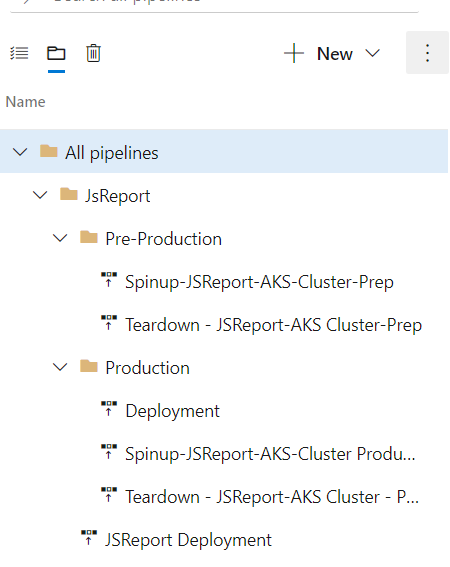
The ability to tear down and spin up an environment on demand changed how we think about environments. A production-like environment for a performance test is no longer a request to another team and a long wait. It is a pipeline run.
What We Learned
Here is the list of areas where we learned the most. Each of them deserves its own discussion, so we will cover them in the next parts of this series,
- Infrastructure as Code (IaC)
- Deployment
- Security
- Scalability
- Monitoring
- Best practices
A Bit of Self-Reflection
Before closing this part, let me be honest about a few things.
- The learning curve was real, but in a specific place. The Azure and IaC part was familiar ground. Docker was the easy part. Kubernetes objects, Helm templating and the AKS specific wiring, like the cluster identity, its access to the registry and the networking around the static IP, took much more time than I expected. Every layer has its own vocabulary and its own way of failing.
- Designing is not the same as doing. I knew these concepts well from the architecture side, but the deeper understanding came only when something failed and I had to find out why. A pod that can’t pull its image teaches you more about how AKS talks to the container registry than any design review.
- The boundary between “architect”, “developer” and “DevOps” disappeared. On paper, networks, identities, registries and log workspaces are boxes and arrows. In the implementation, each of them is a set of permissions, dependencies and failure modes. In fact, one of our main learnings was that for effective IaC, developers are required to have good competency in DevOps and Azure, and architects benefit a lot from going through it hands-on.
- Small application, big experience. Choosing a small, low-risk service for this journey was the right call. We could make mistakes, tear down and start again without impacting our customers.
Wrap up
In this article, we have looked at the context of our JsReport containerization, why we chose containers, the overall architecture and the lifecycle we followed to spin up, deploy, operate and tear down the environment. I really appreciate that you took the time to read this article. In the next article, I will walk you through how we built the infrastructure with Infrastructure as Code, what worked well with ARM templates and where we had to look for alternatives.
Related Posts
How we deployed, scaled and monitored JsReport on AKS with Helm? - Part 3
How we deployed JsReport with Docker and Helm on AKS, then scaled, monitored, secured and operated the service.
How we spin up and tear down AKS with Infrastructure as Code? - Part 2
How we created and removed JsReport’s AKS infrastructure with ARM templates and Azure DevOps pipelines, including drift and permissions lessons.
How we set up disaster recovery for a stateless service on AKS? - Part 4
How we designed active-passive disaster recovery for JsReport across Azure regions, including replicated storage, failover and recovery trade-offs.