How we spin up and tear down AKS with Infrastructure as Code? - Part 2
How we created and removed JsReport’s AKS infrastructure with ARM templates and Azure DevOps pipelines, including drift and permissions lessons.
How we spin up and tear down AKS with Infrastructure as Code? - Part 2
In the previous article, we discussed the context of containerizing our JsReport service, the overall architecture and the lifecycle we followed, spin up, deploy, operate and monitor, and tear down. In this article, we are going to see the first and the most important part of that lifecycle, how we create and remove the whole infrastructure with Infrastructure as Code (IaC), and what we learned from it.
TL;DR Summary
- IaC avoids environment drift, because every environment is created from the same code.
- It enables us to provision a production-like environment quickly, for example to run a performance test, and remove it right after.
- All infrastructure changes are tracked in source control, which reduces the documentation and enables the collaboration.
- ARM templates define the infrastructure declaratively, but some Azure resources and new features are not supported. PowerShell, Bash or Azure CLI fill the gaps.
- The DevOps service principal needs special access, such as Owner at resource group level and permission to create AD apps.
- IaC is not a pure infrastructure skill. Developers need good competency in DevOps and Azure to make it effective.
What is Infrastructure as Code?
Infrastructure as Code is the practice of managing and provisioning infrastructure through machine-readable definition files instead of manual configuration in a portal. In simple terms, we write the infrastructure the same way we write the application, keep it in Git, review it, and let a pipeline apply it.
Let us take a simple analogy. A manually created environment is like a dish cooked by a chef without a recipe. It may taste great, but nobody can cook the same dish again, not even the same chef after six months. IaC is the recipe. Anyone can follow it and get the same result every time.
What We Had to Create
Before writing any template, we listed all the infrastructure we need to run JsReport on AKS. Find below the steps we followed to set up the infrastructure,
- Create a service principal for the cluster.
- Create an Azure Container Registry (ACR) to store our images and Helm charts.
- Create a Log Analytics workspace to collect logs and metrics.
- Create the AKS cluster.
- Create a static IP address for the incoming traffic.
- Assign the AcrPull role to the service principal at the ACR level, so the cluster can pull images from our private registry.
- Assign the Network Contributor role to the service principal at the resource group level, so the cluster can use the static IP address and configure the load balancer.
The last two steps look small, but they are the ones that will hurt you if you miss them. Without AcrPull, the pods are stuck because the cluster can’t pull the images. Without Network Contributor, the load balancer service can’t use the static IP address and the service never gets its public IP.
Infrastructure Spin up
The following diagram depicts how the infrastructure is created.
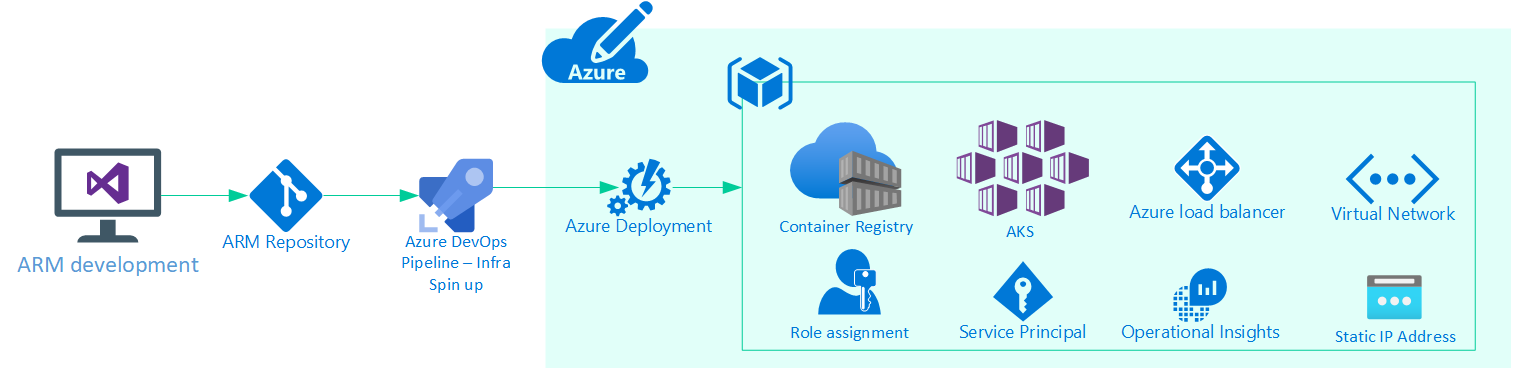
We develop the ARM templates and push them to the ARM repository. The Azure DevOps infrastructure spin up pipeline picks them up and deploys them into Azure. In one run, it creates the container registry, AKS cluster, load balancer, virtual network, role assignments, service principal, Log Analytics (Operational Insights) and the static IP address.
We have separate spin up pipelines for pre-production and production. The templates are the same, only the parameters are different. This is what keeps the environments identical.
Infrastructure Tear Down
Creating an environment is only half of the story. The other half is removing it cleanly.
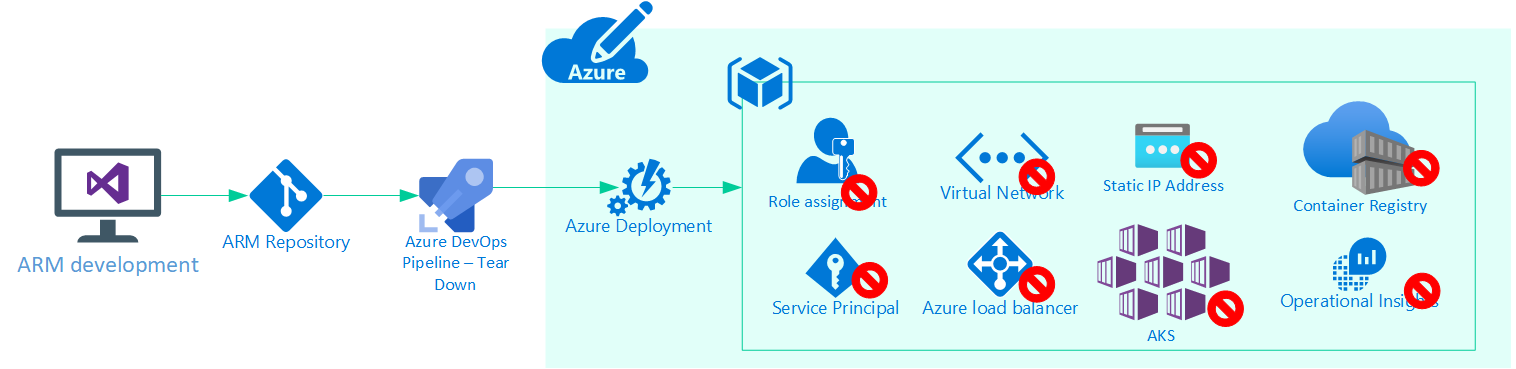
The tear down pipeline removes all the resources that the spin up pipeline created. It sounds simple, but it forced us to think about a few things early,
- Which resources are disposable and which ones must survive? Our templates and generated PDFs are kept outside the cluster, so tearing down the cluster doesn’t lose any data.
- What depends on what? Role assignments, the service principal and network resources must be removed in the right order, otherwise the pipeline fails half way and leaves orphaned resources behind.
- Who is allowed to run it? A tear down pipeline pointing to production is a powerful button. Be mindful of the approvals and permissions around it.
Learnings - IaC
Let us discuss the key learnings from our IaC journey.
IaC avoids environment drift
When people change environments manually, the environments slowly drift apart. Pre-production is no longer like production, and the bugs that “only happen in production” appear. With IaC, every environment is created from the same templates, so there is no room for drift. If we need a change, we change the code and run the pipeline.
Production-like environments on demand
We can now provision a production-like environment quickly to run a performance test or to try a risky change, and tear it down when we are done. We don’t pay for an idle environment, and we don’t wait for anybody to build one for us.
Source control is the documentation
All infrastructure changes are tracked in source control. We don’t need a separate document that explains how the environment was built, because the templates are the documentation, and they are always up to date. And also, changes go through pull requests, so the team reviews infrastructure changes the same way as code changes. It enables the collaboration between developers and the infrastructure team.
ARM is great, but not for everything
ARM templates helped us to define the infrastructure declaratively. However, some of the Azure resources are not supported in ARM, especially the new features. Creating a service principal is a good example, because it is an Azure Active Directory object and not an Azure resource. In these cases, PowerShell, Bash or Azure CLI scripts are the alternatives, and most of the time we end up with a hybrid solution, ARM for the resources and scripts for the gaps.
Keep in mind that scripts are imperative. Unlike ARM, they don’t know the desired state, so you must write them to be safe to run again and again, otherwise the second pipeline run fails or creates duplicates.
The pipeline identity needs special access
This one is easy to miss. Our Azure DevOps pipeline runs with its own service principal, and to create the cluster’s service principal and its role assignments, it needs special access,
- Owner access at the resource group level, because assigning roles requires more than the Contributor role.
- Permission to create AD apps, because a service principal is backed by an AD application.
These permissions are powerful. It is important to scope them to the resource group and not to the whole subscription, and to agree with the security team before asking for them.
IaC needs a different skill set
For effective IaC, developers are required to have good competency in DevOps and Azure. Writing an ARM template is easy. Knowing which resources you need, how they depend on each other, which identity needs which role and why the deployment failed is not. I had done IaC on Azure before, but AKS added a new layer on top of it, the cluster has its own identity, its own node resource group and its own way of talking to the registry and the network.
A Bit of Self-Reflection
Since I had built Azure infrastructure with IaC before, I expected this part to be straightforward, and most of it was. The new part was AKS itself. The cluster’s service principal, the AcrPull role for the registry and the Network Contributor role for the static IP are small details in the template, but each of them decides whether the cluster can actually do its job. Since we were doing this on AKS for the first time, and in fact for the first time in our organization, there was no internal playbook to follow. Our learning was mostly trial and error. However, we had enough resources to learn and clarify things, like the documentation, learning materials and people we could reach out to when we were stuck. Making the IaC pipeline work end to end was a loop of its own, run the pipeline, read the error, fix the template, the script or the permission, tear down and run it again. Each failed run removed one more assumption, and the tear down pipeline turned out to be our best friend here, because we could start from a clean state every time instead of fixing a half-created environment.
I also learned to respect the tear down. Building something is exciting, removing it cleanly is boring, but a clean tear down is the proof that your IaC really describes everything. If something is left behind after a tear down, it means somebody created it outside the code.
Wrap up
In this article, we have looked at what IaC is, the infrastructure we created for JsReport on AKS, how we spin it up and tear it down with Azure DevOps pipelines, and the key learnings about drift, source control, ARM limitations and permissions. I really appreciate that you took the time to read this article. In the next article, I will walk you through how we deployed JsReport with Helm, how it scales, how we monitor it, and the best practices we collected along the way.
Related Posts
What we learned from containerizing JsReport on AKS? - Part 1
Lessons from containerizing JsReport on AKS, including Docker, Helm, Azure infrastructure, pipelines, scaling and the disposable environment lifecycle.
How we deployed, scaled and monitored JsReport on AKS with Helm? - Part 3
How we deployed JsReport with Docker and Helm on AKS, then scaled, monitored, secured and operated the service.
How we set up disaster recovery for a stateless service on AKS? - Part 4
How we designed active-passive disaster recovery for JsReport across Azure regions, including replicated storage, failover and recovery trade-offs.