TypeScript for C# developers - Part 1
TypeScript for C# developers introduces types, interfaces, classes, enums, lambdas, null checks, compilation and familiar concepts from C# development for practical guidance.
TypeScript for C# developers - Part 1
Almost all of our new web applications are Single Page Applications (SPA) these days, and the amount of JavaScript in them is growing every release. For C# developers, JavaScript feels strange, there are no types, no compile time errors, this behaves differently and a small typo in a property name is found only at runtime, sometimes by our customers. As the front-end code grows to thousands of lines, refactoring it becomes risky and the team slows down.
Last year, we discussed the SPA architecture with AngularJS and Web API. Since then, Angular 2 has been released (September 2016) and it is written in TypeScript, and TypeScript 2.0 itself is released with some great features. In the previous article, we discussed static code analysis. In this article, we are going to see what is TypeScript, why it is a natural fit for C# developers and the basic concepts compared side by side with C#. This is Part 1, in Part 2 we will look at generics, modules and how to use TypeScript with existing JavaScript libraries.
TL;DR Summary
- TypeScript is a typed superset of JavaScript that compiles to plain JavaScript.
- Every valid JavaScript is already valid TypeScript, we can adopt it file by file.
- Types exist only at compile time, the browser runs the generated JavaScript.
- Interfaces in TypeScript describe the shape of an object (structural typing), not a contract to implement.
- Classes, access modifiers, enums and lambdas look very familiar to C# developers.
- Turn on
strictNullChecks(TypeScript 2.0) to catch null and undefined errors at compile time. letandconst, nevervar, and be mindful of===vs==.
Challenges
No compile time safety in JavaScript
A misspelled property (fund.nmae) is not an error in JavaScript, it is undefined. We find it only when that line runs. In a large SPA, many lines run only in rare scenarios, so the bugs reach production.
Refactoring is risky
Renaming a property used in 30 files is a “find and replace and pray” exercise in JavaScript. Visual Studio cannot tell us all the usages, because it doesn’t know the types.
Context switch for C# developers
Our developers are productive in C#. Every time they switch to JavaScript, they lose IntelliSense, navigation and the compiler support they rely on. It makes the front-end work feel slower and less safe.
What is TypeScript?
TypeScript is an open source programming language developed by Microsoft, which is a typed superset of JavaScript that compiles to plain JavaScript for any browser, any host and any operating system.
In simple terms, TypeScript is JavaScript with types and a compiler. We write .ts files with type annotations, the TypeScript compiler (tsc) checks them and produces normal .js files which run everywhere. Anders Hejlsberg, the lead architect of C#, is also the core developer of TypeScript, and you can feel it when you use it.
The following diagram depicts how TypeScript is compiled.
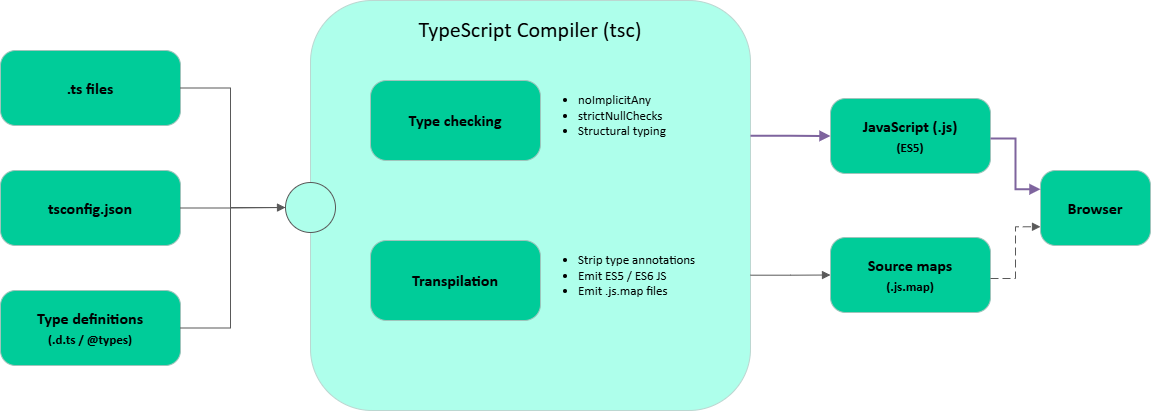
The type definitions (.d.ts files) describe the types of existing JavaScript libraries like jQuery or lodash. With TypeScript 2.0, we can install them directly from npm with the @types scope, for example npm install --save-dev @types/jquery.
Why TypeScript is important for us?
In order to catch the errors at compile time, to refactor the front-end code with confidence and to make our C# developers productive in the front-end, TypeScript is a natural choice. Most importantly, it is not an all-or-nothing decision. We can rename one .js file to .ts, fix the errors and continue, the rest of the application doesn’t need to change.
Getting started
Steps to Implement:
Follow the following instructions to set up TypeScript and compile the first file.
-
Install Node.js, then install TypeScript globally.
npm install -g typescript -
Just to pulse check, check the compiler version.
tsc -v -
Create a
tsconfig.jsonin the project folder.{ "compilerOptions": { "target": "es5", "module": "commonjs", "noImplicitAny": true, "strictNullChecks": true, "sourceMap": true } } -
Write a
fund.tsfile and compile the project.tsc
Note: Visual Studio 2015 Update 3 supports TypeScript 2.0 through the “TypeScript 2.0 for Visual Studio 2015” installer. Once installed,
.tsfiles are compiled on save and on build.
TypeScript vs C# - the basics
Let us take a closer look at the basic concepts side by side, using our fund domain.
Variables and basic types
let fundName: string = "Global Equity Fund";
let unitPrice: number = 12.5;      // no int, decimal or double, only number
let isActive: boolean = true;
const maxFunds = 50;               // type inferred as number, like var in C#
let isins: string[] = ["LU0000000001", "LU0000000002"];- Use
letandconst.varin JavaScript is function scoped, not block scoped, and it causes surprising bugs. numberis a 64-bit floating point. Be mindful while doing money calculations, there is nodecimaltype, so we must round correctly or calculate in the smallest unit on the server.
Interfaces
interface Fund {
    isin: string;
    name: string;
    currency: string;
    launchDate?: Date;          // optional property
    readonly createdBy: string; // TypeScript 2.0
}

function displayFund(fund: Fund): string {
    return `${fund.name} (${fund.isin})`;
}

displayFund({ isin: "LU0000000001", name: "Global Equity", currency: "EUR", createdBy: "import" });
It is the biggest difference from C#. In C#, a class must explicitly implement an interface. In TypeScript, any object with the right shape is accepted, it is called as structural typing (or “duck typing” at compile time). In our team, we use interfaces mostly to describe the JSON returned by our Web APIs.
Classes
class FundUniverse {
    private funds: Fund[] = [];

    constructor(public readonly name: string, private maxFunds: number = 50) { }

    add(fund: Fund): void {
        if (this.funds.length >= this.maxFunds) {
            throw new Error(`Universe cannot contain more than ${this.maxFunds} funds.`);
        }
        this.funds.push(fund);
    }

    get count(): number {
        return this.funds.length;
    }
}
Familiar things, class, constructor, private, public, protected, getters and default parameter values. Different things,
this.is mandatory to access members.- Constructor parameters with an access modifier (
public readonly name) automatically become properties. privateis checked only by the compiler, at runtime it is a normal JavaScript property.
Enums and lambdas
enum FundStatus { Open, Closed, SoftClosed }

let openFunds = funds.filter(f => f.status === FundStatus.Open)
                     .map(f => f.name);
filter and map are like LINQ Where and Select. Arrow functions also keep the value of this from the outer scope, which solves one of the most common JavaScript bugs.
Null and undefined
JavaScript has two “empty” values, null and undefined. With strictNullChecks enabled in TypeScript 2.0, a variable of type string cannot be null or undefined, unless we say so explicitly.
let managerName: string = null;          // compile error with strictNullChecks
let optionalManager: string | null = null; // OK, explicit union type
It is similar to the nullable reference types discussions in C#, and it catches a whole category of “cannot read property of undefined” errors at compile time. It is strongly recommended to enable it for new projects.
Common traps for C# developers
==does type conversion ("1" == 1is true), always use===and!==.- Types are erased at runtime, so you cannot use
typeofwith an interface, and the JSON from the server is not validated against the interface automatically. - Months in JavaScript
Datestart from 0 (January is 0). - There is no method overloading like C#, use optional parameters or union types instead.
Wrap up
In this article, we have looked at the challenges of large JavaScript codebases, what is TypeScript, how to set it up and the basics compared with C#, variables, interfaces, classes, enums, lambdas and null checks. I appreciate your time and efforts to read this article and I hope this article provided you some insights into TypeScript. In the next article, I will walk you through generics, modules and type definitions in TypeScript for C# developers - Part 2.
Related Posts
Async and await in C# - common mistakes
Async and await explained for web applications, including I/O-bound work, async void, blocking calls, deadlocks, ConfigureAwait, fake async, and sequential awaits.
Code review checklist for .NET teams
A practical .NET code review checklist covering design, readability, correctness, errors, security, performance, testing, operations, and constructive review comments and discussion.
Exception handling best practices in .NET
Exception handling practices for .NET, ASP.NET MVC, and Web API covering swallowed exceptions, stack traces, specific catches, and global error handling.