Single Page Application (SPA) architecture with AngularJS and Web API
Single Page Application architecture explained through AngularJS routes and services, ASP.NET Web API boundaries, token handling, deep links, validation, and trade-offs.
Single Page Application (SPA) architecture with AngularJS and Web API
Traditional web applications are rendering a complete page for many user actions. This is simple and useful, but a rich application may need frequent interactions without replacing the whole page. A Single Page Application (SPA) is moving more of the interaction into the browser and uses an Application Programming Interface (API) to exchange data with the server.
AngularJS 1.x and ASP.NET Web API 2 are the popular combination in the .NET world to build this style of application. In this article, we are going to see the SPA responsibilities, the browser-to-API flow, and the trade-offs of using AngularJS with Web API.
TL;DR Summary
- A SPA loads an application shell and updates views through client-side routing and API calls.
- AngularJS controllers, services and directives should have clear responsibilities.
- ASP.NET Web API remains responsible for business rules, authorization and persistence.
- The browser is not a trusted boundary, so server validation is mandatory.
- SPA improves interaction for suitable workflows but adds client complexity and initial load cost.
- Start with one cohesive journey and measure user experience before expanding the SPA.
Challenges
Rich interaction
A user editing a news article may change topics, preview content and validate fields several times. Full page reloads can make the workflow feel slow and lose client state. A SPA can update only the relevant part, but the browser now owns more state and failure handling.
Browser and API boundaries
It is tempting to move business rules into JavaScript because the UI needs instant feedback. That validation improves usability but cannot protect the system. A caller can bypass the browser, so Web API must repeat authorization and business validation.
Initial load and discoverability
A SPA downloads JavaScript before the first interaction. A large bundle, slow dependency or unsupported browser can reduce the first useful response. We should measure time to load and keep the application shell focused, otherwise the smooth later interaction does not help the first visit.
What is a SPA?
A Single Page Application is a web application which loads an initial page and updates its content through client-side code and asynchronous server calls rather than performing a full page navigation for each action.
In simple terms, the browser becomes an interactive client and ASP.NET Web API becomes the resource front door. AngularJS manages view state and calls the API, while the server remains the source of truth for protected data and decisions.
Why SPA architecture is important?
The architecture can make a workflow feel responsive and can separate the UI from server APIs used by other clients. It also creates a clear contract requirement: the API must be documented, versioned and secure. If the API is inconsistent, the browser code only hides the problem until the user reaches an error.
The following diagram depicts AngularJS calling ASP.NET Web API and the API using business and data components,
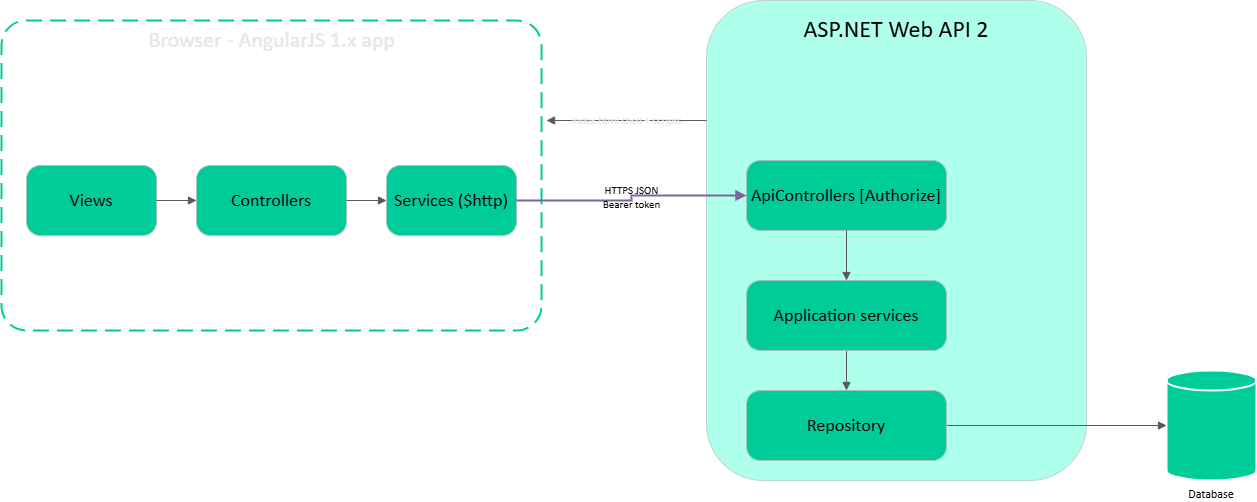
SPA responsibilities
AngularJS view and controller
The view binds to a view model and displays validation or loading state. The controller coordinates the screen but should not contain all HTTP and business rules. If the controller becomes a second server, every other client receives different behaviour.
AngularJS service
An AngularJS service centralizes API calls and maps the response used by the view. It can handle common error and loading behaviour. The service should not keep sensitive credentials or assume that hiding a button is authorization.
app.factory("articleService", function ($http) {
    return {
        get: function (id) {
            return $http.get("/api/articles/" + id);
        },
        publish: function (id) {
            return $http.post("/api/articles/" + id + "/publish");
        }
    };
});
ASP.NET Web API controller
The controller handles HTTP translation and calls an application service. It should validate the request model and return consistent status codes, while the domain or business service owns rules such as whether an article is approved.
[Authorize]
[RoutePrefix("api/articles")]
public class ArticlesController : ApiController
{
    [HttpGet]
    [Route("{id:int}")]
    public IHttpActionResult Get(int id)
    {
        Article article = service.Get(id);
        return article == null ? (IHttpActionResult)NotFound() : Ok(article);
    }
}
How to build a first SPA flow?
Steps to Implement:
Follow the following instructions to create a small AngularJS and Web API journey.
-
Create an ASP.NET Web API 2 project and configure routes.
-
Add AngularJS 1.x and the required scripts through the project package or script files.
Scripts/angular.js Scripts/app.js Scripts/controllers/articlesController.js Scripts/services/articleService.js -
Define a route or view for the article list and article detail.
-
Call the API from an AngularJS service and bind the result to the view.
-
Handle loading, empty, success and error states explicitly.
-
Add server-side authentication and authorization to the Web API actions.
-
Just to pulse check, call the API directly and through the browser, then compare the status codes and payload.
GET /api/articles
Expected: 200 OK with article list
Note: Replace the input place holders with actual values. Client-side validation is for user feedback only, the Web API must validate every request because a client can be replaced or bypassed.
-
Add a build step which restores scripts, compiles the ASP.NET application and runs Web API tests.
Trade-offs and recommendation
SPA is a good fit for workflows with rich interaction, frequent updates and a stable API boundary. It may be unnecessary for a content site where server-rendered pages provide faster first load and better simple navigation. We should choose based on user journey, browser requirements, SEO needs and team experience.
Keep API errors meaningful and never expose stack traces. Use HTTPS for authenticated requests and protect against cross-site request forgery according to the authentication model. Monitor API response time and browser load time separately, because a fast API does not help when the JavaScript bundle is slow.
AngularJS route and service example
Find below a small AngularJS 1.4 module, route and service,
var app = angular.module("newsApp", ["ngRoute"]);

app.config(function ($routeProvider) {
    $routeProvider
        .when("/articles", {
            templateUrl: "/app/articles/list.html",
            controller: "ArticleListController"
        })
        .when("/articles/:id", {
            templateUrl: "/app/articles/detail.html",
            controller: "ArticleDetailController"
        })
        .otherwise({ redirectTo: "/articles" });
});

app.factory("articleService", function ($http) {
    return {
        get: function (id) {
            return $http.get("/api/articles/" + id);
        },
        list: function () {
            return $http.get("/api/articles");
        }
    };
});
The controller should be coordinating the view, not becoming another business layer,
app.controller("ArticleDetailController",
    function ($scope, $routeParams, articleService) {
        $scope.loading = true;
        articleService.get($routeParams.id)
            .then(function (response) {
                $scope.article = response.data;
            })
            .finally(function () {
                $scope.loading = false;
            });
    });
The Web API controller is still validating and authorizing on the server,
[Authorize]
[RoutePrefix("api/articles")]
public class ArticlesController : ApiController
{
    [HttpGet]
    [Route("{id:int}")]
    public IHttpActionResult Get(int id)
    {
        Article article = service.Get(id);
        if (article == null)
            return NotFound();
        return Ok(article);
    }
}
If the API is using bearer tokens, keep the token in the safest storage available for the client and send it in the Authorization header through a controlled $http interceptor. Do not put a long-lived token in the URL, and do not believe that hiding a route is authorization. We will discuss securing ASP.NET Web API with OAuth 2.0 bearer tokens using OWIN in an upcoming article.
Routing, SEO and deep links
The browser route /articles/42 is not automatically a server file. Configure the web server to return the SPA shell for application routes, while /api routes are remaining with Web API. If a user is refreshing a deep link and the server is returning 404, the application is looking broken even when the AngularJS route is correct.
SPA is improving interaction for a fund search or rich article editor, but server-rendered pages may be a better choice for public content and simple navigation. It is a trade-off between first load, browser support, SEO and client complexity. In our case, start with one workflow and measure before moving the whole application.
Must Do and Don’ts
- Must Do: Repeat validation and authorization on Web API.
- Must Do: Show loading, empty, success and error states.
- Don’t: keep business rules only in AngularJS.
- Don’t: put access tokens in query strings.
- Be mindful: Browser code is a client, not a trusted boundary.
If the browser is having no clear loading and error state, the support team is reacting to screens which appear frozen. We should be proactive by defining the API contract, client states and authorization flow before adding more routes. The trade-off is a larger client application, hence in our case SPA is being selected for rich workflows and not for every public page.
Wrap up
In this article, we have looked at SPA architecture, AngularJS 1.x routes and services, ASP.NET Web API boundaries, token handling, deep links, client validation and the main trade-offs. I hope this article provided you some insights into building a Single Page Application. In the next article, I will walk you through the next topic in the architecture series, based on the application needs and lessons learned.
Related Posts
Lessons Learned: Revamping Web Forms into Web API and AngularJS - Part 1
Lessons from moving Web Forms sites to an ASP.NET Web API and AngularJS SPA, including maintainability, performance, SEO and a reversed WCF decision.
What is RESTful API - resources, verbs and status codes?
RESTful API design explained through resources, HTTP verbs, safety, idempotence, Web API 2 controllers, and status codes using a news article example.
Fine-grained vs coarse-grained APIs - avoiding chatty APIs
Fine-grained and coarse-grained APIs compared through response shape, client composition, network calls, latency, business views and the cost of chatty requests.