Security in the cloud - network security groups, Key Vault and least privilege
Cloud security explained through Network Security Groups, Azure Key Vault, identities, access policies, subnet boundaries and least-privilege responsibilities for practical guidance.
Security in the cloud - network security groups, Key Vault and least privilege
Cloud security is not one firewall rule or one secret store. It is a set of layers which reduce the paths an attacker can use and reduce the permissions available when one layer fails. In the previous article, we discussed Service Bus subscriptions and how consumers are separated. In this article, we are going to discuss Network Security Groups (NSGs), Azure Key Vault and least privilege using a web subnet, a data subnet and a fund application.
TL;DR Summary
- NSGs are limiting traffic to a subnet or network interface using ordered security rules.
- The web subnet should expose only the ports required by the application, normally HTTPS 443.
- The data subnet should accept traffic from the intended application boundary, not from the internet.
- Key Vault keeps connection strings, certificates and API keys outside source control.
- Least privilege grants only the identity, action and scope required by the business flow.
- RBAC and Key Vault access policies must be reviewed as part of deployment and recovery.
- A blocked path must be tested and monitored, not only drawn in an architecture diagram.
Challenges
The network boundary is too broad
A public web endpoint does not mean the database must be public. When every resource can reach every other resource, one compromised process receives more opportunity than it needs. Subnets and NSGs are creating a smaller blast radius, but an NSG rule which is not tested can also block a valid deployment.
Secrets are travelling with the code
Connection strings and certificates are often copied into configuration files because it is convenient during development. Once committed, a secret can appear in source history, build logs or a developer workstation. Key Vault is giving us a central place to control, audit and rotate the values.
Permissions are granted for convenience
An application identity which can read, write and delete every resource is making an incident larger. The identity should receive only the action required by its flow. This can feel slower initially, but the smaller permission boundary is reducing the ripple effect of a credential problem.
What is layered cloud security?
Layered cloud security is the practice of combining network boundaries, identity, secret protection and explicit permissions so that no single control is carrying the whole security responsibility.
In simple terms, we are locking the front door, limiting movement inside the building, storing keys safely and giving each person only the room they need. Key Vault is one part of this model, not a substitute for network security.
An everyday analogy is an office building. The street door, reception desk, locked server room and individual cupboard are different controls. A person who gets through reception should not automatically get the production database key.
Why layered security is important?
Applications are exposed to more users, services and deployment systems. A strong boundary reduces the chance that an error becomes an incident, while least privilege reduces what the error can do. Security must be part of the design before the first fund document is uploaded.
The following diagram depicts the security layers:
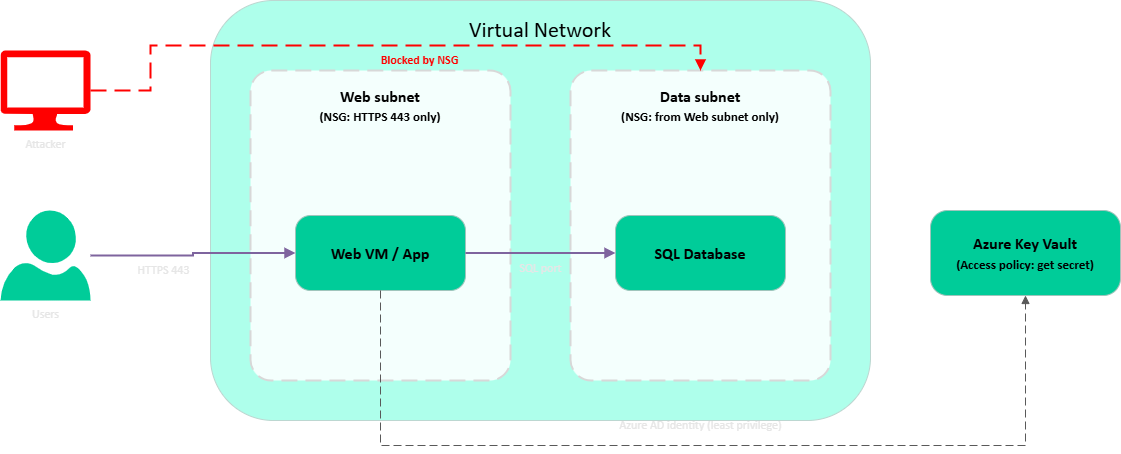
Users are reaching the Web VM through the Web subnet, and the Web VM is reaching SQL in the Data subnet. The attacker-to-data route is red and marked Blocked. The Users → Web VM → SQL route is highlighted in purple. Key Vault is outside the subnet scopes because secret access is an identity decision as well as a network decision.
NSG rules
NSGs are evaluated by priority, where a lower number is evaluated first. A rule should state source, destination, protocol, port and action:
| Priority | Source | Destination | Protocol / port | Action | Reason |
|---|---|---|---|---|---|
| 100 | Internet | Web subnet | TCP 443 | Allow | Public HTTPS endpoint |
| 110 | Internet | Web subnet | TCP 80 | Deny or redirect policy | Do not expose clear HTTP unnecessarily |
| 200 | Web subnet | Data subnet | TCP SQL port | Allow | Application data access |
| 210 | Internet | Data subnet | Any | Deny | Database is not public |
| 220 | Any | Data subnet | Any | Deny | Default containment |
The exact SQL port and source are depending on the service design. A rule allowing Any to Any is hiding the requirement and should be treated as a review item. Network rules are not replacing application authentication; they are reducing the reachable surface.
Key Vault and identity
Key Vault stores secrets, keys and certificates. The Web App can authenticate with Azure Active Directory and read only the secret it requires. Access policies are the 2016 Key Vault model; the broader Azure RBAC model must not be described as if every later role was available in the same form.
An application setting can contain a vault URL and client id, while the client secret or certificate is protected by the deployment environment. The application retrieves the database secret at startup and caches it in memory. It should not call Key Vault on every request.
Set-AzureRmKeyVaultAccessPolicy `
  -VaultName <vault name> `
  -ServicePrincipalName <application id> `
  -PermissionsToSecrets get
The operations identity is receiving set, list or delete only when its runbook requires those actions. Developers are not receiving production secret values merely because they can deploy the application.
Least privilege in practice
The Web App identity needs to read one database secret. The reporting job needs to read a document and write an audit record. The deployment identity needs to update the Web App configuration but does not need to read all customer secrets. These are different identities and scopes.
When a permission is failing, the error should be clear and the operation should be retriable only when retrying is safe. Do not catch a Key Vault access error and continue with an empty connection string, otherwise the failure will be moving to a less useful database error.
Trade-offs
| Approach | Pros | Cons |
|---|---|---|
| Broad network and admin access | + Fast initial setup<br>+ Fewer permission questions | − Large blast radius<br>− Difficult to prove intended paths |
| NSGs and least privilege | + Explicit boundaries<br>+ Easier incident containment | − Rules need ownership and testing<br>− Misconfiguration can block traffic |
| Secrets in Key Vault | + Central rotation and audit<br>+ Secrets are not in source | − Identity and availability are dependencies<br>− Access policies need review |
In our case, we are using NSGs to isolate Web and Data subnets, Key Vault for secrets and separate identities for application, deployment and operations. Refer the Disaster Recovery section because recovery identities and secret availability belong in the DR test.
Reviewing access over time
Security rules become stale when nobody owns their review. The Web subnet may initially need only 443 from the public internet, while an administration path may be added later through a controlled jump host. The new requirement is documented with an expiry or review date, not added as an unrestricted rule.
Key Vault access is checked in deployment and recovery. A Web App can read FundDbConnection, but it should not list every secret or delete a certificate. The operations identity can rotate a secret, while a reporting job receives only the read action for its own document store. These actions are recorded in the audit trail.
An access test uses both allowed and denied cases. The application reads its own secret, the reporting process accesses its permitted store and an attacker simulation is denied at the data subnet. A failed authorization returns a useful error without revealing the secret or the existence of unrelated resources.
RBAC roles and Key Vault access policies are not applied only to make deployment green. The role assignment is tied to an identity and scope. When a team member changes, the old identity is removed and a new one is reviewed. Least privilege is therefore a lifecycle practice, not a one-time portal setting.
The security review also checks logs. An NSG deny is useful evidence when it is correlated with the source and destination, while a Key Vault audit event is useful when it identifies the application identity and secret operation without exposing the value. Alerts are created for unexpected administrative access and repeated denied requests.
Must Do and Don’ts
- Must Do: Keep the data subnet unreachable from the internet, otherwise a database credential compromise has a direct network path.
- Must Do: Give the Web App only
getpermission for required secrets, because read access is not a reason to grant delete access. - Must Do: Test an allowed Web-to-SQL connection and a blocked attacker path, so the NSG rules are proven.
- Must Do: Rotate a test secret and validate application recovery, otherwise rotation will remain an untested assumption.
- Don’t: put connection strings in source control or logs, because deleting a later commit does not remove the old secret from history.
- Don’t: use a shared administrator identity for normal requests, otherwise audit and containment are becoming difficult.
Wrap up
In this article, we have looked at NSG boundaries, Key Vault access policies, Azure Active Directory identities and least privilege. Security becomes stronger when each layer has a reason, an owner and a test. I hope this article provided you some insights into cloud security. In the next article, I will walk you through why we need a CDN for global users.
Related Posts
Azure Service Fabric vs Azure Container Service vs App Service - choosing a hosting model
Azure Service Fabric, Azure Container Service, App Service and Virtual Machines compared through workload fit, operational ownership, scaling and deployment responsibilities.
Designing a multi-region application on Azure - traffic manager and failover
Multi-region Azure application design explained through Traffic Manager routing, primary and secondary regions, SQL replication, latency, health checks and failover practice.
Disaster Recovery (DR) on Azure - RTO, RPO and backups
Azure disaster recovery explained through RTO, RPO, point-in-time restore, geo-restore, Azure Backup, Site Recovery and tested recovery strategies for practical guidance.