Disaster Recovery (DR) on Azure - RTO, RPO and backups
Azure disaster recovery explained through RTO, RPO, point-in-time restore, geo-restore, Azure Backup, Site Recovery and tested recovery strategies for practical guidance.
Disaster Recovery (DR) on Azure - RTO, RPO and backups
A backup is not a disaster recovery plan by itself. A recovery plan describes how much data we can lose, how long the service can be unavailable, who performs each step and how the restored system is validated. In the previous article, we discussed multi-region applications, Traffic Manager and failover. In this article, we are going to discuss Recovery Point Objective (RPO), Recovery Time Objective (RTO), Azure backup options and common DR strategies.
TL;DR Summary
- RPO is the acceptable data-loss interval measured backwards from the incident.
- RTO is the acceptable downtime before the service is available again.
- Azure SQL point-in-time restore and geo-restore are different recovery choices.
- Azure Backup is useful for protected VM and workload backups, while Azure Site Recovery is supporting VM replication and recovery workflows.
- A restored database is not a restored application until secrets, storage, queues, DNS and deployment are also available.
- Backup and Restore, Pilot Light, Warm Standby and Active-Active have increasing readiness and cost.
- A restore test with a known fund and known document is proving more than a green backup job.
Challenges
RPO and RTO are confused
Restoring a service in one hour is not enough if the last available fund price is two days old. RTO is measuring downtime, while RPO is measuring the amount of data which can be lost. The business owner must agree both values before the architecture is selected.
Backups exist but restore is unclear
A scheduled backup can be green while the restore process is failing because of permissions, an unavailable key, a missing storage account or an incompatible schema. The backup job is an input to recovery, not proof of recovery. The restored output must be compared with a known universe and known documents.
The database is only one dependency
The application is also depending on Key Vault, Blob Storage, Service Bus, DNS, certificates, deployment packages and monitoring. Recovering SQL while the API cannot authenticate or the queue is pointing to a failed region will not restore the customer service.
What is Disaster Recovery?
Disaster Recovery is the set of people, processes and technology used to restore an application and its data after a disruptive event.
In simple terms, it answers two questions: how far back can we go, and how quickly can we serve customers again? RPO is the first answer and RTO is the second answer.
An everyday analogy is a spare tyre. Having a spare tyre in the boot is useful, but it must have air, the correct size and a tool to change it. A backup which has never been restored is similar to a spare tyre which has never been checked.
Why RTO, RPO and backups are important?
These measures are important because the cost of a failure depends on the business action. A public news article may tolerate a longer restore than a fund-price calculation used for a customer transaction. A number without an owner is not a target, so RTO and RPO must be connected to the service owner and a validation step.
The following diagram depicts the recovery timeline:

The interval between Last backup and Disaster is the possible RPO data loss. The interval between Disaster and Service restored is the RTO downtime. The red Disaster box is showing that the recovery clock is starting at the disruptive event, not when the operator opens the runbook.
Azure recovery choices
SQL point-in-time restore
Azure SQL point-in-time restore is creating a new database from backups within the configured retention window. It is useful when rows are deleted or corrupted and we need to return to a time before the mistake. It is not a quick regional failover, and the team must update the application connection after validating the restored database.
SQL geo-restore and geo-replication
Geo-restore uses geo-redundant backup storage to restore a database in another region. It can have a larger RTO because a new database is created. Active geo-replication keeps a secondary more ready, but it still requires a decision about promotion and the acceptable replication lag.
Azure Backup and Site Recovery
Azure Backup is protecting supported VMs and workloads with managed backup policies and retention. Azure Site Recovery is supporting replication and recovery workflows for VMs. Neither service is automatically recreating an application contract, a Key Vault access policy or a correct DNS profile. The recovery plan is including these tasks.
The following diagram depicts four strategies:
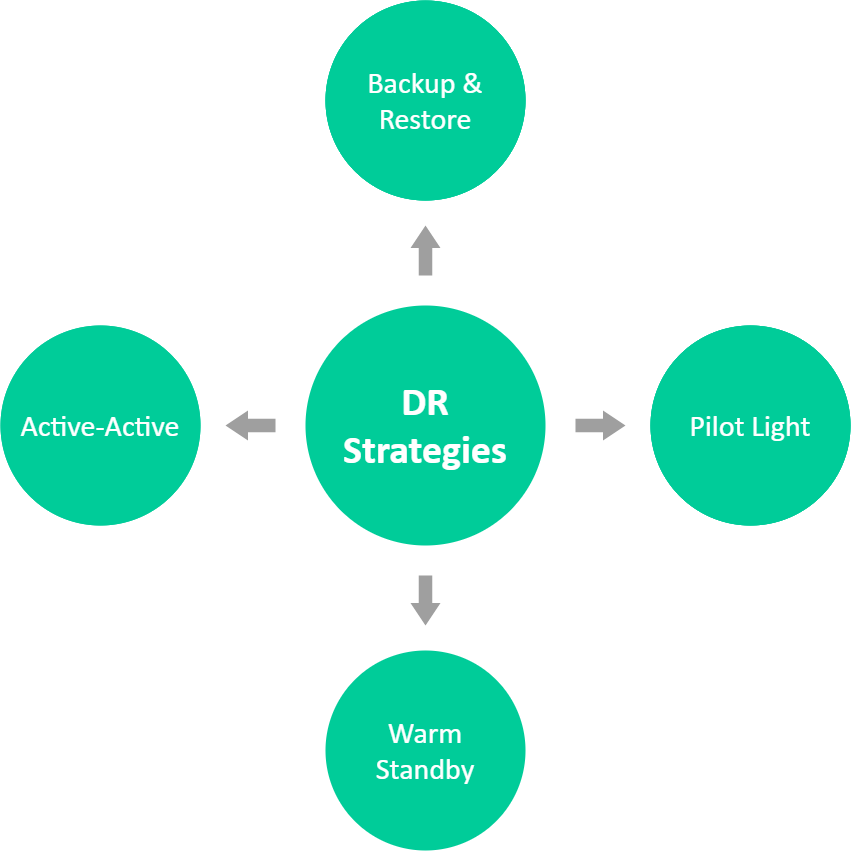
Backup and Restore is having the lowest readiness and normally the lowest running cost. Pilot Light is keeping a small core ready. Warm Standby is keeping more application capacity available. Active-Active is serving from both sides and is therefore requiring the strongest data and operations design.
A practical recovery runbook
For a fund platform, the runbook can be written as following:
1. Declare the incident and record the failure time.
2. Identify the last valid SQL, DocumentDB and Blob recovery points.
3. Restore or promote the required data services.
4. Restore Key Vault access, application settings and certificates.
5. Deploy the known application artifact.
6. Validate Fund 123, its latest price and one news article.
7. Validate queue processing and monitoring.
8. Open traffic only after the business owner approves the result.
The validation is not ending at HTTP 200. It is checking whether units are calculating correctly, whether a document is retrievable and whether the service is writing audit records. If the recovery is losing the last fifteen minutes of price imports, the owner must decide whether that is within the RPO or whether another strategy is required.
Trade-offs
| Strategy | Pros | Cons |
|---|---|---|
| Backup and Restore | + Lowest running cost<br>+ Simple steady state | − Longest RTO<br>− Restore and validation are required |
| Pilot Light | + Core data and configuration are ready<br>+ Faster than a cold restore | − More services to maintain<br>− Capacity expands during recovery |
| Warm Standby | + Application is already running<br>+ Faster recovery | − Duplicate running cost<br>− Configuration drift remains possible |
| Active-Active | + Both regions are serving<br>+ Fastest routing change | − Highest cost<br>− Distributed consistency is difficult |
In our case, we are starting with tested SQL point-in-time restore, protected storage and a pilot-light regional deployment. We are using Active-Active only when the business is accepting the data and operational complexity. Refer the multi-region section for the routing decision.
What a recovery test is proving
A recovery test is capturing evidence for each dependency. The SQL restore duration is recorded separately from the time required to deploy the Web App. The team is checking whether the restored application can read its Key Vault secret, open the required Blob container, receive a Service Bus message and send telemetry. If any of these steps is failing, the RTO is not the database restore time.
The test data is selected so that a human can validate it. Fund 123 has a known latest price, a known unit holding and a known factsheet. The restored database is queried for those values, and the result is compared with the expected recovery point. A random row count is not enough because it will not find an incorrect price or a missing document.
Recovery also requires access review. The recovery identity may be different from the production identity, and the Key Vault access policy must be available in the secondary environment. Certificates are stored and rotated through a documented process. DNS, firewall and NSG rules are checked before customers are sent to the restored service.
After the exercise, the runbook is updated with the actual duration and the step which required manual help. We are not hiding a slow restore to preserve an optimistic RTO. The honest result is allowing the business to choose a warmer strategy or accept a longer outage.
The exercise is also checking who is authorised to declare recovery and who is communicating with customers. A technical restore without a business decision can expose half-recovered data. The product owner is confirming the accepted price date before the service is opened.
Must Do and Don’ts
- Must Do: Write RTO and RPO beside each important workload, otherwise one generic DR target will hide different business needs.
- Must Do: Restore a database and run a known fund-price calculation, because a successful restore command is not proving application correctness.
- Must Do: Include Key Vault, DNS, certificates, queues and storage in the exercise, otherwise the application will not be complete.
- Must Do: Record the restore time and failed steps, so the next RTO estimate is based on evidence.
- Don’t: treat replication as backup, because a corrupted value can be replicated to the secondary.
- Don’t: wait for a real disaster to test recovery, otherwise the first test is happening when the business is already under pressure.
Wrap up
In this article, we have looked at RPO, RTO, SQL point-in-time restore, geo-restore, Azure Backup, Azure Site Recovery and four DR strategies. The recovery plan becomes credible only after it is restored and measured. Thanks for reading this article. In the next article, I will walk you through polyglot persistence and choosing SQL, DocumentDB, Table Storage and Redis for the right job.
Related Posts
Designing a multi-region application on Azure - traffic manager and failover
Multi-region Azure application design explained through Traffic Manager routing, primary and secondary regions, SQL replication, latency, health checks and failover practice.
How to measure resiliency? RTO, RPO, MTTR and SLA - Part 2
Measure resiliency with RTO, RPO, MTTR and MTBF, and calculate the composite and overall SLA of an application with an example.
Azure Service Fabric vs Azure Container Service vs App Service - choosing a hosting model
Azure Service Fabric, Azure Container Service, App Service and Virtual Machines compared through workload fit, operational ownership, scaling and deployment responsibilities.