Secure coding basics - OWASP Top 10 (2017) for .NET developers
OWASP Top 10 2017 risks are translated into practical .NET safeguards for injection, authentication, access control, XSS, deserialization, dependencies and logging.
Secure coding basics - OWASP Top 10 (2017) for .NET developers
Security problems are rarely coming from one large mistake. More often, a small unchecked input, an overly broad permission or a forgotten configuration setting is combining with other gaps and is impacting customers. When secure coding is left until the end of delivery, fixing the issue is becoming expensive and the vulnerable path may already be in production.
In this article, we are going to see the final OWASP Top 10 (2017) risks and the .NET practices which help us to prevent them. This article is closing the 2017 Coding Practices series, so the examples are focused on practical rules which developers can apply while designing, coding, testing and operating applications.
TL;DR Summary
- Validate input and use parameterised queries or Entity Framework instead of concatenating SQL.
- Use a maintained authentication framework, enforce HTTPS and apply the least privilege needed.
- Protect sensitive data in transit and at rest, and never put secrets in logs or source code.
- Disable dangerous XML, deserialization and production debug settings.
- Apply authorization at the resource level, not only at the route or menu level.
- Keep dependencies updated, log security events and monitor them for unusual behaviour.
Challenges
Input and identity cross boundaries
Web applications are accepting data from browsers, partner systems and automated clients. Treating that data as trusted is allowing an attacker to influence queries, commands, files or markup. Authentication is also not enough by itself; a logged-in user may still try to access another user’s fund or document.
Secure settings are easy to lose
A developer exception page, a permissive CORS setting or a debug configuration can be useful on a local machine and dangerous in production. Configuration is deployed through many environments, so secure defaults and a deployment check are necessary.
Dependencies and visibility
Our code is depending on frameworks and packages which can have known vulnerabilities. If security events are not logged and reviewed, an attack can continue without a useful signal. The goal is not only to prevent the problem but also to detect and respond to it.
What is the OWASP Top 10?
The OWASP Top 10 is a regularly updated awareness list of the most critical web application security risks, published by the Open Web Application Security Project.
In simple terms, it is a security checklist which helps development teams discuss common attack paths. It is not a replacement for threat modelling, code review, penetration testing or secure operations, but it is a good starting point for every .NET application.
The following diagram depicts a secure request pipeline with the controls used throughout an application.
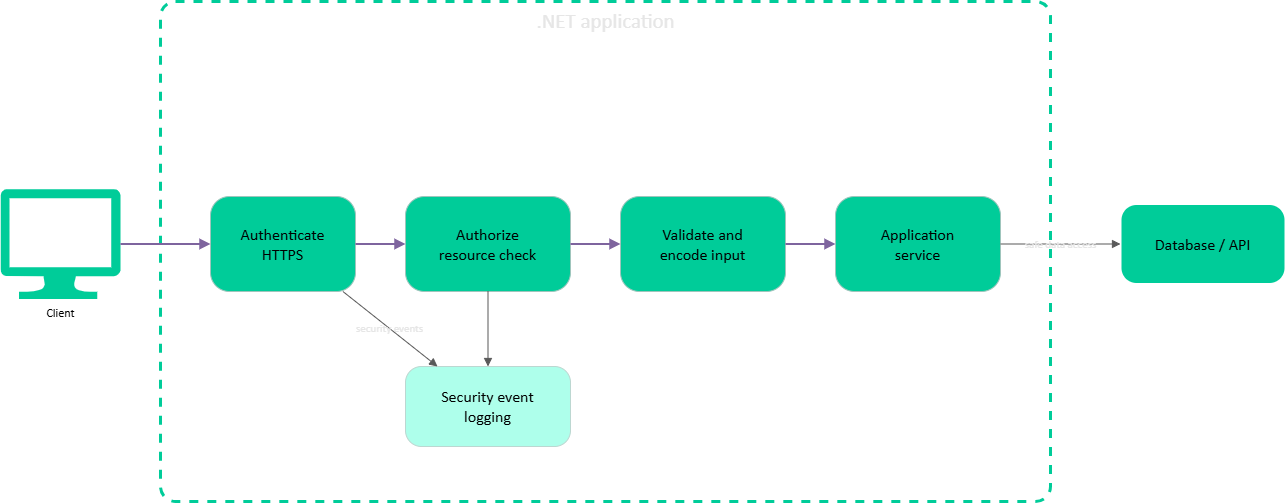
The request is authenticated, authorised for the specific resource, validated and handled by safe application code before it reaches a data or external-service boundary. The purple path highlights the normal protected request. Logging is present across the path, but sensitive values are not written to the logs.
Why secure coding is important?
Secure coding is important because a vulnerability is impacting more than one request. An injection can expose many funds, a broken access check can expose another customer’s document and a missing log can delay incident response. Fixing security at the boundary and in the shared libraries gives us a more consistent control than asking every controller developer to remember a different workaround.
Let us discuss the final 2017 list, one item at a time.
A1 Injection
Injection is happening when untrusted input is interpreted as part of a command or query. SQL injection is the common .NET example, but the same concern applies to LDAP, operating-system commands and dynamic expressions.
Must Do: Use parameterised queries, stored procedures with parameters or Entity Framework query APIs. Validate input for the business rule as well.
var fund = db.Funds
    .SingleOrDefault(x => x.Code == fundCode);
Don’t: Do not concatenate fundCode into SQL, even when it appears to come from an internal client. Escaping strings manually is not a reliable replacement for parameters.
A2 Broken Authentication
Broken authentication includes weak login handling, session problems, credential exposure and incorrect account recovery. An attacker may impersonate a user or keep access after a session should have ended.
Must Do: Use ASP.NET Core Identity or another maintained authentication solution, enforce strong credential and session rules, protect cookies and apply multi-factor authentication where the application supports it.
Don’t: Do not create a custom password hash, put credentials in query strings or accept a token without checking its signature, issuer, audience and expiry.
A3 Sensitive Data Exposure
Sensitive data exposure is occurring when personal, financial or credential data is not protected as it travels or is stored. A fund document may contain customer information which does not belong in a response, exception or log.
Must Do: Use HTTPS, protect data at rest, keep secrets outside source code and apply HSTS for HTTPS applications. Return only the fields required by the caller.
Don’t: Do not log passwords, tokens, connection strings, private keys or unnecessary Personally Identifiable Information (PII). Do not send sensitive data over plain HTTP.
A4 XML External Entities (XXE)
XXE is a risk when an XML parser processes external entities or document type definitions supplied by an attacker. It can disclose local files or make server-side requests.
Must Do: Disable Document Type Definition processing and external resolution when parsing untrusted XML.
var settings = new XmlReaderSettings
{
    DtdProcessing = DtdProcessing.Prohibit,
    XmlResolver = null
};

using (var reader = XmlReader.Create(stream, settings))
{
    var document = XDocument.Load(reader);
}
Don’t: Do not use default XML settings without checking how the parser handles DTDs and external entities. Do not accept an uploaded XML document as trusted because it came from a partner.
A5 Broken Access Control
Broken access control is occurring when a user can perform an action or read a resource which the user is not allowed to access. Hiding a menu item is not an authorization check.
Must Do: Use [Authorize] for the broad policy and resource-based checks for the specific fund, unit or document. Check ownership and permission on every request.
[Authorize]
public IActionResult GetDocument(DocumentId id)
{
    var document = documents.Get(id);
    if (!authorisation.CanRead(User, document))
        return Forbid();

    return Ok(document);
}
Don’t: Do not trust an id from the URL, a client-provided role or a disabled button in the browser. A user authorised to read one fund is not automatically authorised to read every fund.
A6 Security Misconfiguration
Security misconfiguration includes default credentials, unnecessary features, verbose errors, permissive headers and unsafe environment settings.
Must Do: Use secure configuration per environment, remove default accounts, restrict allowed origins and disable the developer exception page outside development. Review HTTPS, cookies, headers and error handling in the deployment checklist.
Don’t: Do not set customErrors Off or expose the developer exception page in production. Do not commit connection strings or secrets into appsettings.json or source control.
A7 Cross-Site Scripting (XSS)
XSS is happening when attacker-controlled content is being rendered as executable script in another user’s browser. Stored fund comments, search values and document labels are examples of data which must be treated as untrusted.
Must Do: Use Razor’s default HTML encoding and encode output for its context. Validate input and use a safe HTML sanitizer only when the business requirement genuinely needs rich content.
Don’t: Do not use Html.Raw for untrusted values, concatenate HTML or place user input into JavaScript without the correct JavaScript encoding. Encoding is not a reason to trust input in another context.
A8 Insecure Deserialization
Insecure deserialization is occurring when attacker-controlled serialized data can create unexpected objects or invoke dangerous behaviour. Polymorphic type metadata is especially risky when the allowed types are not restricted.
Must Do: Use simple data transfer objects, allow-list types and validate the payload before using it. For Json.NET, avoid dangerous type handling settings and keep deserialization settings explicit.
Don’t: Do not use TypeNameHandling.All on untrusted JSON. Do not deserialize an arbitrary object graph only because the client supplied a type name.
A9 Using Components with Known Vulnerabilities
Applications are depending on operating systems, frameworks, NuGet packages and JavaScript libraries. A known vulnerable component can create a security issue even when our own code is correct.
Must Do: Keep an inventory of packages, review NuGet updates, apply security patches and use tools such as OWASP Dependency-Check to identify known vulnerable components.
Don’t: Do not copy a package into the repository and forget its origin. Do not ignore an update because “we are not using that feature”; the vulnerable code may still be reachable through a different path.
A10 Insufficient Logging & Monitoring
Insufficient logging and monitoring is leaving the team blind during an attack. Failed logins, permission failures, input validation attacks and unusual administrative activity should provide enough information for investigation.
Must Do: Log security events with timestamp, correlation id, actor or service identity, resource, result and reason, while protecting secrets and PII. Alert on repeated failures and review the events.
Don’t: Do not log passwords, access tokens or complete sensitive request bodies. Do not assume that writing an event to a local file is monitoring; operators must be able to search and respond to it.
Must Do / Should / Don’t
Must Do
- Must treat every external value as untrusted until it is validated and authorised.
- Must use parameterised data access, safe XML settings, encoded output and restricted deserialization.
- Must apply authorization to the resource and operation, not only the endpoint.
- Must deploy HTTPS, safe configuration and maintained dependencies.
- Must log security events without logging secrets or unnecessary PII.
Should
- Should include the OWASP Top 10 in code review and threat modelling conversations.
- Should keep security checks in shared middleware, libraries and deployment pipelines where possible.
- Should test both allowed and denied access, invalid input and unsafe configuration.
- Should monitor dependency advisories, authentication failures and authorization failures.
Don’t
- Don’t trust a value because it came from our own user interface or an internal network.
- Don’t expose stack traces, developer exception pages or debug settings in production.
- Don’t use
TypeNameHandling.All, unsafe XML parsing orHtml.Rawwith untrusted input. - Don’t postpone package updates or security-event review until after an incident.
Wrap up
In this article, we have looked at the final OWASP Top 10 (2017) list and practical .NET rules for injection, authentication, sensitive data, XXE, access control, misconfiguration, XSS, deserialization, vulnerable components and logging.
I really appreciate that you took the time to read this article. This article closes the 2017 Coding Practices series, and I hope the complete series provided you some insights into keeping code maintainable, testable, resilient and secure.
Related Posts
Avoid sequential coupling and circular dependencies - with examples
Sequential coupling and circular dependencies create hidden constraints, so constructor injection, builders, interfaces and events make code easier to test, change and evolve.
Remove dead code - why and how to find it safely
Dead code increases cognitive load and deployment risk, so this guide explains how to find candidates, confirm they are unused and remove them safely with history as a backup.
Resilient HTTP calls with Polly - retry, timeout and circuit breaker
Polly 5.x adds retry, timeout and circuit breaker policies around HTTP calls, with guidance on composition, transient failures, idempotency and safe handling of writes.