Remove dead code - why and how to find it safely
Dead code increases cognitive load and deployment risk, so this guide explains how to find candidates, confirm they are unused and remove them safely with history as a backup.
Remove dead code - why and how to find it safely
Every application is accumulating code which was useful for one requirement, one experiment or one migration, but is no longer being executed. We normally call this dead code. It looks harmless because it is not producing an error, but it is increasing the code surface, confusing developers and making future changes risky.
In this article, we are going to see why dead code is a problem, how to find it using the tools available to us, and how to remove it safely without depending on guesswork. The main point is simple: source code history is our backup, not commented code.
TL;DR Summary
- Dead code is code which cannot be reached or is no longer used by the application.
- It increases the reading, testing and security surface, even when it is not executing today.
- ReSharper solution-wide analysis, NDepend, Find All References, CodeLens and code coverage can provide useful candidates.
- Confirm candidates with usage data, logs, Application Insights and feature-toggle history.
- Remove dead code in a small pull request, let source control preserve the old implementation and monitor the next release.
- Don’t delete an endpoint only because no source reference was found, because external clients may be calling it.
Challenges
Noise in the code base
When a developer is changing fund pricing code, an old pricing algorithm may still be sitting beside the current one. Both names look valid, and it is taking time to understand which one is used. New team members are asking whether they should update both implementations, and code review is becoming slower.
This noise has a direct impact on the business. A slow change is reaching production later, and a developer can fix the wrong method while believing that the problem is solved. It is not necessary for dead code to execute in order to create this confusion.
False confidence from tests
Dead code is also creating a misleading test suite. Tests may be covering old branches, old feature toggles or helper methods which are no longer part of a real user journey. The coverage percentage can look healthy while the current endpoint or calculation is having a blind spot.
Risk of accidental execution
Unused code can become active after a configuration change, a route registration or a new caller. If it was not maintained, it may have old assumptions, an insecure default or a dependency which is no longer supported. Keeping it “just in case” is not removing risk; it is postponing the decision while the risk is growing.
What is dead code?
Dead code is source code, configuration or a feature path which is not reachable by any supported execution path and is not required as part of a planned feature.
In simple terms, it is code which we are carrying but the application and its users are not using. It can be an unused private method, an unreachable branch, an old controller action, a feature toggle left behind or a project reference which is no longer needed.
Example:
public class FundPriceService
{
    public UnitValue GetCurrentValue(FundId fundId)
    {
        return LoadLatestPrice(fundId);
    }

    // This was the old calculation and has no caller anymore.
    private UnitValue CalculateLegacyValue(FundId fundId)
    {
        return LoadHistoricalPrice(fundId);
    }
}
The comment is not proving that CalculateLegacyValue is dead, but it is giving us a candidate to investigate. The same applies to an endpoint. A source search may not find calls from a browser, partner or scheduled job.
Why removing dead code is important?
Removing dead code is important because every line has a maintenance cost. It must be understood during review, may need to be changed when a dependency is updated and may need a test even when no customer is using it.
It also reduces the number of possible paths through the system. A smaller set of paths gives us better reasoning, simpler testing and fewer places where a security control can be missed. Most importantly, deleting the old path tells the next developer which behaviour is the supported one.
Let us discuss a safe removal process.
Find candidates
There are a few useful ways to find dead code,
ReSharper solution-wide analysis
ReSharper solution-wide analysis can report unused types, members, parameters and fields across the solution. It is more useful than looking only at the current file, because a member can be used from another project. Treat the warning as a candidate, not as a delete button.
For example, if ReSharper reports that LegacyFundDocumentWriter has no usages, check project references, reflection and configuration before removing it. Code called through reflection may not appear as a normal reference.
NDepend
NDepend can help us inspect dependency graphs, unused code and high-level coupling. It is especially useful when a complete project or namespace is suspected to be leftover after a migration. The result is helping us to find the boundary of an investigation, not replacing the investigation.
Find All References and CodeLens
Visual Studio Find All References and CodeLens are useful for checking methods, classes and interfaces which appear to have no callers. Run the search from the declaration and inspect references in all solution projects and test projects.
When a method is part of an interface, search for the interface member and for registrations in the dependency injection setup. A class can have no direct new expression because the IoC container is creating it.
Code coverage from tests
Code coverage is showing which paths are exercised by the tests. A method with no coverage is a candidate for removal, but no coverage does not prove that production is not using it. A controller action can be called by an external client while all automated tests are missing it.
Coverage is most useful when we compare it with supported behaviour. If a feature was retired and its code has no coverage, the two facts together are giving us a strong candidate.
Application Insights and logs
For endpoints, commands and scheduled jobs, usage data is essential. Application Insights request telemetry can show whether an endpoint is receiving requests. Logs can show command names, background jobs and feature-toggle paths. Check a meaningful period which covers normal and peak operation, and check all deployment slots or instances which are in use.
“No requests in the last day” is not enough evidence for a monthly report endpoint. We must understand the expected frequency before we call code dead.
Confirm the candidate
Finding is only the first step. Before deleting anything, follow the following checks,
Check all kinds of callers
Search for direct calls, interface implementations, dependency injection registrations, route attributes, configuration names, serializer settings, reflection and scripts. Search for the endpoint route in client applications and documentation too.
Example:
[Route("api/funds")]
public class FundsController : Controller
{
    [HttpGet("legacy-prices")]
    public IActionResult LegacyPrices()
    {
        return Ok(service.GetLegacyPrices());
    }
}
Find All References may show no C# caller for LegacyPrices, but a JavaScript application or a partner may be requesting /api/funds/legacy-prices. This is why source search and usage data must be used together.
Check feature toggles
Feature toggles are often creating dead branches after a rollout. Find the toggle definition, its default value, configuration in every environment and the code path on both sides. Confirm that the old value is not used for rollback or for a customer group.
A toggle should have an owner and a removal date. When the new fund document format is fully enabled, remove the old branch and the toggle in the same small change, otherwise the code will continue to grow another permanent path.
Check operational and compliance needs
Some code is not called during a normal request but is used for a support script, data repair, export or audit activity. Speak with the service owner and operations team before removing it. If a process is required by a control, move it to a supported tool rather than deleting it without replacement.
Check the history
Use source control history to understand why the code was added and whether a previous change deliberately left it available. History is giving us context without requiring us to keep old code in the current branch. Source control is our backup, not commented code.
Remove it in a small change
Once usage is confirmed as zero and the owner agrees, remove the code in a focused pull request. Delete the implementation, tests which only exercise the deleted behaviour, obsolete configuration and unused project references. Do not mix a dead-code removal with a large refactoring, because it becomes difficult to see what behaviour changed.
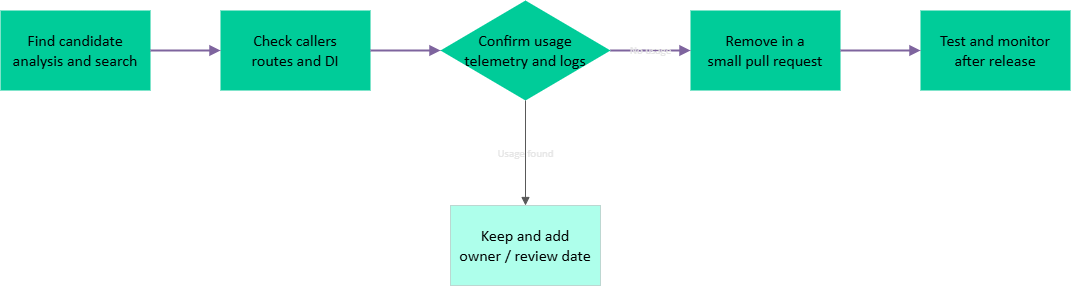
The following diagram explains the safe flow from finding a candidate to monitoring the release.
Example:
public class FundDocumentService
{
    private readonly IDocumentWriter writer;

    public FundDocumentService(IDocumentWriter writer)
    {
        this.writer = writer;
    }

    public Document Create(Fund fund)
    {
        return writer.Write(fund);
    }
}
If CreateLegacy() has been confirmed dead, remove it instead of leaving a commented copy below Create(). A reviewer can restore it from source control if new evidence appears.
After the change, compile the solution, run unit and integration tests, check static analysis again and deploy through the normal process. Monitor endpoint requests, error logs and business reports after release.
Must Do / Should / Don’t
Must Do
- Must confirm an unused result with production usage data when the code can be reached externally.
- Must check dependency injection, reflection, routes, configuration and scripts, otherwise source references alone are not enough.
- Must remove dead code in a small pull request and keep the history in source control.
Should
- Should use ReSharper solution-wide analysis and NDepend to find candidates, then use Find All References and CodeLens to inspect them.
- Should compare code coverage with real supported user journeys, because coverage is a test signal and not a usage report.
- Should give feature toggles an owner and a removal date.
- Should monitor the application after release and record the removal in the change description.
Don’t
- Don’t delete an endpoint only because no source caller is found.
- Don’t keep old implementations as commented code “for future reference”.
- Don’t remove dead code and restructure the complete project in the same pull request.
- Don’t assume an old branch is dead without checking rollback, support, reporting and compliance processes.
Wrap up
In this article, we have looked at the cost of dead code, the tools to find candidates, the usage checks needed to confirm them, and the safe flow of finding, confirming, removing and monitoring.
Thanks for reading this article. In the next article, I will walk you through integration tests and unit tests, and where we should draw the line between them.
Related Posts
Avoid sequential coupling and circular dependencies - with examples
Sequential coupling and circular dependencies create hidden constraints, so constructor injection, builders, interfaces and events make code easier to test, change and evolve.
Resilient HTTP calls with Polly - retry, timeout and circuit breaker
Polly 5.x adds retry, timeout and circuit breaker policies around HTTP calls, with guidance on composition, transient failures, idempotency and safe handling of writes.
Secure coding basics - OWASP Top 10 (2017) for .NET developers
OWASP Top 10 2017 risks are translated into practical .NET safeguards for injection, authentication, access control, XSS, deserialization, dependencies and logging.