How to write maintainable LINQ and Entity Framework queries?
Maintainable LINQ and Entity Framework queries explained through in-memory filtering, N+1 queries, projection, tracking and practices for readable query code.
How to write maintainable LINQ and Entity Framework queries?
LINQ and Entity Framework (EF) made data access much easier for .NET developers. We can write queries in C#, get compile time checks and IntelliSense, and we don’t need to write the SQL by hand for most cases. But the same convenience is also hiding what is really happening. A LINQ query which looks innocent in the code can generate a SQL with 20 joins, load 100 thousand rows into memory or fire 500 queries to the database in a loop. We usually come to know about it only when the page is slow in production.
In the previous article, we discussed defensive coding with guard clauses. In this article, we are going to see the common mistakes in LINQ and Entity Framework 6 queries, how to find them, and the practices we follow to keep the queries readable, maintainable and performing. Most of the points also apply to the new EF Core 1.0 which was released along with ASP.NET Core in June 2016.
TL;DR Summary
- Know where the query runs,
IQueryableruns in the database,IEnumerableruns in memory. - Don’t call
ToList()beforeWhere(), filter and project in the database. - Watch out for the N+1 problem with lazy loading, use
Include()or projections. - Select only the columns you need, project to a DTO with
Select(). - Use
AsNoTracking()for read-only queries. - Give complex queries a name, move them to query methods or extension methods.
- Always look at the generated SQL for important queries.
Challenges
Hidden SQL
The developer writes C#, but the database receives SQL. When we don’t look at the generated SQL, we cannot know if the query is efficient. The performance problems are discovered late, usually with real data volumes.
Long, unreadable queries
Sometimes a single LINQ statement is 40 lines long with nested Select, GroupBy and Join. Nobody wants to touch it, and every change is a risk.
Duplicate query logic
The same filter (ex: “active funds of a given share class”) is copied into ten different places. When the rule changes, we update eight of them and the two others are becoming bugs.
Mistake 1: Filtering in memory
It is the most common and the most expensive mistake.
// Don't - loads all funds into memory, then filters
var funds = _context.Funds.ToList()
                    .Where(f => f.Currency == "EUR" && f.IsActive)
                    .ToList();

// Do - filter runs as WHERE clause in SQL
var funds = _context.Funds
                    .Where(f => f.Currency == "EUR" && f.IsActive)
                    .ToList();
The following diagram depicts the difference.
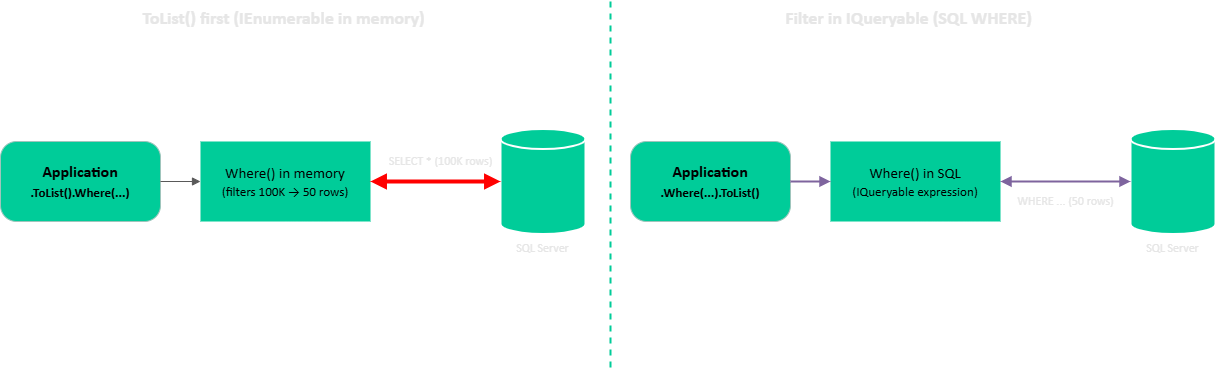
ToList(), ToArray(), AsEnumerable(), First(), Count() and foreach execute the query. Everything before them is translated to SQL, everything after them runs in memory. Keep the filtering, sorting, paging and projection before the execution.
Note: Be mindful when a method returns
IEnumerable<T>instead ofIQueryable<T>. AnyWhere()applied by the caller runs in memory, even though the source was aDbSet.
Mistake 2: The N+1 problem
With lazy loading enabled, accessing a navigation property inside a loop sends one extra query per item.
// Don't - 1 query for funds + 1 query per fund for the manager
var funds = _context.Funds.Where(f => f.IsActive).ToList();
foreach (var fund in funds)
{
    Console.WriteLine(fund.Name + " - " + fund.Manager.Name);
}

// Do - one query with a join
var funds = _context.Funds
                    .Include(f => f.Manager)
                    .Where(f => f.IsActive)
                    .ToList();
For 500 funds, the first version sends 501 queries. In our case, one of the fund list pages was sending <N> queries per request before we fixed it [confirm: real number from profiler].
Mistake 3: Selecting everything
When we need only the fund name and the latest price for a list page, loading the full Fund entity with 40 columns is wasting the database, network and memory.
var items = _context.Funds
                    .Where(f => f.IsActive)
                    .Select(f => new FundListItem
                    {
                        Isin = f.Isin,
                        Name = f.Name,
                        Currency = f.Currency,
                        LatestPrice = f.Prices
                                       .OrderByDescending(p => p.Date)
                                       .Select(p => p.Value)
                                       .FirstOrDefault()
                    })
                    .ToList();
A projection also solves the N+1 problem, because EF generates the join for the properties used in Select().
Mistake 4: Tracking read-only data
By default, EF tracks every loaded entity for changes. For read-only queries, it is an unnecessary cost.
var funds = _context.Funds.AsNoTracking().Where(f => f.IsActive).ToList();How to keep the queries maintainable?
Give the filters a name
Move the repeated filters into extension methods on IQueryable<T>. The query reads like a sentence and the rule lives in one place.
public static class FundQueryExtensions
{
    public static IQueryable<Fund> Active(this IQueryable<Fund> funds)
    {
        return funds.Where(f => f.IsActive && f.ClosedDate == null);
    }

    public static IQueryable<Fund> InCurrency(this IQueryable<Fund> funds, string currency)
    {
        return funds.Where(f => f.Currency == currency);
    }
}

// Usage
var funds = _context.Funds.Active().InCurrency("EUR").ToList();
Because these methods take and return IQueryable<T>, they are still translated to SQL.
Build the dynamic queries step by step
For search pages with optional filters, compose the query instead of writing one big expression with (x == null || ...) conditions.
IQueryable<Fund> query = _context.Funds.AsNoTracking().Active();

if (!string.IsNullOrEmpty(filter.Currency))
    query = query.InCurrency(filter.Currency);

if (filter.MinRating.HasValue)
    query = query.Where(f => f.Rating >= filter.MinRating.Value);

var result = query.OrderBy(f => f.Name)
                  .Skip(filter.Page * filter.PageSize)
                  .Take(filter.PageSize)
                  .ToList();
Use method syntax consistently
Query syntax (from f in ... select f) and method syntax are both fine, but mixing them in the same team makes the code harder to read. In our team, we use method syntax, and query syntax only for complex joins where it is more readable.
Know when to leave LINQ
EF is not the right tool for everything. For reports with heavy aggregations, bulk updates or performance critical queries, a stored procedure or a hand-written SQL with Database.SqlQuery<T>() (or Dapper) is more readable and faster. It is a trade-off between convenience and control.
Steps to find the slow queries
Follow the following instructions to see the SQL generated by EF.
-
Log the SQL in development with EF6
Database.Log._context.Database.Log = sql => Debug.WriteLine(sql); -
Use SQL Server Profiler or Extended Events to see the queries and their duration.
-
Use a profiler like Glimpse, MiniProfiler or the database view of Application Insights / New Relic in test and production.
-
Just to pulse check, count the queries for one page request. If the number grows with the number of rows, you have an N+1 problem.
Why it is important?
In order to keep our pages fast as the data grows, to avoid surprises in production and to make the queries easy to change, we must write the LINQ queries with the same care as the SQL. A slow query is not only a performance problem. It holds the database connections longer, increases the DTU usage and cost on Azure SQL, and it affects every other user of the same database.
Must Do and Don’ts
- Must Do: Filter, sort, page and project before
ToList(). - Must Do: Use
AsNoTracking()for read-only queries. - Must Do: Review the generated SQL for every query on a hot path.
- Should: Move repeated filters to
IQueryable<T>extension methods. - Should: Disable lazy loading for web applications, or at least be aware of it.
- Don’t: return
IQueryable<T>from the repository to the UI layer, otherwise the query can be changed and executed anywhere. - Don’t: call the database inside a loop.
Wrap up
In this article, we have looked at the common mistakes in LINQ and Entity Framework queries, filtering in memory, N+1, selecting everything and unnecessary tracking, and the practices we follow to keep the queries maintainable. I really appreciate that you took the time to read this article. In the next article, I will walk you through logging best practices, what to log and what not to log.
Related Posts
Async and await in C# - common mistakes
Async and await explained for web applications, including I/O-bound work, async void, blocking calls, deadlocks, ConfigureAwait, fake async, and sequential awaits.
Code review checklist for .NET teams
A practical .NET code review checklist covering design, readability, correctness, errors, security, performance, testing, operations, and constructive review comments and discussion.
Exception handling best practices in .NET
Exception handling practices for .NET, ASP.NET MVC, and Web API covering swallowed exceptions, stack traces, specific catches, and global error handling.