Integration tests vs unit tests - where to draw the line
Unit and integration tests serve different boundaries, feedback loops and maintenance costs, with practical guidance for choosing test types and organising a .NET solution.
Integration tests vs unit tests - where to draw the line
Almost all teams agree that automated tests are important, but the test suite is not automatically becoming useful just because it has many tests. Some tests are taking minutes, some tests are failing randomly and some tests are passing while the database mapping or HTTP contract is broken. When every test is treated as the same type, developers are either avoiding the suite or putting too much infrastructure inside unit tests.
Last year, in the FIRST properties and Test Double articles, we discussed the foundation for maintainable unit tests. In this article, we are going to see the difference between unit and integration tests, how to decide which one to write, and how to organise them in a .NET solution.
TL;DR Summary
- A unit test verifies one small unit of behaviour in isolation from infrastructure.
- An integration test verifies that two or more real parts are working together, such as an API and database.
- Unit tests are fast and numerous; integration tests are fewer and give confidence at system boundaries.
- Use test doubles for dependencies in a unit test, but use the real boundary when the boundary itself is what we need to verify.
- Put tests in separate projects named
*.UnitTestsand*.IntegrationTests, so the cost and purpose are visible. - A green unit-test suite cannot prove that a database schema, HTTP route or file format is correct.
Challenges
Fast feedback versus realistic confidence
Unit tests are giving developers a fast feedback loop. Integration tests are giving confidence that real components can communicate. We need both, but they are having different costs.
If every test is opening a database, the suite is becoming slow and difficult to run on a laptop. If every test is mocking the database, HTTP client and file system, the suite is fast but it may be proving only that mocks are returning what they were configured to return. The customer is finding the gap later.
Tests which are difficult to trust
Integration tests can depend on machine state, test order, ports, network availability or leftover data. Unit tests can also be coupled when a fake is not reset between tests. A test which is failing randomly is creating noise, and after few false alarms developers are ignoring real failures.
Unclear ownership
When unit and integration tests are kept in one project with no naming convention, it is not clear what can run on every build and what needs infrastructure. A developer is then making a wrong trade-off, either skipping valuable tests or making all tests expensive.
What is a unit test?
A unit test verifies one unit of code, normally a class or a small group of closely related functions, in isolation from external systems such as a database, HTTP service, file system and clock.
In simple terms, a unit test is asking, “given this input and these controlled dependencies, does this unit produce the expected behaviour?” It is not asking whether SQL Server is reachable or whether another API has the correct response.
Example:
public class FundValueCalculator
{
    public UnitValue Calculate(IEnumerable<FundPrice> prices)
    {
        return new UnitValue(prices.Sum(x => x.Amount));
    }
}

public class FundValueCalculatorUnitTests
{
    [Fact]
    public void Calculate_WithPrices_ReturnsTheirTotal()
    {
        var calculator = new FundValueCalculator();
        var prices = new[]
        {
            new FundPrice(10m),
            new FundPrice(12m)
        };

        var result = calculator.Calculate(prices);

        Assert.Equal(22m, result.Amount);
    }
}
This test is not using a database and is not depending on a network call. It can run in milliseconds and it is explaining one behaviour.
What is an integration test?
An integration test verifies the interaction between two or more real components, or verifies that our application integrates correctly with an external boundary.
In simple terms, an integration test is asking, “can these parts work together in the way our application expects?” It can cover an application and database, an HTTP pipeline and controller, a file writer and file format, or a message publisher and broker.
Example:
public class FundRepositoryIntegrationTests
{
    [Fact]
    public void SaveAndReadFund_UsesTheExpectedDatabaseMapping()
    {
        using (var database = TestDatabase.Create())
        {
            var repository = new FundRepository(database.Connection);
            var fund = new Fund("FUND001");

            repository.Save(fund);
            var result = repository.Get("FUND001");

            Assert.Equal("FUND001", result.Code);
        }
    }
}
The important part is not the name of the test. The test is using a real database boundary, so it can find connection, schema, mapping and transaction problems which a mock cannot find.
Why the distinction is important?
The distinction is important because each test type is answering a different question. A healthy test pyramid has many fast unit tests at the bottom, fewer integration tests in the middle and a small number of end-to-end tests at the top.
The following diagram depicts the boundary between unit tests and integration tests.
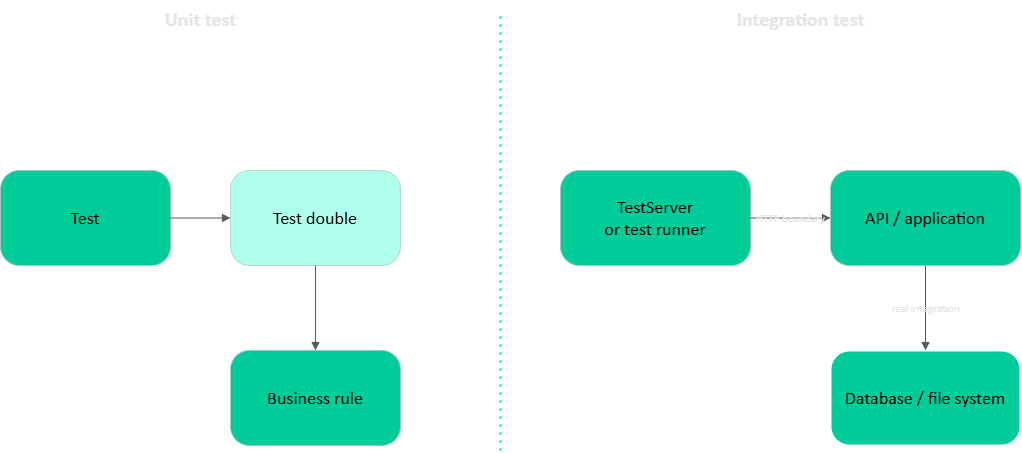
Unit tests are giving quick feedback for business rules such as calculating units or validating a document. Integration tests are checking the seams: the database adapter, HTTP pipeline, file system or message endpoint. End-to-end tests are checking a complete user journey, but they are more expensive and more difficult to diagnose. We should not make every test an end-to-end test to get confidence.
How to decide which test to use?
Test business rules with a unit test
Use a unit test when the behaviour can be represented with input and output and the external dependency is not the behaviour under test. For a fund eligibility rule, inject a clock or a repository abstraction and control its result with a test double.
public class FundEligibilityService
{
    private readonly IFundRepository repository;

    public FundEligibilityService(IFundRepository repository)
    {
        this.repository = repository;
    }

    public bool IsEligible(FundId fundId)
    {
        var fund = repository.Get(fundId);
        return fund.IsOpen && fund.Units > 0;
    }
}
The unit test can provide a fake repository and verify the rule for an open and closed fund. It is not necessary to start a database, because the repository is not the behaviour being verified.
Test a boundary with an integration test
Use an integration test when the boundary is important. Examples are,
- Verify an Entity Framework mapping writes the correct fund and unit values.
- Verify an HTTP endpoint returns the expected status code and JSON shape.
- Verify a document writer produces a file that another process can read.
- Verify a message publisher uses the expected topic and contract.
In these cases, replacing the real boundary with a mock will not tell us whether the integration is correct. The test should use a controlled test database, an in-memory HTTP server or a temporary folder where possible.
Use a contract test for a provider boundary
If a separate team owns an HTTP API, an integration test can verify our client against a stable test endpoint or a recorded contract. Keep the test deterministic and do not make every build depend on an unavailable production service. A production smoke check is a different test with a different operational purpose.
Do not test the same rule at every level
The same calculation can be covered by a unit test, and one integration test can verify that the repository supplies the calculation with correctly mapped data. It is not necessary to copy every input combination into the integration suite. Otherwise the suite is becoming slow without giving additional boundary confidence.
Naming and folder conventions
Test location is making the test purpose visible. In our .NET solution, use separate projects,
src/
  Funds.Domain/
  Funds.Infrastructure/
  Funds.Api/
tests/
  Funds.Domain.UnitTests/
  Funds.Infrastructure.IntegrationTests/
  Funds.Api.IntegrationTests/
Use *.UnitTests for isolated tests which can run without infrastructure. Use *.IntegrationTests for tests which start a real component, use a database, access a file system or verify an HTTP pipeline. If an end-to-end suite is required, name it *.EndToEndTests so its execution cost is not hidden.
Test names should describe the behaviour and condition,
Calculate_WithTwoPrices_ReturnsTheirTotal
GetFund_WhenTheFundDoesNotExist_ReturnsNotFound
SaveFund_ReadsTheSameFundFromTheDatabase
The name is helping us to understand a failure without opening the implementation. Arrange, Act and Assert sections should remain clear, and one test should fail for one reason.
Must Do / Should / Don’t
Must Do
- Must keep business rules in fast unit tests, otherwise the feedback loop will become too slow.
- Must write integration tests for the boundaries which can fail independently, such as database mapping and HTTP routing.
- Must isolate integration test data and clean it after the test, otherwise tests will depend on execution order.
- Must separate
*.UnitTestsand*.IntegrationTestsprojects.
Should
- Should use test doubles for external dependencies in unit tests, as described in the Test Double article.
- Should keep a small number of end-to-end tests for the most important user journeys.
- Should run unit tests on every local check and integration tests in the build pipeline or a reliable local command.
- Should give every integration test a clear setup and teardown strategy.
Don’t
- Don’t call a database from a unit test. It breaks the FIRST properties and makes failures difficult to diagnose.
- Don’t mock the database when the database mapping is the behaviour under test.
- Don’t call a production service from a repeatable automated test.
- Don’t put every test in the integration suite just because the test is valuable.
Wrap up
In this article, we have looked at the definition of unit and integration tests, the test pyramid, the boundary between them, and naming and folder conventions for a .NET solution.
I hope this article provided you some insights into choosing the right test type. In the next article, I will walk you through how to test an ASP.NET Core Web API with an in-memory TestServer.
Related Posts
How to write unit tests with NUnit and Moq?
Unit testing with NUnit and Moq explained through FIRST properties, the AAA pattern, test doubles, test cases, exceptions, and verification of interactions.
Unit Test Best Practices - FIRST properties
FIRST properties explained through fast, independent, repeatable, self-validating and timely unit tests, with practical guidance for keeping a test suite healthy.
What is a Test Double - stub vs mock vs fake
Test doubles explained through dummy, stub, spy, mock and fake objects, with practical examples showing when stubs, mocks and fakes are appropriate.