Serverless - what is it and where does it fit
Serverless computing explained by comparing IaaS, PaaS and Azure Functions, including triggers, retry-safe handlers, lifecycle ownership and production maturity considerations.
Serverless - what is it and where does it fit?
Every application is consuming compute, even when the team is not seeing a server in the architecture diagram. The useful question is not whether servers exist, but which parts of their lifecycle our team must operate. In the previous article, we discussed Service Fabric, Azure Container Service and App Service, and how the hosting model is deciding our operational responsibility. In this article, we are going to see what serverless means, how it compares with IaaS and PaaS, and where Azure Functions is fitting in a fund platform.
TL;DR Summary
- Serverless does not mean there are no servers; Azure is managing more of the server lifecycle.
- IaaS leaves the team managing the VM and operating system, while PaaS is managing more of the runtime.
- Azure Functions was announced in preview in March 2016, so check its maturity before using it for production workloads.
- Timer, HTTP, Blob and queue triggers are useful for small event handlers and scheduled work.
- The function should be stateless, short-lived and safe to retry.
- Long-running, stateful and highly specialised workloads may need App Service, Service Fabric or VMs.
- Logging, correlation, retry behaviour and cost limits must be designed before production.
Challenges
The name is creating a wrong expectation
Serverless is not removing infrastructure. It is moving the infrastructure management boundary to Azure. A function still depends on compute capacity, storage, identity, networking and a runtime. When an event is failing, the team must know whether Azure is retrying it, whether the message is in a poison queue and whether the function is reaching its dependency.
An event handler becomes a hidden monolith
A Blob upload can start a document workflow, but the workflow may have validation, conversion, indexing and notification steps. Putting every step into one large function is hiding the state machine in a method. A small function with one responsibility is easier to retry, test and replace.
Scaling is not the same as capacity planning
The provider can create more function executions, but the SQL database or a third-party API may not be scaling at the same speed. A queue trigger can therefore create a downstream spike. We must protect dependencies with batching, concurrency limits and retry policies, otherwise serverless is moving the bottleneck rather than removing it.
What is serverless?
Serverless is an execution model where the cloud provider provisions and scales the underlying compute while the team deploys application functions or event handlers.
In simple terms, we are handing more of the machine work to Azure and keeping our attention on the code which responds to an event. It is called as serverless because server management is not the unit of work presented to the developer.
An everyday analogy is a taxi rank. We are not maintaining a taxi engine or keeping a vehicle parked all day. We are requesting a ride when we need one, paying according to the service model and still being responsible for giving the correct destination. The road, traffic and the passenger’s business purpose are not disappearing.
Why serverless is important?
Serverless is important when a workload is event-shaped and the value is in reacting to something rather than keeping a process alive all the time. A document upload, a queue message, a timer which checks prices and a small HTTP webhook are good candidates. The main fund API is usually having a longer-lived request model and can remain on App Service.
The following diagram compares the responsibility boundary:
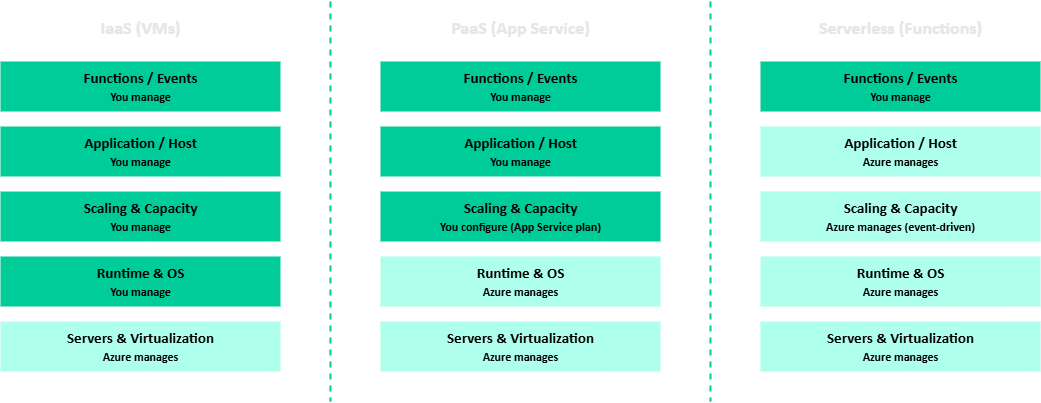
In IaaS, the team is managing the application, runtime, operating system, scaling and servers. In PaaS, Azure is managing more of the operating system and runtime while we are deploying the application. In serverless, Azure is also presenting execution and scaling as an event-based service. The diagram is not saying that Azure is managing our code or data contracts.
A suitable function
The following C#-style function is small and has one clear trigger. The exact host configuration depends on the Functions runtime available today, but the boundary is useful:
public static async Task Run(
    [QueueTrigger("fund-documents")] DocumentMessage message,
    TraceWriter log)
{
    log.Info("Processing document " + message.DocumentId);
    await _documentService.ValidateAndStoreAsync(message);
}
The function should not be keeping the only copy of the document in memory. It should write durable state and include a document id or correlation id in every log entry. If the queue retries the message, ValidateAndStoreAsync must be safe to run again, or it must detect that the document id was already processed.
Azure Functions is still in preview
Azure Functions was announced in preview in March 2016. This matters when we are selecting a production dependency today. The team must check the available runtime, supported bindings, regional availability and support expectation before depending on it.
The following diagram depicts three inputs reaching an Azure Function and three possible outputs:
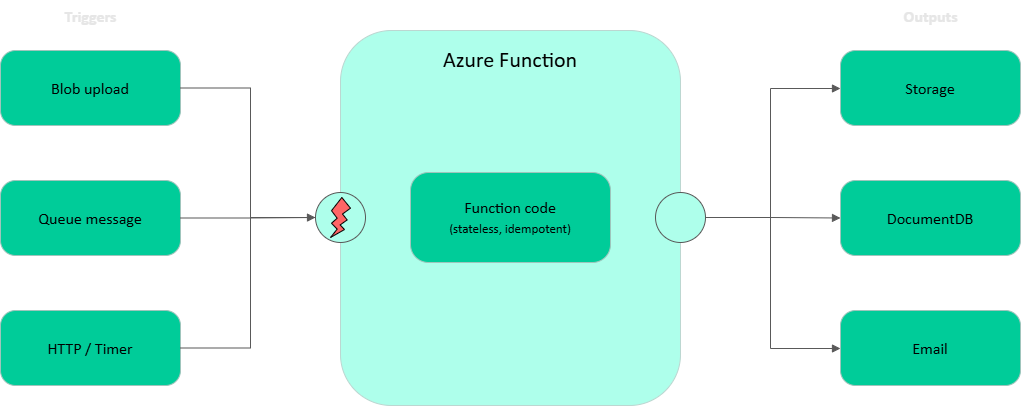
A Blob upload, queue message or HTTP request is entering the function. The function can write to Storage, DocumentDB or send an email. These outputs are having different failure semantics. A database write may need an idempotency key, an email may be retried safely with a message id, and a Blob operation may need to distinguish a missing document from a transient storage error.
The flow highlighted in purple is not being added to this diagram because this design is showing the available event boundaries rather than one preferred route. For a real implementation, we should highlight the business path being reviewed, such as Blob upload to validation to DocumentDB.
Where does serverless fit?
| Model | What the team manages | Good fit | Main concern |
|---|---|---|---|
| IaaS VM | Application, runtime, OS, scaling and server | Legacy runtime or custom host | Patching and capacity |
| PaaS App Service | Application, configuration and data dependencies | Web API and always-on application | Platform limits and cost |
| Serverless Function | Function code, contracts, dependencies and data | Timer, queue, Blob and webhook work | Retries, limits and observability |
In our case, a nightly news-article import can be triggered by a timer, and an uploaded fund document can be processed from a Blob trigger. The fund search API is remaining in App Service until its request, session and scaling needs are better suited to functions. We are not splitting the application into functions only because the service is available.
Testing and operating a function
A function is small, but its tests are not only checking the method output. The test is also checking the trigger payload, missing fields, duplicate event and dependency failure. A queue handler should be given the same message twice in a test and should produce one document result. A timer handler should be given a date boundary and should not import yesterday’s prices twice.
The deployment package moves through development and test before production. Application settings contain the queue name, storage account and DocumentDB endpoint; no connection key is baked into the package. Application Insights or the selected logging sink records the function name, event id, correlation id and duration. An alert is raised when failed executions, retry count or queue age crosses the agreed threshold.
Cold-start and execution duration are also being considered. A small HTTP function is not a good place for a large report which can take ten minutes. That report can be split into a command which accepts the request and a queue worker which records progress. The user is receiving a status id, and the worker is doing the long operation without holding the browser connection.
When the function calls an external service, the retry policy is bounded. A transient SQL error can be retried, but an invalid document should move to a review path. A poison message is not retried forever, otherwise it will consume executions while hiding healthy work. The runbook identifies who can inspect and replay that message.
Must Do and Don’ts
- Must Do: Put durable state in Storage, SQL or DocumentDB, otherwise an instance recycle will lose the only copy of a document.
- Must Do: Make queue and Blob handlers idempotent, otherwise a retry can create duplicate documents or notifications.
- Must Do: Log the event id and correlation id, otherwise a delayed retry cannot be connected to the original request.
- Must Do: Set a concurrency and downstream capacity limit, because a fast trigger can overload SQL or an external API.
- Don’t: put a long-running business workflow into one function, otherwise timeout and retry behaviour will be difficult to understand.
- Don’t: call a serverless function free of operations, because identity, alerts, poison messages and dependency health still belong to the team.
Wrap up
In this article, we have looked at the IaaS, PaaS and serverless boundaries, Azure Functions triggers, retry-safe handlers and the current maturity of Functions. Serverless is a useful execution model for focused event work, not a replacement for every host. I appreciate your time and efforts to read this article. In the next article, I will walk you through designing a multi-region application on Azure with Traffic Manager and failover.
Related Posts
Azure Service Fabric vs Azure Container Service vs App Service - choosing a hosting model
Azure Service Fabric, Azure Container Service, App Service and Virtual Machines compared through workload fit, operational ownership, scaling and deployment responsibilities.
Designing a multi-region application on Azure - traffic manager and failover
Multi-region Azure application design explained through Traffic Manager routing, primary and secondary regions, SQL replication, latency, health checks and failover practice.
Event-driven architecture with Service Bus topics
Azure Service Bus topics and subscriptions explained through fan-out messaging, SQL filters, duplicate delivery, dead-letter handling and explicit event ownership.