How to use Azure Redis Cache for session state and output cache?
Azure Redis Cache explained for shared session state and output caching, including providers, configuration, cache-aside usage, and multiple web instances.
How to use Azure Redis Cache for session state and output cache?
When a web application is running on one server, keeping session state in the worker process appears to be simple. Few months later, when we are adding another instance, a request can reach a different server and the user may lose the session. Local output cache has the same limitation, the response is existing only on the instance which produced it.
Azure Redis Cache provides a shared, fast data store which ASP.NET applications can use for session state and output caching. In this article, we are going to see how to configure Redis with ASP.NET MVC 5 using the Redis session state and Redis output cache providers, and how to use StackExchange.Redis for cache-aside data.
We can manage session and response data in two common ways:
| Approach | Pros | Cons |
|---|---|---|
| In-process or local cache | + Simple setup<br>+ Very low local latency | − Not shared between instances<br>− Data disappears during restart |
| Azure Redis Cache | + Shared across instances<br>+ Supports scale-out | − Adds a network dependency<br>− Requires cache monitoring |
TL;DR Summary
- In-memory session state is not reliable when requests can reach multiple web instances.
- Redis provides shared session and cache storage outside the web worker process.
- Session state and output cache solve different problems and should have different policies.
- A cache entry must be safe to rebuild when it expires or is removed.
- Never store a password or sensitive token in a cache entry without a clear protection design.
- Use a small timeout first and measure cache hits, misses and latency.
Challenges
Session affinity
Sticky sessions can send one user to the same server, but they reduce the freedom to scale and do not protect data from an instance restart. When the application is expanded, this becomes a blind spot because one instance may look healthy while another instance does not contain the session. A shared provider removes that dependency.
Cache consistency
Output cache can improve response time, but an old response can be displayed after an article or fund value has changed. The team must decide which pages can be stale and how they will be invalidated. Otherwise, performance improvement will have a direct impact on customer trust.
Redis availability
Redis is a dependency. If the web application waits forever for the cache, a cache problem can become a web site problem. We must set sensible timeouts, monitor the dependency and make non-critical cache reads fail safely.
What is Azure Redis Cache?
Azure Redis Cache is a managed Redis data store available to Azure applications.
In simple terms, it is a shared memory area which all web instances can reach. Session data can follow the user from one instance to another, and frequently requested responses can be reused instead of querying the database every time. Redis is not a replacement for the system of record.
Why use Redis for ASP.NET?
The application server should do the work which is necessary for the current request. It should not repeat an expensive query when the same result is safe to reuse. Imagine a newspaper counter where the latest printed copy is kept behind the desk, the next reader can receive it quickly, but we still need a rule for printing a new copy.
How to configure Redis?
The following diagram depicts multiple ASP.NET instances using one Redis cache,
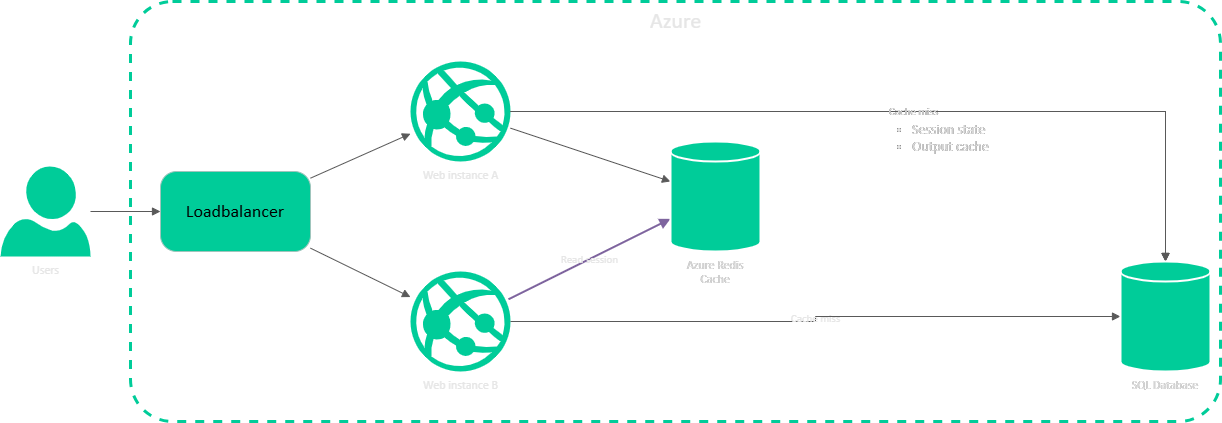
Option1: Azure Redis Cache providers
Steps to Implement:
Follow the following instructions to configure Redis session state and output cache.
-
Create an Azure Redis Cache instance in the same Azure region as the web app.
Name: <globally unique cache name> Resource Group: <Resource Group name> Location: <Azure region> Pricing tier: <cache tier> -
Copy the Redis hostname, port and access key from the Azure portal.
-
Install the Redis packages into the ASP.NET MVC 5 application.
Install-Package StackExchange.Redis Install-Package Microsoft.Web.RedisSessionStateProvider Install-Package Microsoft.Web.RedisOutputCacheProvider -
Add the Redis connection string to the application settings, and replace the input place holders with actual values.
<appSettings> <add key="RedisConnection" value="<cache-name>.redis.cache.windows.net:6380,password=<access-key>,ssl=True,abortConnect=False" /> </appSettings> -
Configure the Redis session state provider in
web.config.<system.web> <sessionState mode="Custom" customProvider="RedisSessionStateProvider"> <providers> <add name="RedisSessionStateProvider" type="Microsoft.Web.Redis.RedisSessionStateProvider" host="<cache-name>.redis.cache.windows.net" port="6380" accessKey="<access-key>" ssl="true" applicationName="<application-name>" /> </providers> </sessionState> </system.web> -
Configure the Redis output cache provider for responses which are safe to reuse.
<system.web> <caching> <outputCache defaultProvider="RedisOutputCacheProvider"> <providers> <add name="RedisOutputCacheProvider" type="Microsoft.Web.Redis.RedisOutputCacheProvider" host="<cache-name>.redis.cache.windows.net" port="6380" accessKey="<access-key>" ssl="true" /> </providers> </outputCache> </caching> </system.web> -
Add output cache policy only to actions which do not contain user-specific data.
[OutputCache(Duration = 60, VaryByParam = "id")] public ActionResult Article(int id) { return View(repository.GetArticle(id)); } -
Just to pulse check, run the application on two web instances and make two requests with the same session.
Request 1 -> instance A
Request 2 -> instance B
Expected -> same session value
Note: Do not cache a response containing a logged-in user’s personal information unless the cache varies correctly by that user. A shared output cache with the wrong policy can disclose data.
Session and cache design
Session state should be kept small. A session containing a selected fund identifier is easy to rebuild, while a large object graph makes every request slower and increases Redis memory usage. The application should not store the only copy of important data in session, because expiration or a cache outage must not lose business information. Session objects must be marked as [Serializable], otherwise the provider cannot serialize the object and the request will be failing at runtime.
Output cache duration depends on the domain. A static help page can have a longer duration, while a fund unit value may need a shorter duration or explicit invalidation. We should measure hit rate, miss rate, connection errors and average latency, then tune the duration based on evidence.
Cache-aside with StackExchange.Redis
For data which is not ASP.NET session or output cache, we can use ConnectionMultiplexer directly. Normally, create one lazy connection for the application, not one connection for every request,
private static readonly Lazy<ConnectionMultiplexer> Redis =
    new Lazy<ConnectionMultiplexer>(() =>
        ConnectionMultiplexer.Connect(
            ConfigurationManager.AppSettings["RedisConnection"]));

public FundSummary GetFundSummary(int fundId)
{
    IDatabase cache = Redis.Value.GetDatabase();
    string key = "fund-summary:" + fundId;
    string cached = cache.StringGet(key);
    if (!string.IsNullOrEmpty(cached))
        return JsonConvert.DeserializeObject<FundSummary>(cached);

    FundSummary summary = repository.GetSummary(fundId);
    cache.StringSet(key, JsonConvert.SerializeObject(summary),
        TimeSpan.FromMinutes(5));
    return summary;
}
The above code is using the connection string from the RedisConnection app setting, hence the app setting is not unused. Be mindful that a cache miss must be handled as a normal condition, and a Redis outage should not stop a non-critical article page from loading. Use an explicit timeout and log the dependency failure without writing the access key.
Must Do and Don’ts
- Must Do: Keep Redis in the same region as the web application, because network latency is directly impacting every session request.
- Must Do: Override
RedisConnectionthrough App Service Application Settings or web.config transforms for each environment. - Don’t: Commit the
accessKeyor the complete Redis connection string to source control. - Don’t: Put user-specific output into a shared cache without a correct vary policy, otherwise one user’s data can be displayed to another user.
- Keep in mind that: Redis is a cache and session store, it is not the system of record.
When the cache is becoming unavailable, the application should be showing a controlled fallback and the operations team should be seeing the dependency alert. This is proactive handling, because we are not waiting for every customer to report that the article page is slow. Start with a small cache policy, observe it, then expand the policy when the result is understood.
Wrap up
In this article, we have looked at the difference between local state and shared Redis state, installed the providers, configured session and output cache, and used cache-aside with StackExchange.Redis. I appreciate your time and efforts to read this article. In the next article, I will walk you through storing files in Azure Blob Storage from ASP.NET.
Related Posts
How to store files in Azure Blob Storage from ASP.NET?
Storing files in Azure Blob Storage from ASP.NET, including containers, validation, uploads, private file serving, and separating file metadata.
How to automate releases with VSTS Release Management?
VSTS Release Management explained through release definitions, environments, approvals, variables, deployment slots, smoke tests and automated ASP.NET deployments for practical guidance.
How to set up Azure Application Insights for an ASP.NET application?
Azure Application Insights explained through server and browser telemetry, custom events, dependencies, alerts, availability tests and ASP.NET application monitoring.