How to organize Application Insights across product families? The instance strategy - Part 1
Why one Application Insights instance per product family works best, how to handle DR and pre-production, and how to enable it with the SDK.
How to organize Application Insights across product families? The instance strategy - Part 1
Almost all modern applications are running on cloud these days, and nobody can operate them without proper monitoring. Azure Application Insights is one of the easy choices to start with, but the real challenge is not enabling it, it is enabling it in a consistent way when you have many teams, many applications and many environments. When every team sets up Application Insights in its own way, we end up with scattered data, unreadable names, uncontrolled cost and no end-to-end view of a request. In this series, I share the guidelines we derived for our teams to implement Application Insights effectively. In this article, we are going to see how many Application Insights instances we need, how to group the applications, and how to enable it for an application.
Application Insights Guidelines series:
- How to organize Application Insights across product families? The instance strategy (this article)
- How to make Application Insights telemetry meaningful? Configuration, enrichment and exclusion
- How to control the cost of Application Insights? Sampling, retention and MI logs
- How to build useful dashboards with Application Insights? Tools, queries and charts
TL;DR Summary
- Create one Application Insights instance per product family, including the DR or secondary sites. A separate instance needs a valid reason and approval.
- Create the instance with ARM templates, but don’t configure it for a specific application in the template.
- Use the same instrumentation key for all applications of a product family, and replace the key token in
ApplicationInsights.configfrom the release pipeline. - Create a separate instance for pre-production and share it across Dev, QA and UAT.
- Don’t enable Application Insights through the Azure extension or ARM template, enable it through Visual Studio with the Application Insights SDK.
- Check the pre-requisites (.NET Framework 4.6 or above, Visual Studio 2015 or above, PHP 5.4.2 or above) before you start, otherwise some features will not work.
Why do we need guidelines for Application Insights?
Application Insights is easy to start, you can enable it in few minutes. That is the good part and also the bad part. When we don’t have a common approach, each team will take its own decisions, and we will see these problems after some time,
Scattered data
If every application has its own instance, the logs of one product are spread across many places. An engineer who is investigating an issue has to jump between instances to find what happened to a single request. It increases the time to find the root cause, and finally it increases the time to resolve the issue for our customers.
Unreadable and inconsistent telemetry
Without a naming standard, the Application Map and log analytics will show generic names. One team adds user id and build version, another team doesn’t. We can’t compare, and we can’t build common dashboards or alerts.
Uncontrolled cost
Application Insights license works based on data ingestion, so the cost is directly proportional to how much data we are sending. By default, it ingests 100% of the data. When it is not managed, the cost goes up silently and nobody owns it.
Blind spots in DR and pre-production
When the DR or secondary site is configured with a different instance, we can’t see the complete picture of a product family. And when pre-production data is mixed with production, it becomes noisy and misleading.
Because of the above reasons, we need a simple set of rules which every team can follow. Let us start with the first and most important decision, how many instances do we need?
What is Application Insights?
Application Insights is an extensible Application Performance Management (APM) service on Azure, which helps us to monitor live applications. In simple terms, it collects the requests, dependencies, exceptions, performance counters and browser details of an application, and gives us the tools to query and visualize them.
For this series, it is enough to remember that it stores all collected data in Log Analytics, and we use Kusto query language to read it. We will use this in the later articles.
How many Application Insights instances do we need?
By default, each product family should have one Application Insights instance to track all applications and their components. It also includes DR or secondary sites. If you need a separate instance within the product family, it needs a valid reason and approval.
Think about a hospital patient file. A patient has one file, and every doctor adds the notes into the same file. If each doctor keeps a separate file, nobody can see the complete history of the patient. An Application Insights instance is the same for a product family, all applications add the telemetry into one place, so we can see the complete history of a request.
The following diagram depicts the difference between an instance per application and an instance per product family,
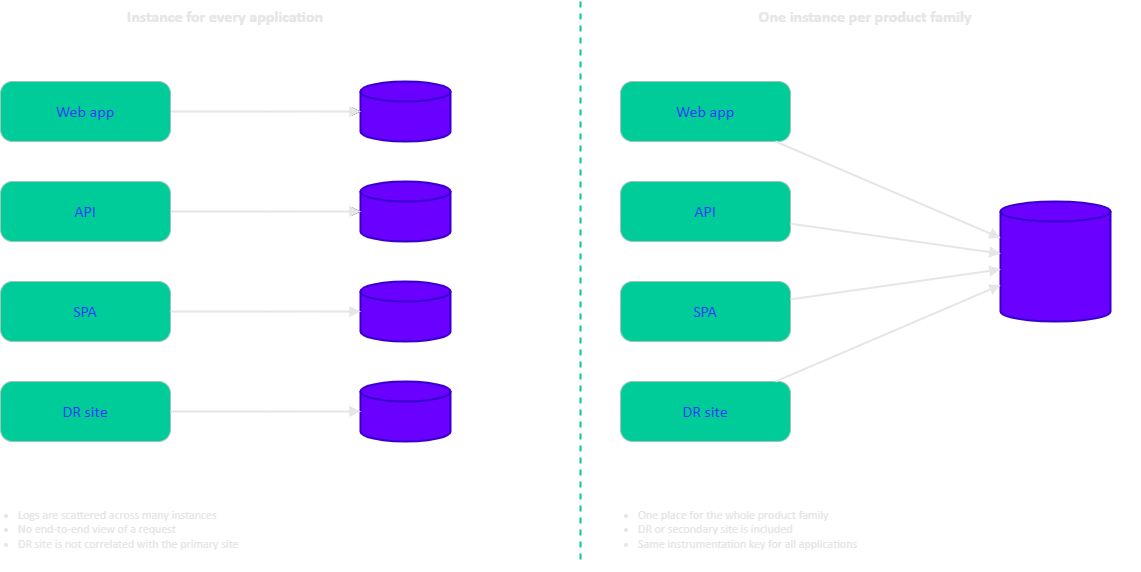
Find below an example of how to group the applications. It is not a solid list, instead it gives an idea on how to group the applications and map the Application Insights instance.
| S. No | Product Family | Applications per Application Insights instance |
|---|---|---|
| 1 | Product family A | Core web application, public API, charting component, others |
| 2 | Product family B | Portal, reporting application |
| 3 | Product family C | New web application, old web application, API, intranet, CMS |
| 4 | Product family D | Service API, search service |
Must Do:
- Create the Application Insights instance with ARM templates, but don’t configure it specifically for an application. Use ARM templates just for creating the instance.
- Create one instance per product family.
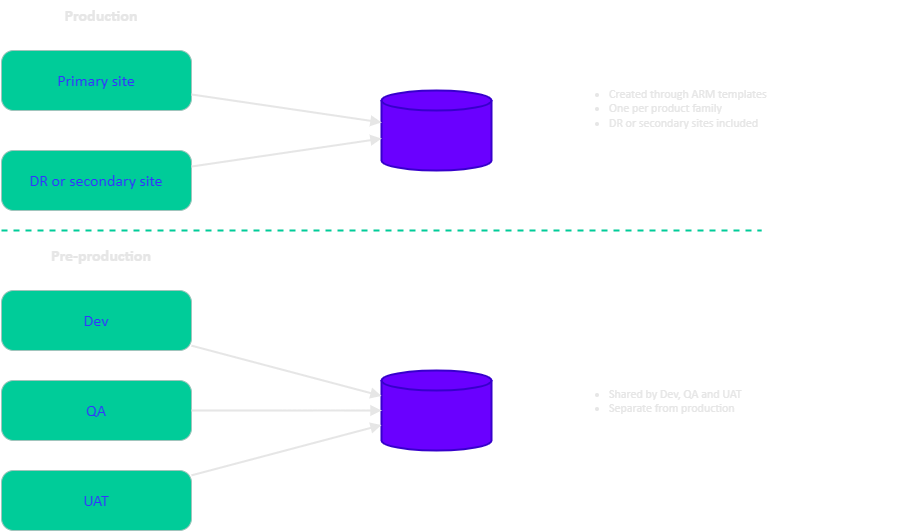
- Include the DR or secondary sites in the primary site’s instance. Don’t create a separate instance for them.
- Use the same instrumentation key to track all applications in a single instance.
- Use the release pipeline to replace the instrumentation key token with the actual one inside
ApplicationInsights.config.
Note: Keeping the key as a token in the repository and replacing it in the release pipeline means the same build can move across the environments, only the key is different.
How to handle pre-production environments?
Create a separate Application Insights instance for pre-production, and use it for Dev, QA and UAT environments. We don’t need one instance for each environment, because the data volume and the retention needs of these environments are not like production. At the same time, we must not send the test data to the production instance, otherwise it will make the production charts and alerts noisy.
How to enable Application Insights for an application?
There are three different ways to enable Application Insights for an application, using Azure extension, using ARM template and using Visual Studio with Application Insights SDK. It is strongly recommended to use Visual Studio and the SDK, and don’t use the Azure extension or ARM template to enable it.
| Approach | Pros | Cons |
|---|---|---|
| Azure extension or ARM template | + Quick, no code change | − Less control on the behavior, can’t extend the functionality |
| Visual Studio with Application Insights SDK | + Full control through configuration, can add additional functionality (custom properties, filters, etc.) | − Needs a code change and a new build |
We need this control for almost everything we will see in the next articles, like adding user id, filtering the health checks, sampling and so on. That is the reason why the SDK is our choice.
Pre-requisites
Go through the Microsoft docs to understand Application Insights and its capabilities. Then, check the following pre-requisites.
For ASP.NET/Core:
- In order to use the full features of Application Insights, upgrade your web application to the latest .NET Framework version or at least 4.6, otherwise the dependency auto tracking will not work.
- Minimum Visual Studio 2015 is required, but the latest version of Visual Studio is recommended.
For PHP:
- The PHP Application Insights SDK supports only PHP version 5.4.2 or above. Refer the SDK repository for more information.
Steps to Implement:
ASP.NET web application
Follow the following instructions to set up Application Insights for an ASP.NET web application,
- Create an Application Insights under your product resource group with the help of ARM template.
- Open Visual Studio 2015 or higher.
- Follow the instructions from this link.
- When your product has a collection of sub applications, use the same Application Insights to monitor them. It is applicable for DR sites as well.
- Go to the Application Insights portal in Azure and ensure all the data of your application and its dependencies are tracked.
Just to pulse check, open the Application Insights instance in the Azure portal and see whether the requests and dependencies of your application are coming in. In case of any issue, refer the troubleshooting FAQ first. If you don’t find the answer there, consult the architecture practices team or contact the Azure support team.
ASP.NET Core web application
- Create an Application Insights under your product resource group.
- Open Visual Studio 2017 or higher.
- Follow the instructions from this link.
Other points remain the same as ASP.NET.
PHP, AngularJS and Angular applications
- PHP, refer the PHP SDK.
- AngularJS, refer the angularjs-application-insights-v2 package.
- Angular, refer the angular-application-insights-v2 package.
Wrap up
In this article, we have looked at why we need guidelines for Application Insights, why one instance per product family works better, how to handle DR and pre-production environments, and how to enable it for an application. I really appreciate that you took the time to read this article. In the next article, I will walk you through how to make the telemetry meaningful with user id, build version, role name and how to exclude the unnecessary data.
Related Posts
How to build useful dashboards with Application Insights? Tools, queries and charts - Part 4
The tools, Kusto queries and dashboard charts which make Application Insights data useful, from web transactions to the application map.
How to control the cost of Application Insights? Sampling, retention and MI logs - Part 3
How to control the Application Insights cost with sampling, data retention, MI logs and custom events, with a flowchart to choose the sampling type.
How to make Application Insights telemetry meaningful? Configuration, enrichment and exclusion - Part 2
How to enrich Application Insights telemetry with user id, build version and role name, exclude the noise, and correlate requests across components.