How to implement hybrid caching with EasyCaching? - Part 5
How to configure EasyCaching’s in-memory, Redis and hybrid providers and implement cache-aside extension methods.
How to implement hybrid caching with EasyCaching? - Part 5
Knowing the theory of hybrid caching is one thing, and implementing it in every application is a different thing. If every team writes its own subscribe and publish code, with its own cache-aside logic, we will end up with many different implementations and many different bugs. In the previous article, we discussed the hybrid caching model and how Redis Pub/Sub keeps the local caches in sync. In this article, we are going to see how to implement it with the EasyCaching library, and how to apply the cache-aside pattern as an extension of the provider.
TL;DR Summary
- EasyCaching is an open source library which provides the hybrid caching capability on top of StackExchange.Redis, with the publish/subscribe functionality as built-in.
- Install the four EasyCaching NuGet packages, and configure the in-memory, Redis and hybrid providers in the
Startupof the application. - Inject
IHybridProviderFactoryand get the provider by the name configured in the startup. We can create more than one hybrid provider based on pub/sub topics. - As a best practice, implement the patterns as extension methods of the provider, for example a cache-aside extension.
- Don’t hard code the Redis host and password in the code, use placeholders and take them from the configuration.
What is EasyCaching?
EasyCaching is an open source library which provides the hybrid caching capability. Refer the EasyCaching documentation for more information.
The following diagram shows the components which we configure for the hybrid provider,
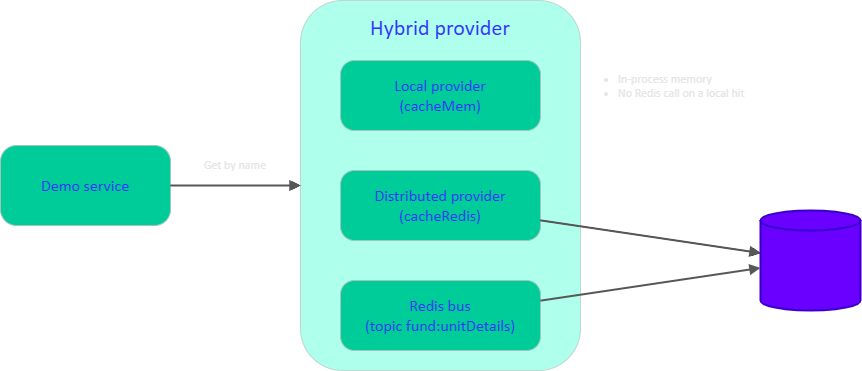
- Local provider - The in-memory cache of the instance.
- Distributed provider - The Redis cache which is shared by all the instances.
- Redis bus - The Pub/Sub channel (topic) which is used to tell the other instances about the changes.
- Hybrid provider - It combines all of them, and the application only talks to it.
How to configure EasyCaching?
Steps to Implement:
Follow the following instructions to enable the hybrid caching in your application,
- Install the following NuGet packages,
<PackageReference Include="EasyCaching.Bus.Redis" Version="0.8.11" />
<PackageReference Include="EasyCaching.HybridCache" Version="0.8.11" />
<PackageReference Include="EasyCaching.InMemory" Version="0.8.11" />
<PackageReference Include="EasyCaching.Redis" Version="0.8.11" />- Add the following configuration in the
Startupof the application. Replace the input place holders with actual values,
private void AddEasyCaching(IServiceCollection services)
{
    services.AddEasyCaching(options =>
    {
        options.UseInMemory("cacheMem");
        options.UseRedis(options =>
        {
            options.DBConfig.Endpoints.Add(
                new ServerEndPoint("<Redis-Host>", 6380));
            options.DBConfig.IsSsl = true;
            options.DBConfig.Password = "<Password>";
        }, "cacheRedis");

        options.UseHybrid(options =>
        {
            options.TopicName = "fund:unitDetails";
            options.EnableLogging = false;

            options.LocalCacheProviderName = "cacheMem";
            options.DistributedCacheProviderName = "cacheRedis";
        }, "hybridProvider")
        .WithRedisBus(busConf =>
        {
            busConf.Endpoints.Add(new ServerEndPoint("<Redis-Host>", 6380));
            busConf.IsSsl = true;
            busConf.Password = "<Password>";
        });
    });
}- Inject the provider
IHybridProviderFactorywherever you want to use it. For example, the followingDemoServicegets theIHybridProviderFactoryand creates an instance of the required hybrid cache provider. Remember that you can create more than one hybrid provider based on the pub/sub topics.
public class DemoService : IDemoService
{
    private readonly IDemoRepository _demoRepo;
    private readonly IHybridCachingProvider _hybridCacheProvider;

    public DemoService(IDemoRepository demoRepo, IHybridProviderFactory hybridCacheFactory)
    {
        _demoRepo = demoRepo;
        _hybridCacheProvider =
            hybridCacheFactory.GetHybridCachingProvider("hybridProvider"); // Use the configured name in the startup
    }

    public async Task<DemoData> GetDemoDetails(string demoId)
    {
        var demoData = await _hybridCacheProvider.GetOrSetCacheAsync<DemoData>(demoId,
            async () => await _demoRepo.GetDemoDetailsByDemoIdAsync(demoId)).ConfigureAwait(false);
        return demoData;
    }
}
Note: The
GetOrSetCacheAsynchere is not part of the library, it is our own extension method. We will see it in the next section.
Warning: Use the same provider name as configured in the startup, and keep the Redis host and password out of the source code.
How to apply the patterns?
As a best practice, create extensions for the provider by implementing the different patterns and strategies which we discussed in the previous articles: Part 1, Part 2, Part 3 and Part 4. The service code above is implemented with the cache-aside pattern extensions for the IHybridCachingProvider.
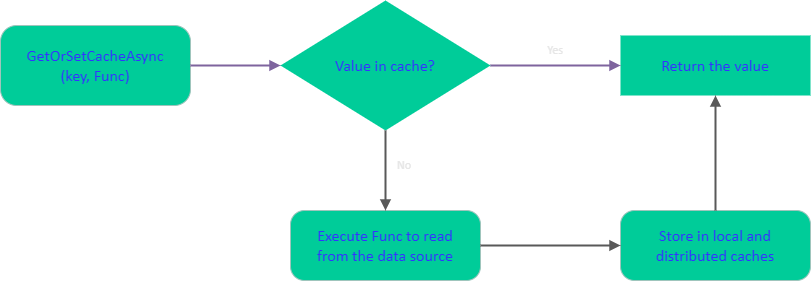
GetOrSetCacheAsync extension takes the key and the actual data reader method as Func<>. It checks whether the data can be read from the cache provider itself. If it is available, it returns it from the cache. Otherwise, it executes the Func<> method to retrieve the data from the actual source, and then it stores the retrieved value to both the in-memory and Redis caches. The following diagram shows the flow, and the flow highlighted in purple is the cache hit,
public static async Task<TResult> GetOrSetCacheAsync<TResult>(this IHybridCachingProvider cache, string key,
    Func<Task<TResult>> updateCacheItemFunc, ILoggerFactory loggerFactory, DistributedCacheEntryOptions cacheRule = null)
    where TResult : class
{
    ILogger<IHybridCachingProvider> logger = loggerFactory.CreateLogger<IHybridCachingProvider>();
    var cachedValue = await cache.GetCacheValueAsync<TResult>(key, logger);
    if (cachedValue == null)
    {
        return await cache.StoreValueAsync(key, updateCacheItemFunc, logger, cacheRule).ConfigureAwait(false);
    }
    return cachedValue;
}
GetCacheValueAsync
GetCacheValueAsync is straightforward, it helps to get the value from the cache. The key is converted to lower case, and a Redis failure is logged instead of failing the request.
private static async Task<TResult> GetCacheValueAsync<TResult>(this IHybridCachingProvider cache, string key, ILogger<IHybridCachingProvider> logger)
    where TResult : class
{
    CacheValue<string> cachedValue = null;
    if (string.IsNullOrEmpty(key))
    {
        throw new ArgumentNullException(nameof(key));
    }

    try
    {
        cachedValue = await cache.GetAsync<string>(key.ToLower(CultureInfo.InvariantCulture)).ConfigureAwait(false);
    }
    catch(Exception ex)
    {
        logger.LogError(ex, "Redis Exception - GetCacheValueAsync - key- {@key}", key);
    }

    if (cachedValue.Value == null)
    {
        return null;
    }

    return JsonConvert.DeserializeObject<TResult>(cachedValue.Value);
}
Warning: When the
GetAsynccall throws,cachedValueremains null and the next linecachedValue.Valuewill throw aNullReferenceException. CheckcachedValuefor null before reading the value, so a cache failure falls back to the database as the lazy loading expects.
StoreValueAsync
StoreValueAsync extension method helps to store the value which is retrieved from the database. When no cache rule is given, the value is stored for 60 minutes.
private static async Task<TResult> StoreValueAsync<TResult>(this IHybridCachingProvider cache, string key,
    Func<Task<TResult>> updateCacheItemFunc, ILogger<IHybridCachingProvider> logger, DistributedCacheEntryOptions cacheRule = null)
    where TResult : class
{
    if (string.IsNullOrEmpty(key))
    {
        throw new ArgumentNullException(nameof(key));
    }
    var valueToCache = await updateCacheItemFunc.Invoke();
    if (valueToCache != null && valueToCache != default(TResult))
    {
        var redisKey = key.ToLower(CultureInfo.InvariantCulture);
        var value = JsonConvert.SerializeObject(valueToCache);
        try
        {
            if (cacheRule != null)
            {
                await cache.SetAsync(redisKey, value,
                    cacheRule.AbsoluteExpirationRelativeToNow.Value).ConfigureAwait(false);
            }
            else
            {
                await cache.SetAsync(redisKey, value,
                    TimeSpan.FromMinutes(60)).ConfigureAwait(false);
            }
        }
        catch (Exception ex)
        {
            logger.LogError(ex, "Redis Exception StoreValueAsync- {@redisKey} {@valueToCache}", redisKey, valueToCache);
        }
    }
    return valueToCache;
}
Just to pulse check, call the same GetDemoDetails twice with the same id. The first call should read from the data source, and the second call should be served from the cache. Keep in mind that the TTL is a trade-off between the freshness of the data and the load on the database, so set the cacheRule based on your data.
How does it look for our use cases?
The service code is the same, only the key, the type and the TTL are different. The following samples are illustrative, the repository and the model names are placeholders.
Mutual fund: fund unit details
public async Task<FundUnitDetails> GetFundUnitDetails(string unitCode)
{
    return await _hybridCacheProvider.GetOrSetCacheAsync<FundUnitDetails>(unitCode,
        async () => await _fundRepo.GetUnitDetailsAsync(unitCode)).ConfigureAwait(false);
}
The topic fund:unitDetails is the one which we configured in the startup, so when a unit is updated, the other instances are told to clear that unit code from their local cache.
E-commerce: product details
public async Task<ProductDetails> GetProductDetails(string productId)
{
    return await _hybridCacheProvider.GetOrSetCacheAsync<ProductDetails>(productId,
        async () => await _productRepo.GetProductAsync(productId)).ConfigureAwait(false);
}
For the e-commerce case, create one more hybrid provider with its own topic (for example, product:details), so the product changes don’t disturb the fund topic and the other way around. It is the “more than one hybrid provider based on the pub/sub topics” we saw above.
Note: Don’t cache orders, payments and fund transactions with this approach. Save them in the database first, they are the source of truth for the money.
Wrap up
In this article, we have looked at how to configure EasyCaching for the hybrid caching, how to use the provider in a service, and how to implement the cache-aside pattern as an extension of the provider. Over the five articles, we covered why we need caching, the server-side strategies, how to choose the right one, how to synchronize the local and distributed caches and how to implement it. I hope this series provided you some insights into caching. I appreciate your time and efforts to read these articles.
Related Posts
How to choose the right server-side caching strategy? Write-through, write-behind and refresh-ahead - Part 3
How write-through, write-behind and refresh-ahead caching work, their trade-offs, and how to choose a strategy for e-commerce and mutual fund use cases.
How to keep local and distributed caches in sync? Hybrid caching with Pub/Sub - Part 4
How hybrid caching combines local and distributed caches, and how Redis Pub/Sub keeps local copies synchronized.
How to cache the data based on the demand? Cache-aside, lazy loading and read-through - Part 2
The cache-aside pattern with lazy loading and read-through, their pros and cons, and use cases from e-commerce and the mutual fund world.